


An EF Core interceptor is a class that plugs into Entity Framework Core’s execution pipeline so you can observe, change, or cancel what EF Core is about to do, like saving changes or running a SQL command, without touching the code that triggered it. Think of it as middleware for your database calls. The most common use is stamping audit fields (CreatedAt, UpdatedAt, CreatedBy) on every save automatically.
That mental model is the whole article in one line. The rest is learning which of the seven interceptor types to reach for, how to register them, and the one thing that breaks for almost everyone: getting the current user (a scoped service) into an interceptor without breaking dependency injection. I tested everything here on .NET 10 with EF Core 10.0.0. Let’s get into it.
TL;DR. EF Core has 7 interceptor interfaces. You’ll use
ISaveChangesInterceptor90% of the time (audit fields, soft deletes) andIDbCommandInterceptorfor SQL-level work (logging slow queries, adding hints). Register them withoptionsBuilder.AddInterceptors(...). To inject a scoped service like the current user, register the interceptor asScopedand wire it through theAddDbContext((sp, options) => ...)overload. Interceptors can also cancel operations viaInterceptionResult.Suppress(). Reach for one only when the behavior is cross-cutting and infrastructure-level. If it’s business logic, use a domain event. If it’s read filtering, use a global query filter.
You can grab the complete, runnable .NET 10 sample from the GitHub repo. Clone it, run it, and watch the audit fields fill in.
ASP.NET Core CRUD with EF Core 10
New to EF Core 10? Start here. This walks through setting up EF Core with PostgreSQL, entities, migrations, and a full CRUD API before you layer interceptors on top.
What Is an Interceptor in EF Core?
An interceptor is a hook into EF Core’s internal pipeline. Every time EF Core does something meaningful, like opening a connection, building a SQL command, or calling SaveChanges, it gives registered interceptors a chance to run code right before and right after that operation.
What makes interceptors different from plain logging is that they can change the outcome. Logging just watches. An interceptor can modify the SQL, suppress a command entirely, swap the result EF Core sees, or stop an exception from being thrown. That power is why they’re the right tool for cross-cutting database concerns, and the reason you have to be careful with them.
Here is the key distinction most tutorials skip. An interceptor runs at the infrastructure layer, below your business logic. It fires for every SaveChanges from every code path, whether the call came from a controller, a background job, or a unit test. That is exactly what you want for something like audit stamping, and exactly what you do not want for business rules that should only run in specific situations.
What Are the Types of Interceptors in EF Core?
EF Core 10 ships seven interceptor interfaces. Most articles only show you SaveChangesInterceptor, but knowing the full set is what stops you from reaching for the wrong one. Here is the complete map:
| Interceptor | What it hooks into | Reach for it when |
|---|---|---|
ISaveChangesInterceptor | SaveChanges / SaveChangesAsync | Audit fields, soft deletes, domain events, the outbox pattern |
IDbCommandInterceptor | The SQL command, before and after execution | Logging slow queries, adding query hints, modifying SQL |
IDbConnectionInterceptor | Opening and closing connections | Per-tenant connection strings, fetching an access token |
IDbTransactionInterceptor | Begin, commit, rollback, savepoints | Custom transaction logging or behavior |
IMaterializationInterceptor | Entity instances created from query results | Setting unmapped properties, injecting services into entities |
IQueryExpressionInterceptor | The LINQ expression tree before it compiles | Injecting ordering or filters into every query |
IIdentityResolutionInterceptor | Identity conflicts when tracking entities | Merging two tracked instances with the same key |
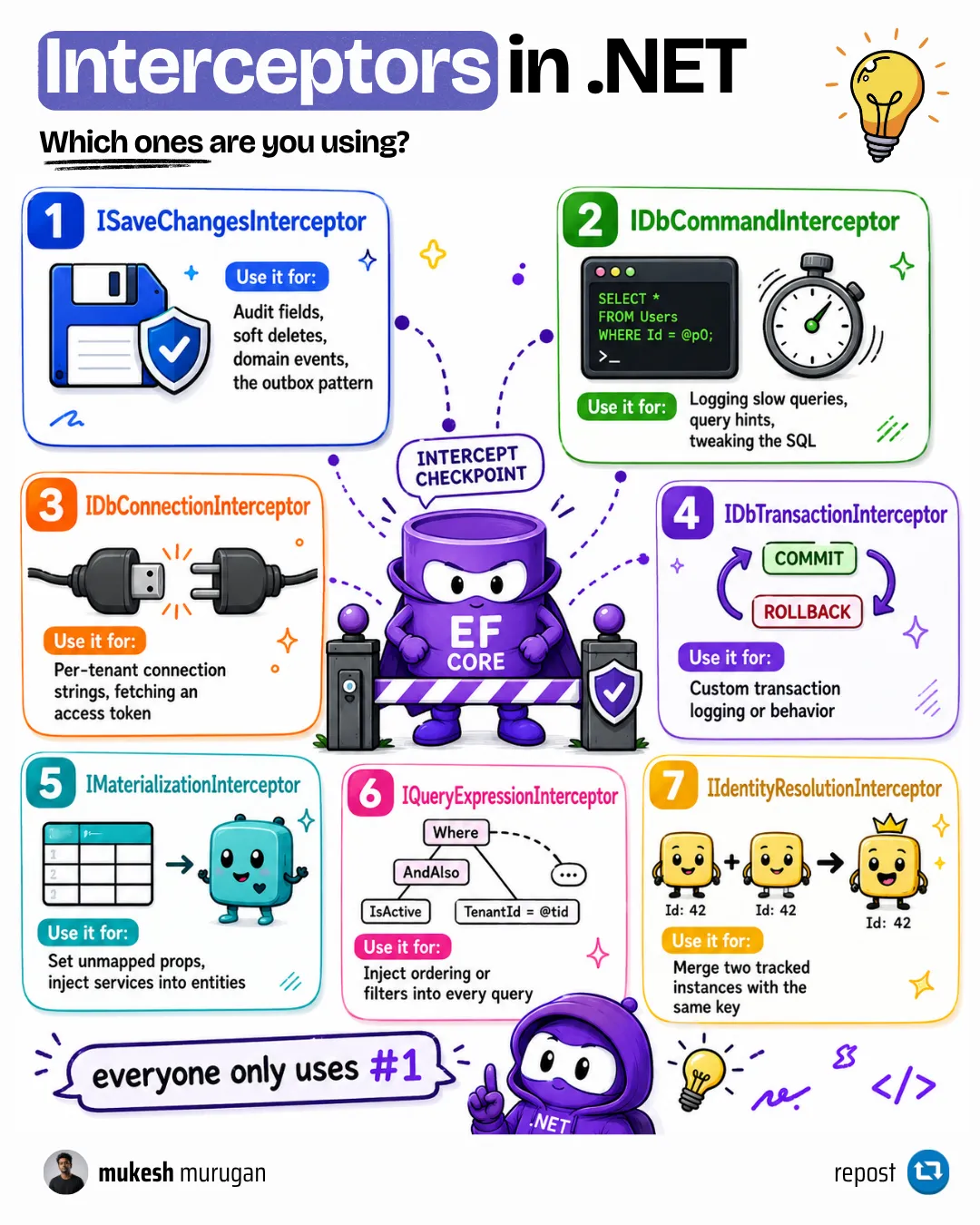
A few facts worth pinning down, because they affect how you register and reuse interceptors:
- Database interception is relational-only. The command, connection, and transaction interceptors only work with relational providers (SQL Server, PostgreSQL, SQLite). They don’t fire on the in-memory provider.
- Three of the seven are singletons.
IMaterializationInterceptor,IQueryExpressionInterceptor, andIIdentityResolutionInterceptorimplementISingletonInterceptor. EF Core shares one instance across everyDbContext, so they must be stateless and thread-safe. This matters later when we talk about dependency injection. - The four non-singleton interceptors ship with a no-op base class.
SaveChangesInterceptor,DbCommandInterceptor,DbConnectionInterceptor, andDbTransactionInterceptoralready implement every method as a pass-through. Inherit from the base class and override only the one or two methods you care about. The three singleton interceptors have no base class, so you implement their interface directly. - There’s technically an eighth.
IInstantiationBindingInterceptoris a lower-level hook for customizing how EF Core constructs entity instances during model building. It sits outside the everyday pipeline and you’ll rarely reach for it, so the seven above are the set worth knowing.
How Do I Register an EF Core Interceptor?
You register interceptors with optionsBuilder.AddInterceptors(...) when you configure the DbContext. There are two places to do it, and they behave slightly differently.
The first is inside OnConfiguring on the context itself:
public class AppDbContext : DbContext{    private static readonly SlowQueryInterceptor _slowQueryInterceptor = new();
    protected override void OnConfiguring(DbContextOptionsBuilder optionsBuilder)        => optionsBuilder.AddInterceptors(_slowQueryInterceptor);}
Notice the static readonly field. For a stateless interceptor, you want a single shared instance, not a new one per context. I’ll explain why that matters in the dependency injection section.
The second place, and the one you’ll use in a real ASP.NET Core app, is during AddDbContext in Program.cs:
builder.Services.AddDbContext<AppDbContext>(options => options .UseNpgsql(builder.Configuration.GetConnectionString("Default")) .AddInterceptors(new SlowQueryInterceptor()));One useful detail: OnConfiguring still runs even when you use AddDbContext. EF Core calls both. So OnConfiguring is a good place to put configuration that should apply no matter how the context gets built, including from a design-time factory during migrations.
Multiple DbContext in EF Core
Running more than one DbContext? Interceptor registration gets a little more deliberate. Here's how to keep multiple contexts cleanly separated in the same app.
How Do I Add Audit Fields with a SaveChangesInterceptor?
This is the use case that sells interceptors. You want CreatedAtUtc, UpdatedAtUtc, CreatedBy, and UpdatedBy populated automatically on every entity, without remembering to set them in every handler.
Start with two marker interfaces. Any entity that implements them opts into the behavior:
public interface IAuditable{    DateTime CreatedAtUtc { get; set; }    string? CreatedBy { get; set; }    DateTime? UpdatedAtUtc { get; set; }    string? UpdatedBy { get; set; }}
public interface ISoftDeletable{    bool IsDeleted { get; set; }    DateTime? DeletedAtUtc { get; set; }}
A Product entity that opts into both looks like this:
public class Product : IAuditable, ISoftDeletable{    public int Id { get; set; }    public string Name { get; set; } = null!;    public decimal Price { get; set; }
    public DateTime CreatedAtUtc { get; set; }    public string? CreatedBy { get; set; }    public DateTime? UpdatedAtUtc { get; set; }    public string? UpdatedBy { get; set; }
    public bool IsDeleted { get; set; }    public DateTime? DeletedAtUtc { get; set; }}
Now the interceptor. It inherits from SaveChangesInterceptor and overrides the SavingChanges hooks, which fire right before EF Core sends anything to the database. The ICurrentUser dependency is injected through the constructor:
public sealed class AuditableInterceptor(ICurrentUser currentUser) : SaveChangesInterceptor{    public override InterceptionResult<int> SavingChanges(        DbContextEventData eventData,        InterceptionResult<int> result)    {        ApplyAudit(eventData.Context);        return base.SavingChanges(eventData, result);    }
    public override ValueTask<InterceptionResult<int>> SavingChangesAsync(        DbContextEventData eventData,        InterceptionResult<int> result,        CancellationToken cancellationToken = default)    {        ApplyAudit(eventData.Context);        return base.SavingChangesAsync(eventData, result, cancellationToken);    }
    private void ApplyAudit(DbContext? context)    {        if (context is null)        {            return;        }
        // Reading ChangeTracker.Entries<T>() already forces change detection        // when auto-detect is on (the default), but calling DetectChanges        // explicitly keeps auditing correct even if a code path turned        // auto-detect off. It's what EF Core's own audit sample does.        context.ChangeTracker.DetectChanges();
        var now = DateTime.UtcNow;        var user = currentUser.UserId ?? "system";
        foreach (var entry in context.ChangeTracker.Entries<IAuditable>())        {            if (entry.State == EntityState.Added)            {                entry.Entity.CreatedAtUtc = now;                entry.Entity.CreatedBy = user;            }            else if (entry.State == EntityState.Modified)            {                entry.Entity.UpdatedAtUtc = now;                entry.Entity.UpdatedBy = user;            }        }
        foreach (var entry in context.ChangeTracker.Entries<ISoftDeletable>())        {            if (entry.State == EntityState.Deleted)            {                entry.State = EntityState.Modified;                entry.Entity.IsDeleted = true;                entry.Entity.DeletedAtUtc = now;            }        }    }}
Two things are happening in ApplyAudit. The first loop stamps audit fields based on whether the entity is new or changed. The second loop is the soft-delete trick: when something is marked for deletion, I flip its state from Deleted back to Modified and set the flag instead. EF Core then sends an UPDATE rather than a DELETE, so the row stays in the table.
Soft Deletes in EF Core
The full soft-delete pattern, including how to restore records and handle cascades. This article goes deeper than the interceptor snippet above.
Why You Must Override Both Sync and Async
Look again at the interceptor. I overrode both SavingChanges and SavingChangesAsync. This is the silent bug that bites people. If you only override the async version and some code path calls the synchronous SaveChanges(), your audit fields never get set, and nothing errors. EF Core just calls the method you didn’t override, which is the base class no-op.
The rule: implement both unless you have fully banned one. Some teams throw from the sync SavingChanges to force every call to go async. That’s a valid choice, but make it on purpose.
Hiding Soft-Deleted Rows on Read
The interceptor handles the write side. To stop deleted rows from showing up in queries, pair it with a global query filter in OnModelCreating:
protected override void OnModelCreating(ModelBuilder modelBuilder){ modelBuilder.Entity<Product>().HasQueryFilter(p => !p.IsDeleted);}Now context.Products.ToList() silently excludes soft-deleted rows. The interceptor writes the flag, the query filter hides the row. They’re two halves of one feature.
Global Query Filters in EF Core
How query filters work, how to bypass them with IgnoreQueryFilters, and the gotchas with required relationships. The read-side companion to soft deletes.
How Do I Inject the Current User into an Interceptor?
Here’s the question that trips up almost everyone, and the part competing tutorials either skip or get wrong. Your AuditableInterceptor needs ICurrentUser. That service is scoped: it reads the user from the current HTTP request, so it changes per request. Interceptors and scoped services do not mix by accident.
The wrong way, which you’ll see in plenty of blog posts, is registering the interceptor as a singleton:
// Wrong. A singleton interceptor cannot depend on a scoped service.builder.Services.AddSingleton<AuditableInterceptor>();A singleton is created once and lives forever. It cannot hold a per-request ICurrentUser, so you either get a captive-dependency error or a stale user that’s wrong for every request after the first.
The correct pattern is to register the interceptor as scoped and resolve it through the AddDbContext overload that hands you the service provider:
builder.Services.AddHttpContextAccessor();builder.Services.AddScoped<ICurrentUser, CurrentUser>();builder.Services.AddScoped<AuditableInterceptor>();
builder.Services.AddDbContext<AppDbContext>((serviceProvider, options) =>    options        .UseNpgsql(builder.Configuration.GetConnectionString("Default"))        .AddInterceptors(serviceProvider.GetRequiredService<AuditableInterceptor>()));
Because AddDbContext registers the context and its options as scoped, that options lambda runs per request with the request’s own service provider. So GetRequiredService<AuditableInterceptor>() returns a fresh interceptor whose injected ICurrentUser belongs to the current request. The lifetimes line up.
One exception: if you use
AddDbContextPoolinstead ofAddDbContext, the options are built once and shared across the pool, so a scoped interceptor won’t resolve per request. With pooling, keep the interceptor stateless and reach for scoped services througheventData.Contextinside the method instead.
The ICurrentUser implementation itself is ordinary:
public interface ICurrentUser{    string? UserId { get; }}
public sealed class CurrentUser(IHttpContextAccessor accessor) : ICurrentUser{    public string? UserId =>        accessor.HttpContext?.User.FindFirstValue(ClaimTypes.NameIdentifier);}
This scoped-registration pattern is safe for SaveChangesInterceptor, IDbCommandInterceptor, and the other non-singleton interceptors. It is not safe for the three singleton interceptors (materialization, query expression, identity resolution). Passing a new instance of one of those each time forces EF Core to build a new internal service provider every request, which eventually triggers a ManyServiceProvidersCreatedWarning and tanks performance. For those, reuse a single static instance, and if they need a scoped service, reach for it through eventData.Context instead.
When to Use Transient, Scoped, and Singleton in .NET
The lifetime mismatch that breaks audit interceptors is the same captive-dependency trap that breaks a lot of DI setups. This explains the rules in plain terms.
When Should You Use an Interceptor (and When Not To)?
This is the section I wish more articles had. Interceptors are powerful, so they get overused. A lot of logic that ends up in an interceptor belongs somewhere cleaner. Here is how I decide:
| You want to… | Best tool | Why not an interceptor |
|---|---|---|
Stamp CreatedAt / UpdatedAt on every save | SaveChangesInterceptor | This is the canonical fit, use it |
| Convert a delete into a soft delete | SaveChangesInterceptor | Canonical fit, paired with a query filter |
| Hide soft-deleted rows from reads | Global query filter | The interceptor handles writes, not reads |
| Run a side effect after save (email, event) | Domain events / MediatR | Business logic doesn’t belong in infrastructure |
| Filter every query by tenant | Global query filter | Simpler and safer than rewriting expression trees |
| Validate a request or shape an HTTP response | Middleware or filters | Interceptors never see HTTP |
| Log slow SQL or add a query hint | DbCommandInterceptor | Canonical fit, use it |
My 30-second test before writing an interceptor: reach for one only when the behavior is cross-cutting, sits at the infrastructure level (not a business rule), and must run on every save or command regardless of which code path triggered it. Audit stamping passes all three. “Send a welcome email when a user signs up” fails all three: it’s business logic, it’s specific, and it belongs in a domain event handler.
CQRS and MediatR in ASP.NET Core
If your 'interceptor' is really a business side effect, a domain event published through MediatR is the cleaner home for it. Here's the pattern.
How Do I Log Slow Queries with a Command Interceptor?
Not everything is SaveChanges. A DbCommandInterceptor sits at the SQL level, so it’s perfect for diagnostics like flagging queries that run too long. The CommandExecutedEventData carries a Duration you can check:
public sealed class SlowQueryInterceptor(ILogger<SlowQueryInterceptor> logger)    : DbCommandInterceptor{    private const int SlowQueryThresholdMs = 500;
    public override DbDataReader ReaderExecuted(        DbCommand command,        CommandExecutedEventData eventData,        DbDataReader result)    {        Log(command, eventData);        return base.ReaderExecuted(command, eventData, result);    }
    public override ValueTask<DbDataReader> ReaderExecutedAsync(        DbCommand command,        CommandExecutedEventData eventData,        DbDataReader result,        CancellationToken cancellationToken = default)    {        Log(command, eventData);        return base.ReaderExecutedAsync(command, eventData, result, cancellationToken);    }
    private void Log(DbCommand command, CommandExecutedEventData eventData)    {        if (eventData.Duration.TotalMilliseconds >= SlowQueryThresholdMs)        {            logger.LogWarning(                "Slow query took {ElapsedMs}ms: {Sql}",                eventData.Duration.TotalMilliseconds,                command.CommandText);        }    }}
Any read query slower than 500ms now lands in your logs with its SQL and timing. That’s a faster way to catch N+1 problems and missing indexes than waiting for users to complain about a slow page.
10 EF Core Performance Mistakes (and How to Fix Them)
The slow queries this interceptor catches usually trace back to one of these ten patterns. Each comes with a fix and a benchmark.
Can an Interceptor Change What EF Core Does?
Yes, and this is the feature that separates interceptors from logging. Every interception method returns an InterceptionResult. Return it unchanged and EF Core proceeds normally. But you can also tell EF Core to stop.
A practical example is suppressing a concurrency exception on delete. If two requests delete the same row at nearly the same time, the second one fails because the row is already gone. The end state is fine, the row is deleted, so you can swallow that specific exception with InterceptionResult.Suppress():
public sealed class SuppressDeleteConcurrencyInterceptor : ISaveChangesInterceptor{    public InterceptionResult ThrowingConcurrencyException(        ConcurrencyExceptionEventData eventData,        InterceptionResult result)    {        if (eventData.Entries.All(e => e.State == EntityState.Deleted))        {            return InterceptionResult.Suppress();        }
        return result;    }
    public ValueTask<InterceptionResult> ThrowingConcurrencyExceptionAsync(        ConcurrencyExceptionEventData eventData,        InterceptionResult result,        CancellationToken cancellationToken = default)        => new(ThrowingConcurrencyException(eventData, result));}
There’s a sibling method, SuppressWithResult, that goes further: it cancels the operation and hands EF Core a result you supply, which is how a simple query cache would return data without ever touching the database.
A warning that the EF Core docs make and I’ll repeat: changing EF Core’s behavior like this is powerful and easy to get wrong. EF Core may misbehave if you hand it a result it can’t process. Suppress an exception when you understand exactly why it’s safe, not as a way to silence errors you haven’t diagnosed.
Concurrency Control and Optimistic Locking in EF Core
Before you suppress a concurrency exception, make sure you understand what triggered it. This covers concurrency tokens and the optimistic locking model end to end.
Gotchas and Performance Notes
A few things I’ve learned the hard way, plus what the docs warn about:
- Interceptors run in the hot path.
SavingChangesfires on every save, command interceptors fire on every query. Don’t make a network call or hit an external service inside one. The operation waits on you. - Shared instances must be thread-safe. A single interceptor instance can serve many
DbContextinstances at once. If it holds mutable state, you have a race condition. Keep them stateless where you can. - Call
DetectChanges()before you read the entries. ReadingChangeTracker.Entries<T>()already forces change detection when auto-detect is on (the default), so modified entities report the right state. Callingcontext.ChangeTracker.DetectChanges()explicitly keeps auditing correct even if a code path has turned auto-detect off, and it’s exactly what EF Core’s own audit sample does. Separately,ExecuteUpdateandExecuteDeletebypass the change tracker entirely, so an interceptor never sees those rows. - Prefer the base class over the interface. Inheriting from
SaveChangesInterceptorinstead of implementingISaveChangesInterceptormeans you override the two methods you care about instead of implementing every method on the interface.
Tracking vs No-Tracking Queries in EF Core
Interceptors that read ChangeTracker.Entries depend on tracking being on. Here's how tracking works and when to turn it off for reads.
Key Takeaways
- An EF Core interceptor is middleware for your database calls. It can observe, modify, or cancel EF Core operations from the infrastructure layer.
- There are 7 interceptor types, but
ISaveChangesInterceptorandIDbCommandInterceptorcover almost everything you’ll do. - Register with
optionsBuilder.AddInterceptors(...), inOnConfiguringor duringAddDbContext.OnConfiguringalways runs, even withAddDbContext. - To inject a scoped service like the current user, register the interceptor as Scoped and wire it through
AddDbContext((sp, options) => options.AddInterceptors(sp.GetRequiredService<T>())). Never register such an interceptor as a singleton. - Override both the sync and async methods, or your logic silently no-ops on whichever path you skipped.
- Reach for an interceptor only when the behavior is cross-cutting and infrastructure-level. Business logic belongs in a domain event, read filtering belongs in a query filter.
FAQ
What is an interceptor in EF Core?
An EF Core interceptor is a class that hooks into Entity Framework Core's execution pipeline so you can observe, change, or suppress operations like SaveChanges, SQL commands, connections, and transactions. Unlike logging, an interceptor can modify the operation, not just watch it. The most common use is adding audit fields automatically on every save.
What are the different types of EF Core interceptors?
EF Core 10 has seven interceptor interfaces: ISaveChangesInterceptor, IDbCommandInterceptor, IDbConnectionInterceptor, IDbTransactionInterceptor, IMaterializationInterceptor, IQueryExpressionInterceptor, and IIdentityResolutionInterceptor. The save-changes and command interceptors cover the vast majority of real-world use cases. The materialization, query expression, and identity resolution interceptors are singletons shared across all contexts.
How do I register an EF Core interceptor?
Call optionsBuilder.AddInterceptors(...) when configuring the DbContext. You can do this inside an OnConfiguring override on the context, or during AddDbContext in Program.cs. OnConfiguring still runs even when you use AddDbContext, so it is a good place for configuration that should apply no matter how the context is built.
How do I access the current user or a scoped service inside an interceptor?
Register the interceptor as Scoped, then wire it up through the AddDbContext overload that provides the service provider: AddDbContext((sp, options) => options.AddInterceptors(sp.GetRequiredService<YourInterceptor>())). Because AddDbContext is scoped, the lambda runs per request and resolves an interceptor whose injected scoped services belong to that request. Do not register such an interceptor as a singleton, since a singleton cannot hold a per-request dependency.
What is the difference between an interceptor and overriding SaveChanges?
Both let you run logic before a save. Overriding SaveChanges on the DbContext is simpler and fine for one context. An interceptor is reusable across multiple contexts, is registered through dependency injection, and can also hook lower-level events like SQL commands, connections, and transactions. Use an override for context-specific logic and an interceptor for cross-cutting infrastructure behavior.
Are EF Core interceptors thread-safe or singletons?
It depends on the type. Materialization, query expression, and identity resolution interceptors implement ISingletonInterceptor and are shared across all DbContext instances, so they must be stateless and thread-safe. The command, connection, transaction, and save-changes interceptors are not singletons and can be registered per scope. Passing a new instance of a singleton interceptor on every request triggers a ManyServiceProvidersCreatedWarning and hurts performance.
Do EF Core interceptors affect performance?
Yes. Interceptors run inside the hot path, so a SaveChanges interceptor fires on every save and a command interceptor fires on every query. The interception itself is cheap, but any slow work you do inside one, like calling an external service, blocks the database operation. Keep interceptors fast and stateless, and never put network calls in them.
Can an interceptor cancel or change what EF Core does?
Yes. Every interception method returns an InterceptionResult. Returning InterceptionResult.Suppress() tells EF Core to skip the operation it was about to perform, such as throwing a concurrency exception. SuppressWithResult goes further and hands EF Core a replacement result. This ability to change behavior, not just observe it, is the main thing that separates interceptors from logging, but it should be used carefully.
Wrapping Up
Interceptors are one of those EF Core features that feel advanced until the mental model clicks, and then they’re obvious: middleware for your database. Start with a SaveChangesInterceptor for audit fields, because that’s where you’ll feel the payoff immediately. Add a DbCommandInterceptor when you want visibility into slow SQL. Get the scoped dependency injection right so the current user flows in cleanly. And before you write one at all, run the 30-second test, because half the time a domain event or a query filter is the better home.
The full sample, with the audit interceptor, soft deletes, the command interceptor, and the registration wiring, is in the GitHub repo. Clone it and step through it.
Happy Coding :)




What's your take?
Push back, share a war story, or ask the obvious question someone else is wondering. I read every comment.