


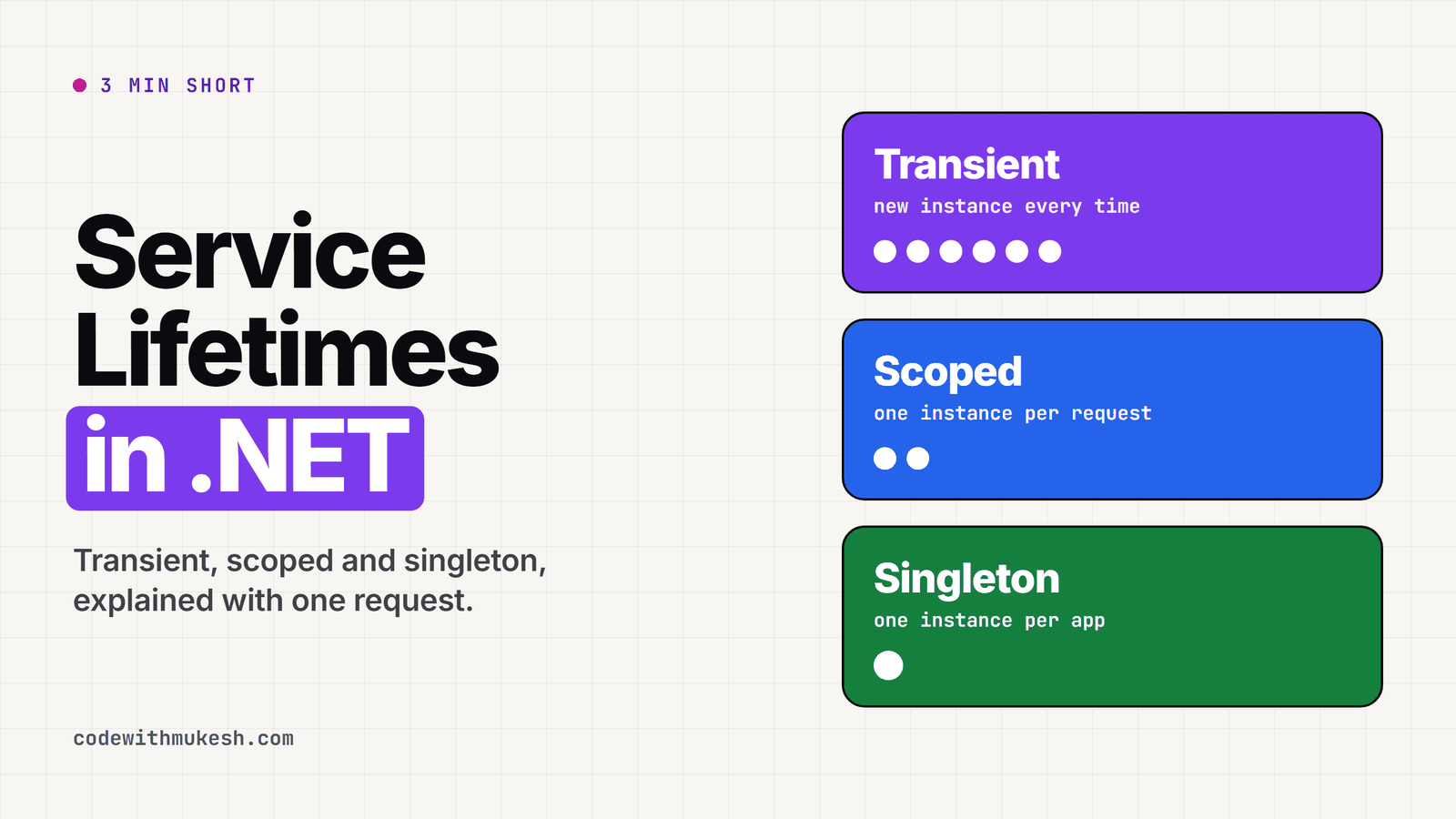
Singleton, scoped and transient are the three service lifetimes in .NET. A transient service gets a new instance every time it is asked for. A scoped service gets one instance per scope, which in ASP.NET Core means one instance per HTTP request. A singleton gets one instance for the whole life of the application.
If you’re building ASP.NET Core APIs, you type AddScoped, AddTransient or AddSingleton almost every day. I did the same for a long time without thinking much about it. But the lifetime you pick decides when an object is created, who shares it, and when it gets disposed. Pick the wrong one and you can end up with a DbContext shared by every request in your app, and the code will still compile just fine.
In this article, I will walk you through each lifetime in .NET 10, what happens to it across a request, and when to use which. I will also run a small demo app and show you the real output, so you can see the instances being created and reused. After that, I will show you the most common lifetime bug, the captive dependency, and the two ways to fix it. Let’s get started.
From Transient to Singleton: .NET Dependency Injection Made Easy
Short on time? I made a 3 minute animated video that explains the transient, scoped and singleton lifetimes.
What Are Service Lifetimes in .NET?
A service lifetime tells the .NET dependency injection (DI) container how long to keep an instance of a service after it creates it. When you register a service, you are really telling the container two things: how to create it, and how long to keep it around.
.NET gives you three lifetimes to pick from, and each one has its own registration method:
builder.Services.AddTransient<ProductValidator>();builder.Services.AddDbContext<AppDbContext>(options => options.UseInMemoryDatabase("products")); // scoped by defaultbuilder.Services.AddSingleton<ProductCache>();I will use these three services throughout the article. ProductValidator is a small transient helper, AppDbContext is an Entity Framework Core (EF Core) DbContext, which AddDbContext registers as scoped by default, and ProductCache is a singleton. They come from a small products API that you can find in the companion code repo.
Transient: A New Instance Every Time
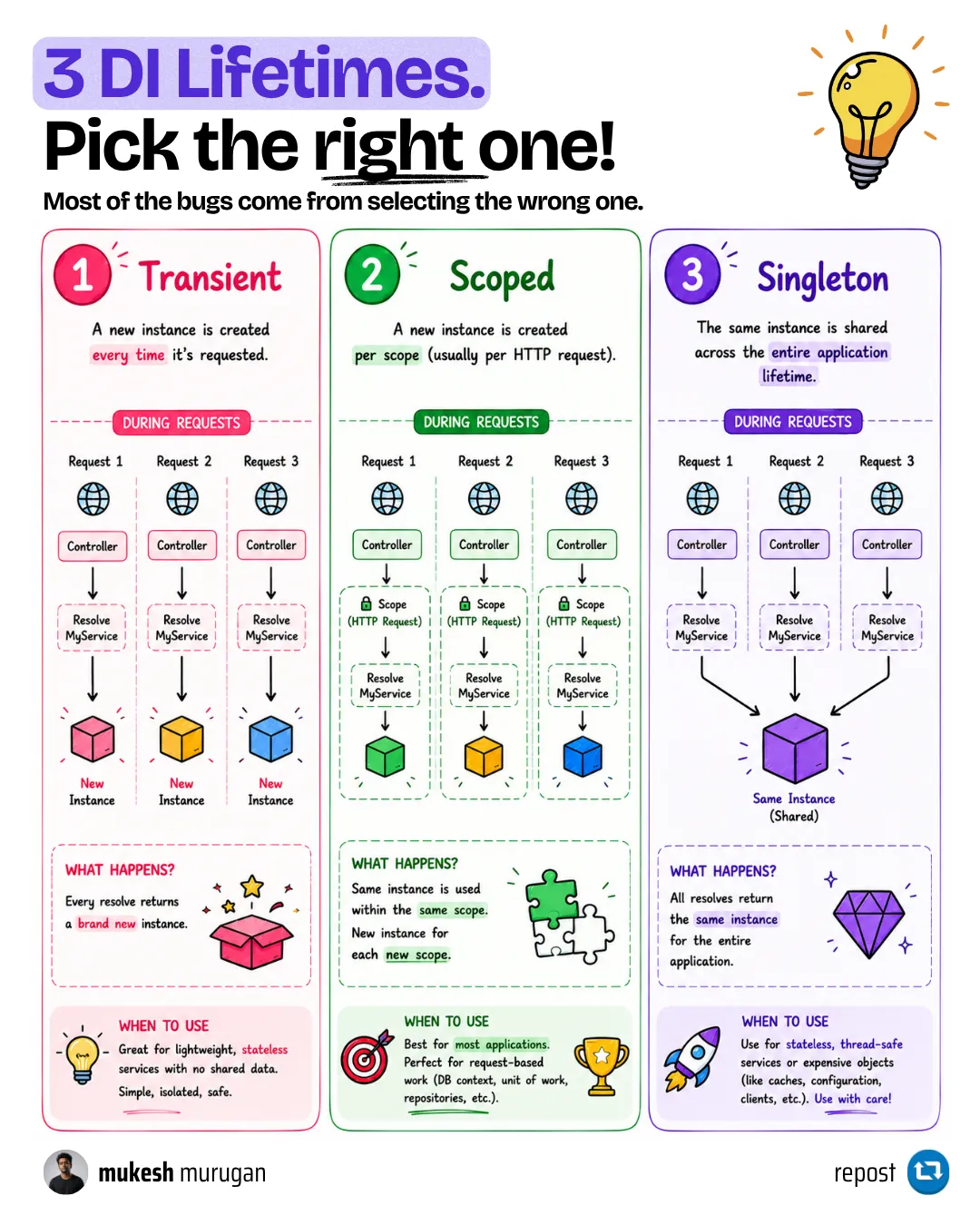
A transient service is created every time it is requested from the container. Nothing is cached, so two classes that ask for it in the same request each get their own copy.
Here is what happens to a transient service during one request:
- A request comes in, and ASP.NET Core creates a scope for it.
- The endpoint asks for a
ProductValidator, so the container creates a new one. ProductServiceasks for one too, and it gets another new instance.- When the request ends, the scope is disposed, and it cleans up any disposable transient services it created.
public sealed class ProductValidator{    public Guid InstanceId { get; } = Guid.NewGuid();
    public bool IsValid(Product product) =>        !string.IsNullOrWhiteSpace(product.Name) && product.Price > 0;}
When to use transient: small, stateless services that are cheap to create, like validators, mappers, or helper classes. Since they hold no state, a fresh copy costs almost nothing and there is nothing to share by accident.
What to watch out for:
- Don’t make a service transient if it is expensive to build, like something that opens a connection or loads a large file in its constructor.
- If a transient service implements
IDisposableand you resolve it from the root provider (for exampleapp.Services.GetRequiredService<T>()), the container holds on to it until the app shuts down. Microsoft’s DI guidelines call this out as a memory leak. Resolve it from a scope instead.
Scoped: One Instance per Request
A scoped service is created once per scope and shared by everything that resolves it inside that scope. In ASP.NET Core, the framework creates a scope per request, so a scoped service is effectively one instance per HTTP request.
Here is what happens to a scoped service across two requests:
- Request 1 comes in and gets its own scope.
- The endpoint and
ProductServiceboth ask forAppDbContext, and both get the same instance. - Request 2 comes in with a separate scope, so it gets its own, separate
AppDbContext. - When each request ends, its scope is disposed, and the
AppDbContextit created is disposed with it.
When to use scoped: anything that belongs to one request. A DbContext is the classic example, along with a unit of work, or a service that holds details about the current user. This is also why EF Core registers AddDbContext as scoped by default: a DbContext tracks the entities you load, and that tracking should not leak from one request into the next.
What to watch out for:
- A scope is not the same thing as a request. ASP.NET Core happens to create one scope per request, but outside a request (a background service, a console app, or code that runs at startup) there is no scope until you create one yourself with
IServiceScopeFactory. - Don’t inject a scoped service into a singleton. That is the captive dependency, and I cover it in detail below.
Singleton: One Instance for the Whole App
A singleton service is created once, the first time it is needed, and every request and every class gets that same object until the app shuts down.
Here is what happens to a singleton:
- The first time anything asks for
ProductCache, the container creates it. - After that, every request and every class gets that same instance.
- When the app shuts down, the container disposes it, if the container created it. If you registered an instance you created yourself, like
AddSingleton(new ProductCache(...)), the container will not dispose it for you.
When to use singleton: things that are expensive to create and safe to share, like an in-memory cache or configuration. For example, IOptions<T> from the options pattern is registered as a singleton.
What to watch out for: since many requests use a singleton at the same time, it has to be thread-safe. If it keeps any mutable state, protect it with a ConcurrentDictionary, a lock, or immutable data. And a singleton must never hold on to a scoped service.
Options Pattern in ASP.NET Core
IOptions is a singleton, IOptionsSnapshot is scoped and IOptionsMonitor is a singleton that reloads. Here is how the three compare.
See It for Yourself: Instance IDs Across Two Requests
Reading about lifetimes is one thing, but I find it much easier to understand once you see the instances. So I built a small endpoint for this. Two classes, ProductService and PricingService, both depend on all three services, and each one reports the ID of the instance it was given:
public sealed class ProductService(ProductValidator validator, AppDbContext db, ProductCache cache){    public InstanceIds Describe() =>        new(validator.InstanceId.Short(), db.ContextId.InstanceId.Short(), cache.InstanceId.Short());}
app.MapGet("/lifetimes", (ProductService products, PricingService pricing) =>    new { productService = products.Describe(), pricingService = pricing.Describe() });
For the DbContext, I use ContextId.InstanceId, which EF Core gives every DbContext instance. Short() just keeps the first four characters of the GUID. Here is the real output when I called the endpoint twice:
// Request 1{"productService":{"validator":"ebbe","dbContext":"1f97","cache":"5866"}, "pricingService":{"validator":"b79f","dbContext":"1f97","cache":"5866"}}
// Request 2{"productService":{"validator":"246f","dbContext":"2c77","cache":"5866"}, "pricingService":{"validator":"f751","dbContext":"2c77","cache":"5866"}}
This one small output shows all three lifetimes:
- Transient: four requests for a validator gave four different instances (
ebbe,b79f,246f,f751), even inside the same request. - Scoped: both classes shared
1f97in request 1, and request 2 got a new one,2c77. - Singleton:
5866everywhere, in both requests.
Singleton vs Scoped vs Transient: Side-by-Side Comparison
| Transient | Scoped | Singleton | |
|---|---|---|---|
| Registration | AddTransient | AddScoped (and AddDbContext) | AddSingleton |
| New instance | Every time it is resolved | Once per scope (per request in ASP.NET Core) | Once, on first use |
| Shared by | Nobody | Everything in the same scope | The whole app |
| Disposed | When its scope ends | When its scope ends | When the app shuts down |
| Typical services | Validators, mappers, helpers | DbContext, unit of work, current user | Caches, configuration, clients meant to be shared |
| Main risk | Expensive to build, root-resolved disposables | Captured by a singleton | Thread safety, capturing scoped services |
Which Lifetime Should You Use?
Here is the decision table I use when I register a new service:
| If the service… | Use | Why |
|---|---|---|
| Holds no state and is cheap to create | Transient | A fresh copy costs nothing and nothing gets shared by accident |
Uses a DbContext or anything request-specific | Scoped | It should see one consistent unit of work per request |
| Needs data about the current user or request | Scoped | That data is only valid for one request |
| Is expensive to create and has no per-request state | Singleton | Built once, reused everywhere |
| Holds an in-memory cache shared by all users | Singleton | The whole point is sharing it, so it must be thread-safe |
| Depends on a scoped service | Scoped (or use IServiceScopeFactory) | A service can’t safely outlive its dependencies |
My own defaults are simple. Application services that touch the database or the current request are scoped. Small stateless helpers are transient. I only reach for singleton when a service is expensive to build or has to share data across requests, and even then I first check that everything it depends on is a singleton too. That last check is what keeps you out of the bug in the next section.
.NET Interview Questions
300+ real .NET interview questions with answers, red flags, and follow-ups - C#, EF Core, ASP.NET Core, system design
The Captive Dependency Bug
Let’s say the ProductCache singleton needs to load products from the database. The quickest way is to inject AppDbContext into its constructor:
// DON'T DO THISpublic sealed class CaptiveProductCache(AppDbContext db){    public Guid DbContextId => db.ContextId.InstanceId;
    public Task<List<Product>> GetProductsAsync(CancellationToken cancellationToken) =>        db.Products.AsNoTracking().ToListAsync(cancellationToken);}
It compiles, and it looks fine. But the cache is a singleton, so it is created once and it holds on to the first DbContext it was given. That DbContext is never released, and now every request shares it. This is called a captive dependency: a service with a longer lifetime holding on to a dependency with a shorter one.
In the demo repo, this registration is behind a config flag, so you can reproduce it on purpose. When I ran the app in the Development environment, it refused to start:
Unhandled exception. System.AggregateException: Some services are not able to be constructed(Error while validating the service descriptor 'ServiceType: ServiceLifetimes.Api.Caching.CaptiveProductCache Lifetime: SingletonImplementationType: ServiceLifetimes.Api.Caching.CaptiveProductCache': Cannot consume scoped service'ServiceLifetimes.Api.Data.AppDbContext' from singleton 'ServiceLifetimes.Api.Caching.CaptiveProductCache'.)That is ASP.NET Core’s scope validation doing its job. But it only runs in the Development environment by default. When I ran the exact same code with ASPNETCORE_ENVIRONMENT=Production, the app started without any warning, and this is what three requests returned:
{"thisRequestsDbContext":"e51e","cachesDbContext":"9d65","products":3}{"thisRequestsDbContext":"ea6e","cachesDbContext":"9d65","products":3}{"thisRequestsDbContext":"cf69","cachesDbContext":"9d65","products":3}Every request gets its own DbContext, but the cache keeps using 9d65, the very first one it was given. A DbContext is not thread-safe, so as soon as two requests use it at the same time, EF Core throws this (the exact message from EF Core 10):
System.InvalidOperationException: A second operation was started on this context instance before a previousoperation completed. This is usually caused by different threads concurrently using the same instance of DbContext.Even before that happens, the captured DbContext keeps tracking every entity it loads, so memory grows and reads can return stale data. Microsoft’s EF Core docs explain this in avoiding DbContext threading issues.
The Rule: Depend on Services That Live as Long or Longer
The rule to avoid this is simple. A service should only depend on services that live as long as it does, or longer.
| A service that is… | can depend on Transient | can depend on Scoped | can depend on Singleton |
|---|---|---|---|
| Transient | Yes | Yes | Yes |
| Scoped | Yes | Yes | Yes |
| Singleton | Careful: the transient now lives as long as the singleton | No, captive dependency | Yes |
Taking a transient dependency is fine for scoped services, and it also works for singletons as long as that transient is stateless and thread-safe, because it will live as long as the singleton that holds it. The one to really watch for is a singleton taking a scoped dependency.
How to Fix a Captive Dependency
There are two ways to fix this.
Fix 1: If the service doesn’t need to be shared, make it scoped too. Change AddSingleton to AddScoped, and the lifetimes line up. This is the right fix most of the time.
Fix 2: If it does need to be shared, like the cache, keep it a singleton, inject IServiceScopeFactory, and create a new scope each time it needs the database:
public sealed class ProductCache(IServiceScopeFactory scopeFactory){    private IReadOnlyList<Product>? _products;
    public Guid InstanceId { get; } = Guid.NewGuid();    public Guid? LastDbContextId { get; private set; }
    public async Task<IReadOnlyList<Product>> GetProductsAsync(bool refresh, CancellationToken cancellationToken)    {        if (_products is not null && !refresh)        {            return _products;        }
        await using var scope = scopeFactory.CreateAsyncScope();        var db = scope.ServiceProvider.GetRequiredService<AppDbContext>();        LastDbContextId = db.ContextId.InstanceId;
        _products = await db.Products.AsNoTracking().ToListAsync(cancellationToken);        return _products;    }}
The await using makes sure the scope, and the DbContext inside it, is disposed as soon as the load is done. Here is the real output from calling it four times, the last two with ?refresh=true:
{"cacheInstance":"5866","loadedWithDbContext":"23ae","products":3}{"cacheInstance":"5866","loadedWithDbContext":"23ae","products":3}{"cacheInstance":"5866","loadedWithDbContext":"09f9","products":3}{"cacheInstance":"5866","loadedWithDbContext":"aa7b","products":3}The cache stays the same singleton (5866), but every load gets a fresh DbContext. The same pattern applies to background services. A BackgroundService is registered as a singleton, so it needs IServiceScopeFactory to use a DbContext. Microsoft has a full walkthrough on using scoped services within a BackgroundService.
IHostedService vs BackgroundService
Background services are singletons, so they need their own scope for every unit of work. Here is how to build them properly in .NET 10.
Turn On Scope Validation in Every Environment
Since the startup check only runs in Development by default, you can turn it on everywhere. ValidateScopes stops scoped services from being captured or resolved from the root provider, and ValidateOnBuild checks every registration when the app builds its service provider:
builder.Host.UseDefaultServiceProvider(options =>{ options.ValidateScopes = true; options.ValidateOnBuild = true;});With this in place, I ran the captive version again in Production, and it failed at startup with the same “Cannot consume scoped service” error, instead of silently sharing one DbContext. I prefer failing at startup over finding this under load in production.
How the DI Container Manages Lifetimes
Here is what the built-in container (Microsoft.Extensions.DependencyInjection) does behind the scenes:
- Registration: every
AddTransient,AddScopedorAddSingletoncall adds aServiceDescriptorto theIServiceCollection, holding the service type, the implementation (or a factory), and the lifetime. - The root provider: when the app builds, the container becomes the root service provider. Singletons are created and cached here.
- One scope per request: for every HTTP request, the framework creates a scope and exposes it as
HttpContext.RequestServices. Your endpoints, minimal API parameters and middleware resolve their scoped services from it. - Caching: scoped instances are cached inside their scope, singletons inside the root, and transient instances are never cached.
- Disposal: when a scope ends, it disposes every
IDisposableorIAsyncDisposableservice it created, both scoped and transient. You don’t dispose services resolved from the container yourself. Singletons the container created are disposed when the app shuts down.
One more thing that often gets mixed up: AddDbContext gives you a new DbContext per scope. Reusing DbContext instances from a pool only happens if you register it with AddDbContextPool, which I cover in multiple DbContexts in EF Core.
Troubleshooting Common Lifetime Errors
“Cannot consume scoped service ‘X’ from singleton ‘Y’.”
A singleton depends on a scoped service. Make the singleton scoped, or inject IServiceScopeFactory and create a scope when you need the scoped service.
“Cannot resolve scoped service ‘X’ from root provider.”
Something resolved a scoped service from app.Services directly, outside any scope. This often happens in startup code. Wrap it in using var scope = app.Services.CreateScope(); and resolve from scope.ServiceProvider.
“A second operation was started on this context instance before a previous operation completed.”
Two operations used the same DbContext at the same time. Look for a DbContext captured by a singleton, or parallel Task.WhenAll calls sharing one context. Give each operation its own DbContext.
“Cannot access a disposed context instance.”
Something used a DbContext after its scope ended, usually a fire-and-forget task started from an endpoint. The request finished, the scope was disposed, and the task was still running. Create a new scope inside the task, or move the work to a background service.
Memory keeps growing with transient disposable services.
Transient services that implement IDisposable and are resolved from the root provider are held until the app shuts down. Resolve them from a scope instead, or register them with a different lifetime.
Key Takeaways
- Transient gives a new instance every time, scoped gives one per scope (per request in ASP.NET Core), and singleton gives one for the whole app.
AddDbContextregisters yourDbContextas scoped, and that is almost always what you want.- A service should only depend on services that live as long as it does, or longer. A singleton holding a scoped service is a captive dependency.
- ASP.NET Core only catches captive dependencies at startup in Development by default. Turn on
ValidateScopesandValidateOnBuildto catch them everywhere. - When a singleton needs a scoped service, inject
IServiceScopeFactoryand create a scope for each unit of work.
Summary
So that’s service lifetimes in .NET 10. Transient, a new one every time. Scoped, one per scope. Singleton, one for the app. Once you know when each instance is created and when it is disposed, picking a lifetime becomes a simple question: how long should this object live, and does anything it depends on live shorter?
This article is one lesson from my free .NET Web API Zero to Hero course, and the complete source code for the demo is in the course repository. If you are working with EF Core, my guides on EF Core performance mistakes and HybridCache are good next reads, and if you are preparing for interviews, lifetimes come up a lot in my ASP.NET Core interview questions.
If you found this helpful, share it with your colleagues. And if a lifetime bug has ever bitten you in production, I would love to hear about it in the comments.
Happy Coding :)
What is the difference between singleton, scoped and transient in .NET?
A transient service gets a new instance every time it is requested. A scoped service gets one instance per scope, which in ASP.NET Core means one per HTTP request. A singleton gets one instance that is shared for the whole life of the application.
Which service lifetime should I use by default in ASP.NET Core?
Use scoped for application services that touch the database or the current request, transient for small stateless helpers like validators and mappers, and singleton only for services that are expensive to create or must share data across requests, and are thread-safe.
Is DbContext scoped or transient?
AddDbContext registers a DbContext as scoped by default, so every HTTP request gets its own DbContext that is disposed when the request ends. That is the recommended lifetime because a DbContext tracks entities and is not thread-safe.
What is a captive dependency in .NET?
A captive dependency happens when a service with a longer lifetime, usually a singleton, holds on to a service with a shorter lifetime, like a scoped DbContext. The shorter-lived service is never released, so every request ends up sharing it.
Why does injecting a scoped service into a singleton not throw in production?
ASP.NET Core only runs scope validation in the Development environment by default. In other environments the app starts normally and the singleton silently captures the scoped service. Set ValidateScopes and ValidateOnBuild to true with UseDefaultServiceProvider to catch it in every environment.
How do I use a scoped service inside a singleton or a BackgroundService?
Inject IServiceScopeFactory, call CreateAsyncScope for each unit of work, resolve the scoped service from that scope, and dispose the scope when the work is done. This gives you a fresh scoped instance every time.
Are transient services disposed automatically?
Yes. When a scope ends, it disposes every disposable service it created, including transient ones. The exception is a transient disposable resolved from the root provider, which is held until the app shuts down and can grow memory.


What's your take?
Push back, share a war story, or ask the obvious question someone else is wondering. I read every comment.