


If you have ever asked an AI model to write an HTML template for a PDF, you probably know how it goes. The template looks finished, and page one renders just fine. Then you feed it a real order with 46 line items, open page two, and the header row is missing or the totals block has been cut in half. I walked through exactly this in my HTML to PDF in C# guide.
That article was about one model. This time, I wanted to answer a more practical question: if you are going to let a model write your PDF templates, which one should you pick? Anthropic released Claude Fable 5.1 on 1 September 2026, and OpenAI released GPT-6 Astra two days later. Both cost the same per token, and both are pitched as their vendor’s most capable generally available model. So I put both of them through the same test and let the PDFs decide.
Here is what I did. I gave Claude Fable 5.1 and GPT-6 Astra the same invoice prompt five times each, rendered every template with IronPDF 2026.9.2 on .NET 10, and scored the PDFs with a small C# app. To my surprise, both models passed. All 10 templates scored 9 out of 9. The only difference showed up when I made the test harder: Fable protects its background fills for print, and Astra does not. I ran all of these tests on 19 September 2026.
In this article, I will walk you through the prompt, the scorer I built to check the PDFs, the results of both rounds, and which model I would pick for which situation. Let’s get into it.
All the code in this article runs. You can find the scorer and every template both models wrote on GitHub, along with the generated PDFs. Feel free to run it and check my scores.
How did I test Claude Fable 5.1 and GPT-6 Astra?
I kept the test as simple and fair as I could. Both models got the same prompt, the same invoice data and the same renderer, with five fresh chats per model. After that, a C# app renders each template and checks the PDF for the things that usually break on page two.
Here are the two models I compared.
| Claude Fable 5.1 | GPT-6 Astra | |
|---|---|---|
| Vendor | Anthropic | OpenAI |
| API model ID | claude-fable-5-1 | gpt-6-astra |
| Released | 1 September 2026 | 3 September 2026 |
| API price per million tokens | $10 input / $50 output | $10 input / $50 output |
| Where I ran it | Claude app, Max 5x plan | ChatGPT app, Plus plan, GPT-6 Astra (Medium) |
As you can see, the API price is exactly the same for both models. That was a nice surprise for me, because it takes cost out of the comparison completely. The only question left is which one writes HTML that holds up when it gets printed.
Here are the rules I followed for every single run:
- A new chat for every run. I never reused a conversation, so one answer could not influence the next one.
- Memory and custom instructions turned off in both apps. My saved preferences should not have any effect on a comparison like this.
- Default settings. I did not increase the thinking or effort level on either side. Most developers never change these settings, so I left them alone as well.
- Copied as-is. Whatever HTML the model returned went into the scorer without any changes. I did not even fix typos.
You might be wondering why I did five runs and not just one. These models do not give you the same answer twice. If you ask only once, you might get the best template that model will ever write, or the worst one. Five runs give you a much better idea of what you will actually get on a normal day.
I ran these prompts in the Claude and ChatGPT apps, because that is where most developers go to ask for a template. The apps add their own system prompts, so calling the API with the same prompt might give slightly different results. Keep that in mind if you compare my numbers with your own.
What prompt did both models get?
Both models got the following prompt, word for word:
Write a single-file HTML invoice template for A4 print output.CSS Grid for the masthead and the seller/buyer blocks. One <table> forline items with columns: SKU, description, qty, unit price, discount,amount. A totals block with subtotal, discount, tax, and grand total.Neutral professional styling, no external assets, no JavaScript.
Use exactly these placeholders and no others:{{Number}} {{IssuedOn}} {{DueOn}} {{PaymentTerms}}{{SellerName}} {{SellerAddress1}} {{SellerAddress2}} {{SellerCity}} {{SellerPostCode}} {{SellerCountry}} {{SellerTaxId}}{{BuyerName}} {{BuyerAddress1}} {{BuyerAddress2}} {{BuyerCity}} {{BuyerPostCode}} {{BuyerCountry}} {{BuyerTaxId}}{{Subtotal}} {{TotalDiscount}} {{Tax}} {{TaxRatePercent}} {{Total}}
{{Lines}} goes inside the <tbody> and gets replaced with one <tr> perline item, shaped like this:<tr><td class="sku">..</td><td>..</td><td class="num">..</td><td class="num">..</td><td class="num">..</td><td class="num">..</td></tr>
Return only the HTML.
The top half of this prompt is the same one I used in the invoice article. The bottom half is new, and honestly, it is the part I would recommend you copy even if you skip the rest of this article.
In the first article, I let the model come up with its own placeholder names. That is fine when you are going to review the template by hand anyway. But it becomes a problem as soon as you want to switch models or regenerate the template later, because every new version comes back with different names, and your fill code breaks. So instead, give the model your contract. Your C# code already knows which values it has. Tell the model those exact names, and also show it what one line item row looks like. This way, it can style the .num cells, even though those rows never appear in its own output.
Also notice what is not in the prompt. I did not mention @page, page breaks or repeating headers at all, and I did that on purpose. “For A4 print output” is all that most developers would type, and the whole point of the test is to see whether the model knows what print output needs without being told.
Prompt Engineering for Claude Code - The .NET Developer's Guide
Why constraints like an exact placeholder list work so well, and how to write prompts that give you the same shape of answer every time.
If you want more prompts written this way, with the contract spelled out up front, I also maintain a copy-paste prompt library for .NET work.
How do you score an AI-written invoice template in C#?
The idea is simple. You render the template with an invoice that is long enough to reach page two, then read the text back out of the PDF and check it. Just looking at the HTML does not tell you much, because almost everything that goes wrong with a print template only shows up once the first page runs out.
I did not want to open 20 PDFs and judge them by eye, so I wrote a small .NET 10 console app to do the scoring for me. It turned out to be a useful tool on its own. No matter which model writes your templates, you can point this app at the output and find out within seconds whether page two has a problem.
The invoice data is the same 46 line wholesale order from the first article, and it is rendered with the same ChromePdfRenderer settings. This way, a template that passes here will behave the same way inside that invoice API. I explained the reasoning behind each renderer setting in the HTML to PDF guide, so I will not repeat it here. If you have not used the renderer before, IronPDF’s HTML to PDF tutorial covers the basics of rendering HTML strings, files and URLs.
What does the scorer check?
The scorer runs nine checks. Five of them only need the HTML, and the other four need the rendered PDF.
| # | Check | How the scorer checks it |
|---|---|---|
| 1 | Self-contained | No <script>, <link>, @import or remote URLs |
| 2 | Real @page rule | An @page block with margins |
| 3 | Placeholders | All 24 names from the prompt, and nothing extra |
| 4 | No thead override | No display: block (or flex, grid) on the table header |
| 5 | Tabular numbers | font-variant-numeric: tabular-nums, so money columns line up |
| 6 | Renders | IronPDF produces a PDF without throwing |
| 7 | Header repeats | The column labels show up on every page that has line items |
| 8 | Totals together | Subtotal and grand total land on the same page |
| 9 | Rows intact | No line item is sliced in half by a page break |
Check 4 needs a bit of explanation. In the first article, the worst failure I found was caused by an extra rule: responsive table CSS that turns thead into a block so that it can be restyled on phones. In a PDF, that rule quietly removes the header from page two. Models have seen a lot of responsive tables during training, so this is the first thing I scan for.
Rendering the template and reading page two back
Here is the core of the scorer. It fills the template with the invoice data, renders it, and pulls the plain text out of every page:
PdfDocument pdf;try{    pdf = await _renderer.RenderHtmlAsPdfAsync(InvoiceFiller.Fill(template, invoice));}catch (Exception ex){    checks.Add(new Check("Renders", false, ex.Message));    return new ScoreCard(model, run, 0, checks);}
checks.Add(new Check("Renders", true, "OK"));
var pages = Enumerable.Range(0, pdf.PageCount)    .Select(i => Normalize(pdf.ExtractTextFromPage(i)))    .ToArray();
ExtractTextFromPage takes a zero based page index and returns the text on that page. IronPDF’s text extraction is what makes this whole approach possible. Once each page is a plain string, checking whether the header made it to page two is just a Contains call.
Normalize collapses all the whitespace and converts everything to lowercase. Text extraction adds line breaks wherever the layout wrapped the text, so without this step, a description that wraps onto two lines would never match.
Does the header row repeat on every page?
This is the most important check, and there is a small trick to it. The prompt names the columns, but it does not fix the exact labels, so one template might say “Unit price” and another might say “Price”. So instead of hardcoding the labels, the scorer reads them from each template’s own <thead>:
private static Check CheckHeaderRepeats(string html, string[] pages, Invoice invoice){    var labels = HeaderCell().Matches(HeadBlock().Match(html).Value)        .Select(m => Normalize(WebUtility.HtmlDecode(Tags().Replace(m.Groups[1].Value, " "))))        .Where(l => l.Length > 0)        .ToArray();
    if (labels.Length == 0) return new Check("Header repeats", false, "no <thead> cells found");
    var pagesWithLines = Enumerable.Range(1, pages.Length - 1)        .Where(p => invoice.Lines.Any(l => pages[p].Contains(Normalize(l.Sku))))        .ToArray();
    if (pagesWithLines.Length == 0) return new Check("Header repeats", null, "all line items fit on page 1");
    var failing = pagesWithLines.Where(p => !labels.All(pages[p].Contains)).Select(p => p + 1).ToArray();
    return new Check("Header repeats", failing.Length == 0,        failing.Length == 0 ? $"on pages {string.Join(", ", pagesWithLines.Select(p => p + 1))}" : $"missing on page {string.Join(", ", failing)}");}
This check only looks at the pages after the first one that actually have line items on them. If the last page has nothing but the totals block, it does not need a header. And if the whole invoice fits on one page, the check returns null, which counts as n/a. A template that squeezes everything onto one page has not proven anything about page breaks, so I did not want it to get a free point.
Did the totals or any row get split?
The totals check finds the page that has the subtotal amount and the page that has the grand total. If they are on different pages, the person paying the invoice sees the subtotal at the bottom of one page and the amount they owe on the next one.
private static Check CheckTotalsTogether(string[] pages, Invoice invoice){    var culture = InvoiceFiller.CultureFor(invoice);    var subtotal = PageOf(pages, InvoiceFiller.Money(invoice.Subtotal, culture));    var total = PageOf(pages, InvoiceFiller.Money(invoice.Total, culture));
    if (subtotal < 0 || total < 0) return new Check("Totals together", false, "subtotal or total not found in the PDF text");
    return new Check("Totals together", subtotal == total, $"subtotal on page {subtotal + 1}, total on page {total + 1}");}
The rows check looks for each SKU and its full description together on the same page. My first version looked for them separately, and it failed every Astra template on the same row, BV-1011. When I looked into it, the row was actually fine. Its description, “Vanilla Syrup 750ml”, is also part of BV-1014’s description, “Sugar Free Vanilla Syrup 750ml”, and that row happened to land on the next page. Matching the SKU and description as one string fixed the problem.
That is pretty much everything the scorer does. It is a normal console app with a .slnx solution, so once the license key is set, dotnet run is all you need.
Checking the scorer before trusting it
If a scorer has never caught a failure, you cannot really trust it when it says everything passed. So before judging either model, I ran it against templates where I already knew the expected result. All of them are variations of the reviewed template from my invoice article:
| Control template | Expected | Result |
|---|---|---|
| The article template, unchanged | Pass everything | 9/9 |
Plus table.lines thead { display: block; } | Lose the header | 7/9, header missing on pages 2 and 3 |
Minus print-color-adjust: exact | Lose fills with backgrounds off | Fail, 26.6% of pixels lost their fill |
Minus break-inside: avoid on rows | Split the long row | Fail, row starts on page 1 and ends on page 2 |
Every check caught the failure it was designed to catch. With that confirmed, I moved on to the models.
Round 1: what did each model write?
Every single template passed. All 10 of them scored 9 out of 9. Each one rendered the 46 line invoice onto three pages, the header row repeated on pages two and three every time, and the totals always stayed together on the last page. Here is a typical page two from each model:
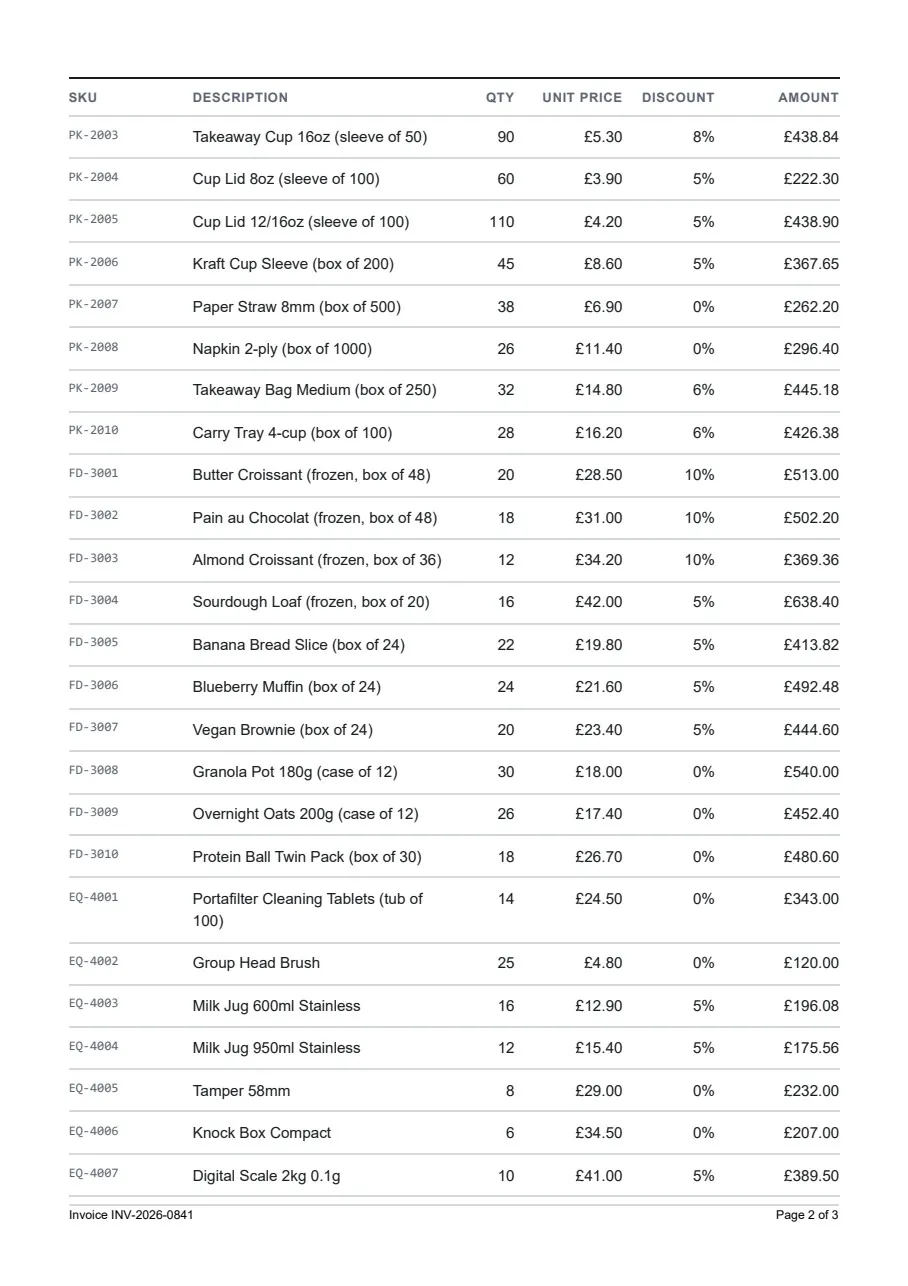
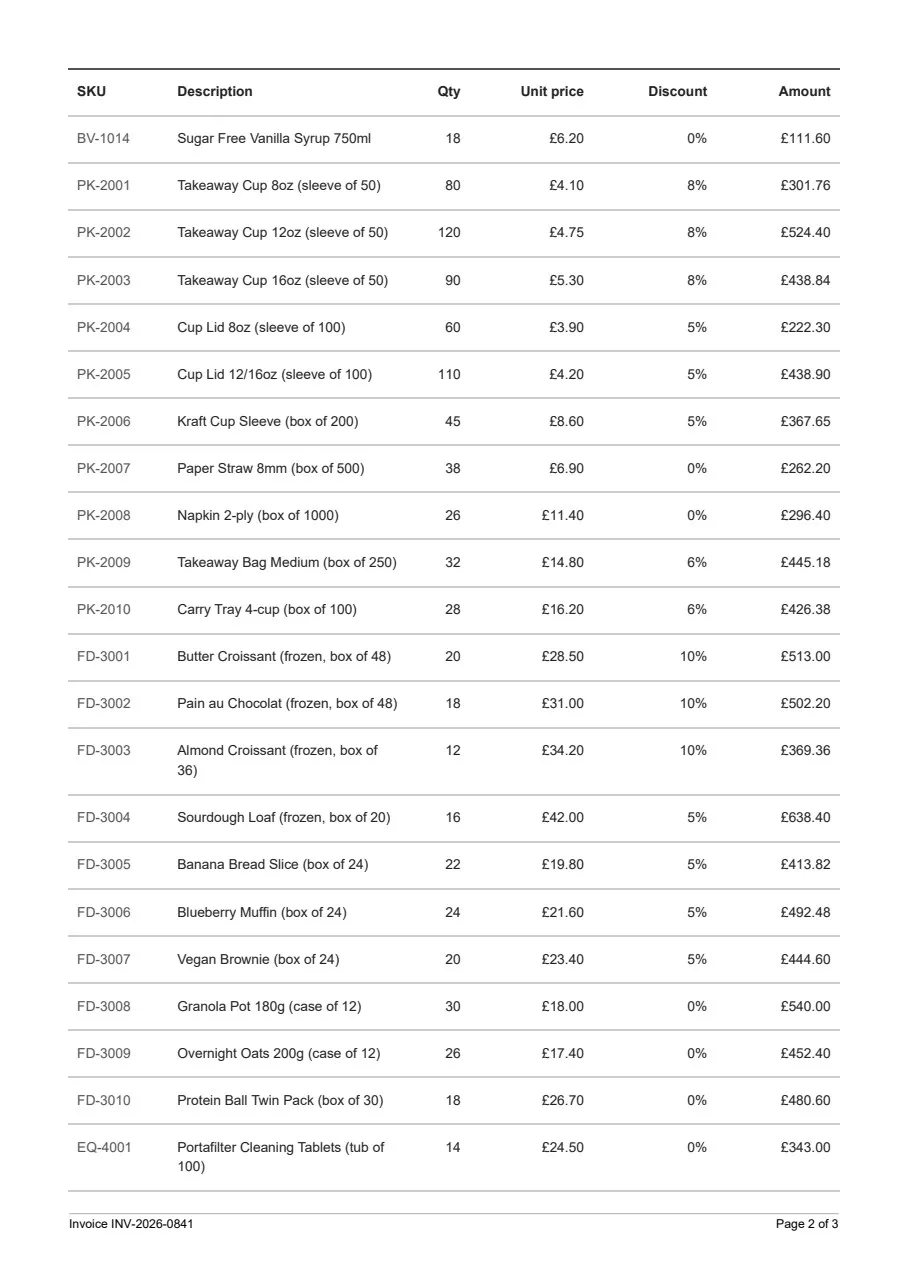
Honestly, I did not expect this. In the first article, the template the model wrote did not have a real @page rule, and I had to add the print rules myself. This time, with nothing more than “for A4 print output” in the prompt, both models wrote those rules on every run:
| Print rule | Fable 5.1 | GPT-6 Astra |
|---|---|---|
@page with size and margins | 5 of 5 | 5 of 5 |
thead { display: table-header-group } | 5 of 5 | 5 of 5 |
break-inside: avoid plus the old page-break-inside | 5 of 5 | 5 of 5 |
font-variant-numeric: tabular-nums | 5 of 5 | 5 of 5 |
@media print block | 3 of 5 | 5 of 5 |
print-color-adjust: exact | 5 of 5 | 0 of 5 |
Both models even added the old page-break-inside property next to the modern one. MDN lists it as a legacy alias that is kept only for older content, so it does no harm to have both. The one rule where the models differ is at the bottom of that table, and a 46 line invoice was never going to expose it. So I decided to make the test harder.
The stress round: what happens when the invoice gets difficult?
For this round, I used the same 10 templates without changing anything in them. Only the input got harder:
- Backgrounds off.
PrintHtmlBackgrounds = false, which is the renderer default. It is the same idea as printing from a browser with “Background graphics” unticked. - A long row at the page break. One line item with a description that wraps onto several lines, placed right where page one ends.
- 200 lines. Nine or ten pages instead of three.
- Euro and long names. German number formatting (
1.234,56 €) and a 67 character buyer name.
| Test | Claude Fable 5.1 | GPT-6 Astra |
|---|---|---|
| Backgrounds off | 4 runs print grey fills, all kept. 1 run prints none. | 1 run prints a grey header row and loses it. 4 runs print none. |
| Long row at the break | Whole on page 2, 5 of 5 | Whole on page 2, 5 of 5 |
| 200 lines | All checks pass, 9 pages | All checks pass, 10 pages |
| Euro and long names | All checks pass | All checks pass |
The long row and the 200 line invoice did not break anything. Both models moved the long row to page two in one piece, and the header repeated on every page, all the way to the end.
The background test is where the two models differ. Fable sets print-color-adjust: exact on html in every run, and its grey fills survived even with IronPDF’s background printing switched off. In Astra’s run 1, the header row has a light grey fill, but nothing protects it:
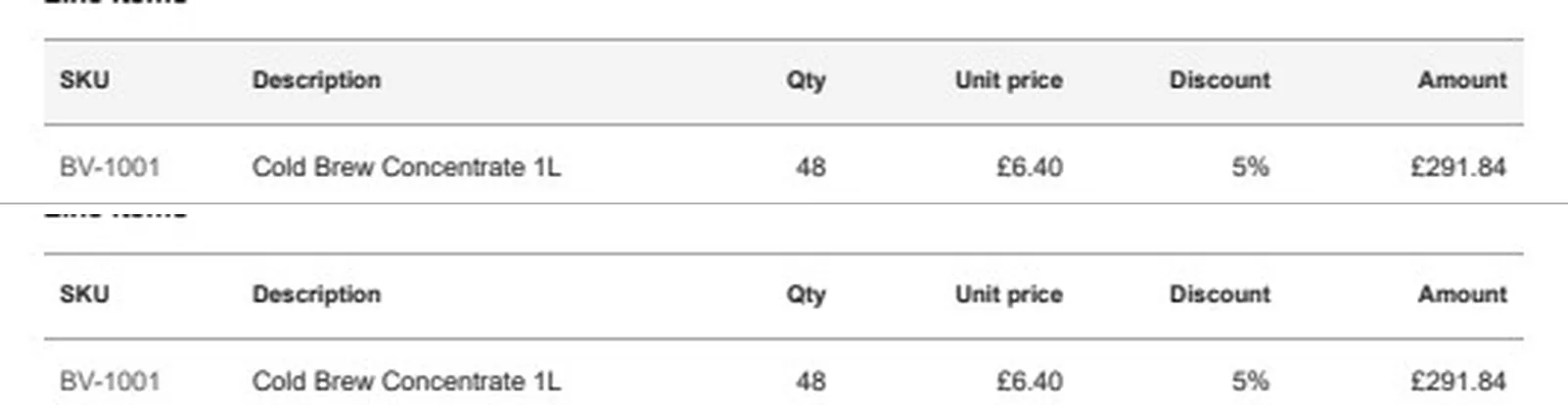
It is a very light #f4f4f4 grey, so it is not a big deal on this invoice. But it is the one print detail that Fable handled every time and Astra never did.
I also found one flaw that the scorer cannot see, and this one is Fable’s. In run 2, the invoice number wraps onto a second line in the masthead:
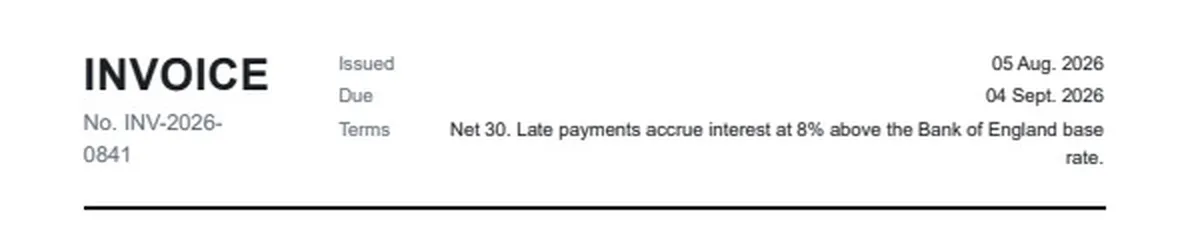
It happened in only one of the five runs, it is purely cosmetic, and adding white-space: nowrap fixes it. Still, this is the kind of issue you will only catch by actually opening the PDF and looking at it.
How to Convert HTML to PDF in C# (.NET 10 Guide)
The full invoice endpoint these templates plug into - renderer settings, culture-aware currency, page numbers and a render queue.
Which model should you use for HTML templates?
Honestly, either of them will do the job, and I would not switch models based on this test alone. Both wrote print-ready invoice HTML on every run, and both passed every stress test that matters for page breaks. If you still want me to pick one, Fable 5.1 is slightly more careful with print details, and GPT-6 Astra writes slightly roomier layouts. Here is how I would decide:
| If this is you | Pick | Why |
|---|---|---|
| Your invoices use colored header bands or shaded totals | Fable 5.1 | It protected its fills with print-color-adjust on every run |
| Your invoices get printed from a browser, not only rendered on a server | Fable 5.1 | It at least asks the browser to keep the fills. The user’s print settings can still override it, so never put anything important in a fill |
| You care about page count on long documents | Fable 5.1, then tune | 9 pages against 10 at 200 lines. My hand-tuned template needs 7, so neither is tight |
| You already pay for ChatGPT and not Claude | GPT-6 Astra | It passed every page break test. Add print-color-adjust: exact yourself |
| You already have a template that works | Neither | Keep it. Re-generating a working template only gives you new bugs to find |
Note that this test does not cover the C# side of things. Both models write good HTML and CSS because there is so much of it on the web to learn from. Library code is a different story, and a model can easily make up an IronPDF method that does not exist. For that part, load the vendor’s skill file into your agent before you ask for code, and while you are at it, make sure it does not pick the wrong NuGet packages.
Iron Software has a setup guide for each side. There is one for IronPDF with Claude Code , and one for IronPDF with ChatGPT Codex if you work in Codex and not the ChatGPT app. Both do the same thing: you add a short PDF section to CLAUDE.md or AGENTS.md that points the agent to IronPDF’s llms.txt and skill file, so that it reads the real API before it writes any code.
Whichever model you pick, the workflow stays the same. Generate the template once at design time, run it through a check like this scorer, fix whatever fails, and commit it as a file. Please do not ask a model for fresh HTML on every request. If the layout changes from one invoice to the next, you will have a hard time explaining that to a customer. I covered the reasons in more detail in the first article.
This verdict is based on my tests from 19 September 2026. Both vendors release a new model every few months, and I plan to re-run the same test when they do. I will keep the scorer and the prompt the same, so that the numbers stay comparable.
Key takeaways
- Both models now write print-ready invoice HTML. All 10 templates scored 9/9, and none of them broke with a long row, 200 lines or euro formatting.
- The only real difference is print-only CSS. Fable 5.1 set
print-color-adjust: exactin 5 of 5 runs, and GPT-6 Astra in 0 of 5. - Give the model your placeholder contract. List the exact token names that your fill code uses, along with the shape of one row.
- Test the template by reading the PDF text back.
ExtractTextFromPageturns “is the header on page two?” into a one line check. - Check your checker first. Run a known-broken template through it before you trust its results. My scorer had two bugs that I only found this way.
FAQ
Is Claude or ChatGPT better at writing HTML for PDFs?
In my test on 19 September 2026 they were close to even. Claude Fable 5.1 and GPT-6 Astra each wrote five invoice templates from the same prompt, and all 10 scored 9 out of 9 after rendering with IronPDF on .NET 10. Fable was slightly more careful with print-only CSS: it set print-color-adjust exact in every run, and its background fills survived IronPDF rendering with background printing off. Astra never set it.
Can ChatGPT generate an HTML invoice template for C#?
Yes. GPT-6 Astra wrote a complete single file HTML invoice template from a short prompt in all five of my runs, including an @page rule, a repeating table header and rules that keep rows from splitting across pages. Add print-color-adjust exact yourself if the template uses background colors.
How do I test AI-generated HTML before rendering it to PDF?
Render it with sample data long enough to span at least two pages, then read the text of each page back out of the PDF. With IronPDF, ExtractTextFromPage returns the text of one page, so you can check that the column labels appear on page two and that the subtotal and total are on the same page.
Should I use Claude Fable 5.1 or GPT-6 Astra at runtime to generate PDFs?
No. Use either model at design time to draft the template, check it, and commit it as a file. Generating HTML on every request makes the layout non deterministic, adds latency and token cost to every render, and leaves you unable to explain why two invoices for the same order look different.
What does print-color-adjust exact do in a PDF template?
It asks the rendering engine not to adjust colors and backgrounds when printing. With IronPDF's background printing switched off, which is the default, it was the difference between keeping and losing the fills: removing it from a template with a dark header band lost the fill on 26.6 percent of the page in my test. Browsers are allowed to let a user's print settings override it, so treat it as a strong hint.
Why does IronPDF throw a sandbox license exception from dotnet run?
A sandbox key only works in a development environment with a debugger attached. Running the app with dotnet run, dotnet test or in CI throws a LicensingException. Run it with F5 from Visual Studio or Rider, or use a trial or full license key.
Troubleshooting
LicensingException: A SANDBOX license key is being used outside of a development environment
I ran into this one myself while building the scorer. A sandbox key only works when a debugger is attached, so dotnet run throws this exception before the first render. You can either press F5 in Visual Studio or Rider, or set a free trial key in user secrets instead.
The thead check fails on every template, even the good ones
Mine did too, at first. A plain thead regex also matches .masthead, and almost every invoice template has a masthead with display: grid. Anchor the match so that thead cannot be part of a longer class name.
The page two image is saved as page-1.png
RasterizeToImageFiles numbers the output files starting from 1, in the order it writes them. The page index has nothing to do with the file name, so if you ask only for page index 1, you get a file that ends in 1. I rename the file right after rasterizing, so that the file name matches the page.
Background colors are missing from the header row
You can either set PrintHtmlBackgrounds = true on the renderer, or add print-color-adjust: exact to the template. I would do both. The CSS also helps when the same HTML gets printed from a browser, although the user’s print settings can still override it there.
Summary
In this article, I gave Claude Fable 5.1 and GPT-6 Astra the same invoice prompt five times each, and scored every PDF with a C# app. All 10 templates passed all 9 checks, and none of them broke with a long row, 200 lines or euro formatting. The only real difference was print-color-adjust. Fable wrote it every time, and Astra never did. You can go with either model, and if you choose Astra, just add that one line yourself.
In my opinion, the most useful part of this article is the scorer, because it will stay useful long after both of these models are replaced. Point it at whatever template the next model writes, and you will find out about page two problems before your customers do. And if you would rather let an agent call the renderer itself, the render step is a good fit for a tool that you expose with an MCP server in C#.
You can find the complete source code on GitHub. It has the scorer, the prompt, the control templates and every template both models wrote, along with the PDFs.
Try IronPDF free for 30 days
If you want to run the scorer yourself, you will need a license key. Iron Software gives you a free 30 day trial key , and unlike a sandbox key, it works with a plain dotnet run. Here is what they include in the trial:
- You can test in a live environment without watermarks
- You get the fully functional product
- You can be up and running in minutes
- You get 24/5 access to their technical support engineering team
If you found this article helpful, do share it with your colleagues.
What model are you using to write your templates right now? Let me know in the comments below.
Happy Coding :)



What's your take?
Push back, share a war story, or ask the obvious question someone else is wondering. I read every comment.