
Minimal APIs are the recommended approach for building HTTP APIs in ASP.NET Core. Introduced in .NET 6 and significantly enhanced through each release, Minimal APIs in .NET 10 have matured into a production-ready framework with built-in validation, Server-Sent Events, OpenAPI 3.1, and more.
If you’ve been working with Controllers, you might wonder - why switch? The answer is simple: less boilerplate, better performance, and a cleaner development experience. Minimal APIs strip away the ceremony and let you focus on what matters - building endpoints.
In this article, we’ll build a complete Product Catalog API from scratch using Minimal APIs. You’ll learn route handlers, parameter binding, route groups, endpoint filters, TypedResults, validation, and how to document your API with OpenAPI and Scalar.
What Are Minimal APIs?
Minimal APIs are a simplified way to define HTTP endpoints in ASP.NET Core without using controllers. Instead of creating controller classes with action methods, you define endpoints directly in Program.cs using lambda expressions or method references.
Here’s the simplest possible Minimal API:
var app = WebApplication.Create(args);
app.MapGet("/", () => "Hello, World!");
app.Run();
Let’s break this down:
- Line 1:
WebApplication.Create(args)creates a web application with default configuration. It handles setting up the host, configuration, logging, and DI container in a single call. - Line 3:
MapGet("/", ...)registers a route handler. The first parameter"/"is the URL pattern, and the lambda() => "Hello, World!"is the handler that executes when this route is hit. The return value is automatically serialized to the response. - Line 5:
app.Run()starts the web server and begins listening for HTTP requests.
That’s a complete, runnable web application. No controllers, no startup classes, no attributes - just a route and a handler.
Why Microsoft Recommends Minimal APIs
Microsoft’s official stance is clear: Minimal APIs are the recommended approach for new projects. Here’s why:
- Less ceremony - No controller inheritance, no attributes on action methods, no separate files for simple endpoints
- Better performance - Reduced overhead compared to MVC’s model binding and filter pipeline
- Native AOT support - Minimal APIs work seamlessly with Native AOT compilation, producing apps under 5MB
- Modern C# features - Built to leverage primary constructors, lambda expressions, and records
- Cleaner testing - Endpoints are just functions, making unit testing straightforward
Minimal APIs vs Controllers - When to Use What
Before we dive into building, let’s address the elephant in the room: should you abandon controllers entirely?
Use Minimal APIs when:
- Building new APIs from scratch
- Creating microservices or small, focused services
- Performance is critical (high-throughput scenarios)
- You want Native AOT compilation
- The API is relatively simple (CRUD operations, integrations)
Consider Controllers when:
- You need advanced model binding (custom
IModelBinderimplementations) - Working with
IFormFilefor complex file uploads - Using OData or JSON Patch
- Existing large codebase that would require significant refactoring
- Team is more comfortable with MVC patterns
The good news? You can mix both in the same application. Controllers and Minimal APIs coexist peacefully.
Setting Up the Project
Let’s create a Product Catalog API to demonstrate Minimal APIs in action. We’ll use .NET 10 with the built-in OpenAPI support and Scalar for API documentation.
dotnet new webapi -n ProductCatalog.Api -minimalcd ProductCatalog.ApiThe -minimal flag creates a project with Minimal API structure. Open Program.cs - this is where all our API logic will live.
Your initial Program.cs looks like this:
var builder = WebApplication.CreateBuilder(args);
builder.Services.AddOpenApi();
var app = builder.Build();
app.MapOpenApi();
app.MapGet("/", () => "Hello World!");
app.Run();
Here’s what each part does:
WebApplication.CreateBuilder(args)- Creates a builder that lets you configure services and middleware before building the app. This is more flexible thanWebApplication.Create()when you need to register services.builder.Services.AddOpenApi()- Registers the OpenAPI document generation service. This automatically scans your endpoints and generates an OpenAPI 3.1 specification.builder.Build()- Builds the configuredWebApplicationinstance.app.MapOpenApi()- Exposes the generated OpenAPI document at/openapi/v1.json.
Let’s add Scalar for a proper API documentation UI:
dotnet add package Scalar.AspNetCoreUpdate Program.cs:
using Scalar.AspNetCore;
var builder = WebApplication.CreateBuilder(args);
builder.Services.AddOpenApi();
var app = builder.Build();
app.MapOpenApi();app.MapScalarApiReference();
app.MapGet("/", () => "Hello World!");
app.Run();
The key addition here is app.MapScalarApiReference() - this registers the Scalar UI middleware that reads the OpenAPI document and renders an interactive API documentation page. Scalar is a modern alternative to Swagger UI with a cleaner interface and better performance.
Now run the application and navigate to /scalar/v1 to see your API documentation.
Defining Route Handlers
Route handlers are the core of Minimal APIs. They define what happens when a request hits a specific URL. ASP.NET Core provides methods for all HTTP verbs:
MapGet()- Handle GET requestsMapPost()- Handle POST requestsMapPut()- Handle PUT requestsMapDelete()- Handle DELETE requestsMapPatch()- Handle PATCH requests
Let’s define our Product model and create CRUD endpoints:
public record Product(int Id, string Name, string Category, decimal Price, int Stock);We’re using a C# record here instead of a class. Records are ideal for API models because they’re immutable by default, provide value-based equality, and have a concise syntax. The positional parameters automatically become public properties with init setters.
Now let’s create a simple in-memory data store and endpoints:
var products = new List<Product>{    new(1, "Mechanical Keyboard", "Electronics", 149.99m, 50),    new(2, "Wireless Mouse", "Electronics", 49.99m, 100),    new(3, "USB-C Hub", "Accessories", 79.99m, 75)};
// GET all productsapp.MapGet("/products", () => products);
// GET single productapp.MapGet("/products/{id:int}", (int id) =>{    var product = products.FirstOrDefault(p => p.Id == id);    return product is not null ? Results.Ok(product) : Results.NotFound();});
// POST new productapp.MapPost("/products", (Product product) =>{    products.Add(product);    return Results.Created($"/products/{product.Id}", product);});
// PUT update productapp.MapPut("/products/{id:int}", (int id, Product updated) =>{    var index = products.FindIndex(p => p.Id == id);    if (index == -1) return Results.NotFound();
    products[index] = updated with { Id = id };    return Results.NoContent();});
// DELETE productapp.MapDelete("/products/{id:int}", (int id) =>{    var product = products.FirstOrDefault(p => p.Id == id);    if (product is null) return Results.NotFound();
    products.Remove(product);    return Results.NoContent();});
Let’s walk through each endpoint:
GET all products - The simplest handler. It just returns the list, which ASP.NET Core automatically serializes to JSON with a 200 status code.
GET single product - Notice the {id:int} route template. The :int is a route constraint that ensures the id parameter is a valid integer. The handler uses pattern matching (is not null) to check if the product exists and returns appropriate HTTP responses using the Results helper class.
POST new product - The Product product parameter is automatically deserialized from the JSON request body. Results.Created() returns a 201 status with the Location header pointing to the new resource.
PUT update product - Uses the with expression (updated with { Id = id }) to create a new record instance with the Id property overridden. This ensures the ID from the URL takes precedence over the body. Returns 204 No Content on success.
DELETE product - Finds and removes the product from the list. Returns 204 No Content on success or 404 if not found.
Run the application and test these endpoints via Scalar at /scalar/v1.
Parameter Binding
One of the strengths of Minimal APIs is automatic parameter binding. ASP.NET Core intelligently determines where to get values from based on the parameter type and attributes.
Route Parameters
Route parameters are extracted from the URL path:
app.MapGet("/products/{id:int}", (int id) => /* id comes from URL */);
app.MapGet("/categories/{name}/products", (string name) => /* name from URL */);
When a request comes in for /products/42, ASP.NET Core extracts 42 from the URL and passes it to the handler as the id parameter. The parameter name in the lambda must match the placeholder name in the route template.
Route constraints like :int, :guid, :bool validate the parameter type before the handler executes. If someone requests /products/abc, the :int constraint fails and returns a 404 - your handler code never runs.
Query Parameters
Parameters not in the route are bound from the query string:
app.MapGet("/products", (string? category, decimal? minPrice, int page = 1, int pageSize = 10) =>{    var query = products.AsEnumerable();
    if (!string.IsNullOrEmpty(category))        query = query.Where(p => p.Category == category);
    if (minPrice.HasValue)        query = query.Where(p => p.Price >= minPrice);
    return query.Skip((page - 1) * pageSize).Take(pageSize);});
Here’s how ASP.NET Core binds these parameters:
string? category- The?makes it nullable. If?category=isn’t in the query string, it’snull.decimal? minPrice- Nullable value type. The framework parses the string to decimal automatically.int page = 1- Default values work. If?page=isn’t provided, it defaults to1.int pageSize = 10- Same pattern for pagination size.
The handler builds a filtered, paginated result using LINQ. Skip() and Take() handle pagination efficiently.
Now you can call /products?category=Electronics&minPrice=50&page=1.
Request Body
Complex types are automatically bound from the request body:
app.MapPost("/products", (Product product) =>{ // product is deserialized from JSON body products.Add(product); return Results.Created($"/products/{product.Id}", product);});ASP.NET Core uses System.Text.Json to deserialize the request body into your model. For POST, PUT, and PATCH requests, complex types (classes, records) are automatically assumed to come from the body. No [FromBody] attribute needed - it’s the default behavior for Minimal APIs.
Headers and Services
Use attributes to bind from specific sources:
app.MapGet("/secure", ( [FromHeader(Name = "X-Api-Key")] string apiKey, [FromServices] ILogger<Program> logger) =>{ logger.LogInformation("API called with key: {Key}", apiKey[..4] + "***"); return Results.Ok("Authenticated");});When the default binding conventions don’t apply, use attributes:
[FromHeader(Name = "X-Api-Key")]- Binds from a specific HTTP header. TheNameproperty specifies the header name (they’re case-insensitive).[FromServices]- Explicitly requests a service from the DI container. While services are usually auto-detected, this attribute makes intent clear.
The apiKey[..4] uses C#‘s range operator to log only the first 4 characters - a good practice for sensitive values.
Dependency Injection in Handlers
Services registered in the DI container are automatically injected:
app.MapGet("/products", (IProductService productService) =>{ return productService.GetAll();});This is one of the most powerful features of Minimal APIs. ASP.NET Core inspects your handler’s parameters and automatically resolves any registered services. If IProductService is registered in the DI container (builder.Services.AddScoped<IProductService, ProductService>()), it’s injected without any attributes. This keeps your handlers clean and testable.
TypedResults - Strongly Typed Responses
The Results class returns IResult, but .NET provides TypedResults for strongly typed responses. This improves OpenAPI documentation and compile-time safety.
Compare these approaches:
// Using Results (returns IResult)app.MapGet("/products/{id}", (int id) =>{    var product = products.FirstOrDefault(p => p.Id == id);    return product is not null ? Results.Ok(product) : Results.NotFound();});
// Using TypedResults (returns Results<Ok<Product>, NotFound>)app.MapGet("/products/{id}", Results<Ok<Product>, NotFound> (int id) =>{    var product = products.FirstOrDefault(p => p.Id == id);    return product is not null ? TypedResults.Ok(product) : TypedResults.NotFound();});
The key difference is in the return type declaration:
Results(first example) - ReturnsIResult, which is an interface. The compiler doesn’t know what specific types might be returned, so OpenAPI generation has to guess.TypedResults(second example) - The return typeResults<Ok<Product>, NotFound>explicitly declares “this endpoint returns either Ok with a Product, or NotFound.” This is a union type that tells both the compiler and OpenAPI exactly what to expect.
The second approach explicitly declares possible response types, which:
- Generates accurate OpenAPI documentation automatically
- Provides compile-time checking for response types
- Makes the API contract explicit in the code
Here are common TypedResults methods:
| Method | HTTP Status | Use Case |
|---|---|---|
TypedResults.Ok(value) | 200 | Successful response with data |
TypedResults.Created(uri, value) | 201 | Resource created |
TypedResults.NoContent() | 204 | Successful, no response body |
TypedResults.BadRequest(error) | 400 | Invalid request |
TypedResults.NotFound() | 404 | Resource not found |
TypedResults.Conflict() | 409 | Resource conflict |
Route Groups - Organizing Endpoints
As your API grows, having all endpoints in Program.cs becomes unmanageable. Route groups help organize related endpoints and apply common configurations.
var productsGroup = app.MapGroup("/products")    .WithTags("Products");
productsGroup.MapGet("/", () => products);productsGroup.MapGet("/{id:int}", (int id) => products.FirstOrDefault(p => p.Id == id));productsGroup.MapPost("/", (Product product) =>{    products.Add(product);    return TypedResults.Created($"/products/{product.Id}", product);});productsGroup.MapPut("/{id:int}", (int id, Product updated) =>{    var index = products.FindIndex(p => p.Id == id);    if (index == -1) return Results.NotFound();    products[index] = updated with { Id = id };    return Results.NoContent();});productsGroup.MapDelete("/{id:int}", (int id) =>{    var product = products.FirstOrDefault(p => p.Id == id);    if (product is null) return Results.NotFound();    products.Remove(product);    return Results.NoContent();});
Here’s what’s happening:
app.MapGroup("/products")- Creates a route group with/productsas the base path. All endpoints registered on this group will have their routes prefixed with/products..WithTags("Products")- Adds an OpenAPI tag. In Scalar UI, endpoints are grouped by tag, making navigation easier.productsGroup.MapGet("/", ...)- The route is/relative to the group, which becomes/productsin the actual URL.productsGroup.MapGet("/{id:int}", ...)- Becomes/products/{id:int}.
This pattern keeps related endpoints together and ensures consistent URL prefixes without repetition.
Applying Common Configuration
Route groups can apply configurations to all child endpoints:
var apiGroup = app.MapGroup("/api/v1")    .RequireAuthorization();
var productsGroup = apiGroup.MapGroup("/products")    .WithTags("Products");
var categoriesGroup = apiGroup.MapGroup("/categories")    .WithTags("Categories");
This demonstrates nested route groups - a powerful organization pattern:
apiGroup- The parent group at/api/v1with.RequireAuthorization(). Every endpoint registered on this group or its children requires authentication.productsGroup- A child group that inherits the/api/v1prefix and authorization requirement. Its endpoints are at/api/v1/products/*.categoriesGroup- Another child group with its own tag. Its endpoints are at/api/v1/categories/*.
Now all endpoints under /api/v1 require authorization and are grouped by tags in the OpenAPI documentation. This is how you build versioned, secured APIs with clean organization.
Endpoint Filters - Cross-Cutting Concerns
Endpoint filters let you run code before and after your handlers - perfect for validation, logging, caching, or authorization logic.
Creating a Custom Filter
Here’s a logging filter:
public class LoggingFilter(ILogger<LoggingFilter> logger) : IEndpointFilter{    public async ValueTask<object?> InvokeAsync(        EndpointFilterInvocationContext context,        EndpointFilterDelegate next)    {        var endpoint = context.HttpContext.GetEndpoint()?.DisplayName;        logger.LogInformation("Executing: {Endpoint}", endpoint);
        var stopwatch = Stopwatch.StartNew();        var result = await next(context);        stopwatch.Stop();
        logger.LogInformation("Completed: {Endpoint} in {Duration}ms",            endpoint, stopwatch.ElapsedMilliseconds);
        return result;    }}
Let’s break down how this filter works:
- Primary constructor -
LoggingFilter(ILogger<LoggingFilter> logger)uses C#‘s primary constructor syntax. The logger is injected via DI when the filter is instantiated. IEndpointFilterinterface - Requires implementingInvokeAsync(), which wraps the endpoint execution.context- Contains theHttpContext, request arguments, and endpoint metadata. You can access handler arguments viacontext.GetArgument<T>(index).next(context)- Calls the next filter in the pipeline or the actual handler. This is the middleware pattern - code beforenext()runs before the handler, code after runs after.Stopwatch- Measures execution time. This pattern is useful for performance monitoring and identifying slow endpoints.
Apply it to endpoints or groups:
app.MapGet("/products", () => products)    .AddEndpointFilter<LoggingFilter>();
// Or apply to a groupvar productsGroup = app.MapGroup("/products")    .AddEndpointFilter<LoggingFilter>();
The first example adds the filter to a single endpoint. The second applies it to all endpoints in the group - every endpoint registered on productsGroup will be logged. Filters applied to groups are inherited by all child endpoints, making it easy to add cross-cutting concerns without repetition.
Inline Filters
For simple cases, use inline filters:
app.MapPost("/products", (Product product) => { /* handler */ }) .AddEndpointFilter(async (context, next) => { var product = context.GetArgument<Product>(0); if (string.IsNullOrEmpty(product.Name)) { return TypedResults.BadRequest("Product name is required"); } return await next(context); });This inline filter performs validation before the handler executes:
context.GetArgument<Product>(0)- Retrieves the first argument passed to the handler (index 0). The type parameter<Product>casts it appropriately.- Short-circuit return - If validation fails, the filter returns
BadRequestimmediately. The handler never executes. await next(context)- If validation passes, control flows to the handler.
Inline filters are convenient for one-off logic, but for reusable validation, consider the built-in validation (next section) or a proper filter class.
Built-in Validation in .NET 10
.NET 10 introduces native validation support for Minimal APIs. No more custom validation filters - just use DataAnnotations and register the validation service.
Setting Up Validation
First, create a model with validation attributes:
public record CreateProductRequest( [Required, StringLength(100)] string Name, [Required] string Category, [Range(0.01, 999999.99)] decimal Price, [Range(0, int.MaxValue)] int Stock);These are standard System.ComponentModel.DataAnnotations attributes:
[Required]- The property must have a non-null, non-empty value.[StringLength(100)]- Maximum string length. You can also setMinimumLength.[Range(0.01, 999999.99)]- Value must be within the specified range. For decimals, this prevents negative prices and absurdly high values.
The attributes are applied directly in the record’s positional parameters - clean and concise.
Register validation in Program.cs:
builder.Services.AddValidation();This single line enables automatic validation for all Minimal API endpoints. The framework:
- Inspects incoming request bodies for models with
DataAnnotationsattributes - Validates before your handler executes
- Returns a standardized error response if validation fails
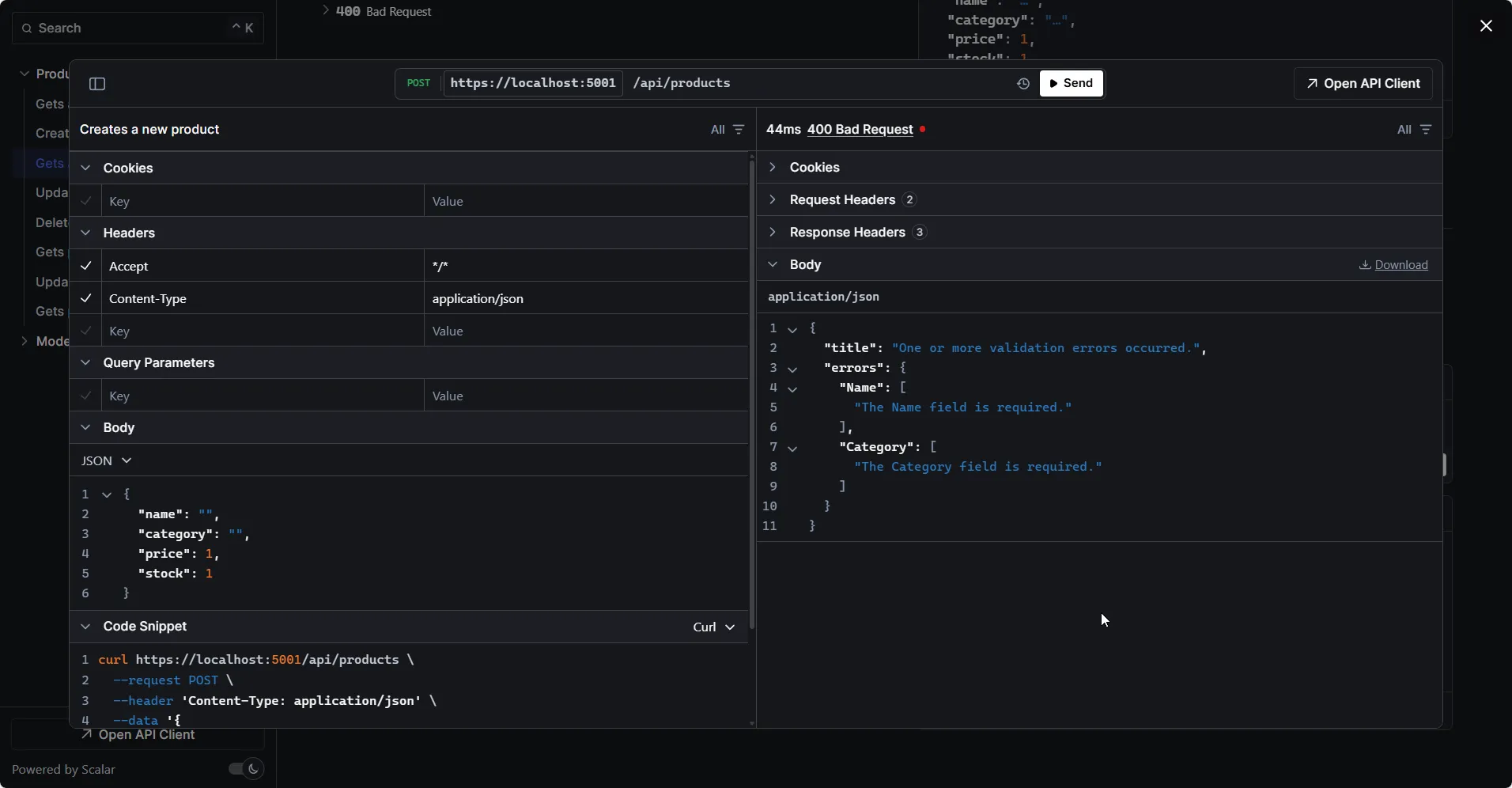
That’s it. Now when validation fails, ASP.NET Core automatically returns a ProblemDetails response:
{ "type": "https://tools.ietf.org/html/rfc9110#section-15.5.1", "title": "One or more validation errors occurred.", "status": 400, "errors": { "Name": ["The Name field is required."], "Price": ["The field Price must be between 0.01 and 999999.99."] }}This follows the RFC 9457 Problem Details specification - a standardized format for HTTP API errors. The errors dictionary maps property names to their validation messages, making it easy for clients to display field-specific errors.
Disabling Validation for Specific Endpoints
If you need to bypass validation on certain endpoints:
app.MapPost("/products/bulk", (List<Product> products) => { /* handler */ }) .DisableValidation();.DisableValidation() turns off automatic validation for this specific endpoint. Use this when you need custom validation logic, are handling raw data, or have performance-critical endpoints where you validate manually.
OpenAPI and Scalar Integration
.NET 10 provides first-class OpenAPI 3.1 support. Combined with Scalar, you get beautiful, interactive API documentation.
Enhancing OpenAPI Metadata
Add descriptions, summaries, and examples to your endpoints:
app.MapGet("/products/{id:int}", (int id) =>{ var product = products.FirstOrDefault(p => p.Id == id); return product is not null ? TypedResults.Ok(product) : TypedResults.NotFound();}).WithName("GetProductById").WithSummary("Gets a product by ID").WithDescription("Returns a single product based on the provided ID. Returns 404 if not found.").Produces<Product>(StatusCodes.Status200OK).Produces(StatusCodes.Status404NotFound);Here’s what each method does:
.WithName("GetProductById")- Sets the operation ID. This becomes the method name in generated API clients and appears in Scalar UI..WithSummary("...")- A short, one-line description shown in the endpoint list..WithDescription("...")- A longer description shown when you expand the endpoint details..Produces<Product>(StatusCodes.Status200OK)- Explicitly documents that this endpoint returns aProducton success. Useful when TypedResults aren’t used..Produces(StatusCodes.Status404NotFound)- Documents the 404 response (no body).
In .NET 10, OpenAPI metadata is automatically included when you register AddOpenApi(). The WithName, WithSummary, WithDescription, and Produces methods provide all the metadata needed for comprehensive API documentation.
YAML Output
.NET 10 supports YAML OpenAPI documents:
app.MapOpenApi("/openapi/{documentName}.yaml");The {documentName} placeholder defaults to v1. This registers an additional endpoint that serves the OpenAPI specification in YAML format instead of JSON. YAML is often preferred for version control (more readable diffs) and by tools like AWS API Gateway.
Now you can access your spec at /openapi/v1.yaml.
Complete Product Catalog API
Now let’s put everything together into a production-style API. This example combines route groups, TypedResults, validation, filtering, and pagination into a cohesive implementation.
Here’s the complete Program.cs:
using System.ComponentModel.DataAnnotations;using System.Diagnostics;using Microsoft.AspNetCore.Http.HttpResults;using Scalar.AspNetCore;
var builder = WebApplication.CreateBuilder(args);
builder.Services.AddOpenApi();builder.Services.AddValidation();
var app = builder.Build();
app.MapOpenApi();app.MapScalarApiReference();
// In-memory data storevar products = new List<Product>{    new(1, "Mechanical Keyboard", "Electronics", 149.99m, 50),    new(2, "Wireless Mouse", "Electronics", 49.99m, 100),    new(3, "USB-C Hub", "Accessories", 79.99m, 75)};var nextId = 4;
// Route group for productsvar productsGroup = app.MapGroup("/api/products")    .WithTags("Products");
// GET all productsproductsGroup.MapGet("/", Results<Ok<List<Product>>, NoContent> (    string? category,    decimal? minPrice,    int page = 1,    int pageSize = 10) =>{    var query = products.AsEnumerable();
    if (!string.IsNullOrEmpty(category))        query = query.Where(p => p.Category.Equals(category, StringComparison.OrdinalIgnoreCase));
    if (minPrice.HasValue)        query = query.Where(p => p.Price >= minPrice);
    var result = query.Skip((page - 1) * pageSize).Take(pageSize).ToList();
    return result.Count > 0 ? TypedResults.Ok(result) : TypedResults.NoContent();}).WithName("GetProducts").WithSummary("Gets all products with optional filtering");
// GET single productproductsGroup.MapGet("/{id:int}", Results<Ok<Product>, NotFound> (int id) =>{    var product = products.FirstOrDefault(p => p.Id == id);    return product is not null ? TypedResults.Ok(product) : TypedResults.NotFound();}).WithName("GetProductById").WithSummary("Gets a product by ID");
// POST new productproductsGroup.MapPost("/", Results<Created<Product>, BadRequest<string>> (CreateProductRequest request) =>{    var product = new Product(nextId++, request.Name, request.Category, request.Price, request.Stock);    products.Add(product);    return TypedResults.Created($"/api/products/{product.Id}", product);}).WithName("CreateProduct").WithSummary("Creates a new product");
// PUT update productproductsGroup.MapPut("/{id:int}", Results<NoContent, NotFound> (int id, UpdateProductRequest request) =>{    var index = products.FindIndex(p => p.Id == id);    if (index == -1) return TypedResults.NotFound();
    products[index] = new Product(id, request.Name, request.Category, request.Price, request.Stock);    return TypedResults.NoContent();}).WithName("UpdateProduct").WithSummary("Updates an existing product");
// DELETE productproductsGroup.MapDelete("/{id:int}", Results<NoContent, NotFound> (int id) =>{    var product = products.FirstOrDefault(p => p.Id == id);    if (product is null) return TypedResults.NotFound();
    products.Remove(product);    return TypedResults.NoContent();}).WithName("DeleteProduct").WithSummary("Deletes a product");
app.Run();
// Modelspublic record Product(int Id, string Name, string Category, decimal Price, int Stock);
public record CreateProductRequest(    [Required, StringLength(100)] string Name,    [Required, StringLength(50)] string Category,    [Range(0.01, 999999.99)] decimal Price,    [Range(0, int.MaxValue)] int Stock);
public record UpdateProductRequest(    [Required, StringLength(100)] string Name,    [Required, StringLength(50)] string Category,    [Range(0.01, 999999.99)] decimal Price,    [Range(0, int.MaxValue)] int Stock);
Code Walkthrough
Service Registration (lines 10-13) - AddOpenApi() enables OpenAPI document generation, AddValidation() enables automatic DataAnnotations validation.
Middleware Pipeline (lines 17-18) - MapOpenApi() exposes the OpenAPI JSON at /openapi/v1.json, MapScalarApiReference() adds the Scalar UI at /scalar/v1.
Route Group (lines 29-31) - All product endpoints share the /api/products prefix and “Products” tag. This keeps URLs consistent and OpenAPI documentation organized.
GET with Filtering (lines 34-54) - Demonstrates optional query parameters, nullable types, default values, and LINQ-based filtering. The return type Results<Ok<List<Product>>, NoContent> explicitly documents possible responses.
POST with Validation (lines 65-72) - Uses CreateProductRequest instead of Product directly. The request DTO has validation attributes, ensuring invalid data never reaches your business logic.
Separate Request DTOs (lines 103-116) - Notice we have CreateProductRequest and UpdateProductRequest as separate records from Product. This is a best practice - your API contract (DTOs) should be separate from your domain models.
Testing Your API
Run the application and navigate to /scalar/v1. You’ll see all your endpoints documented with request/response schemas.
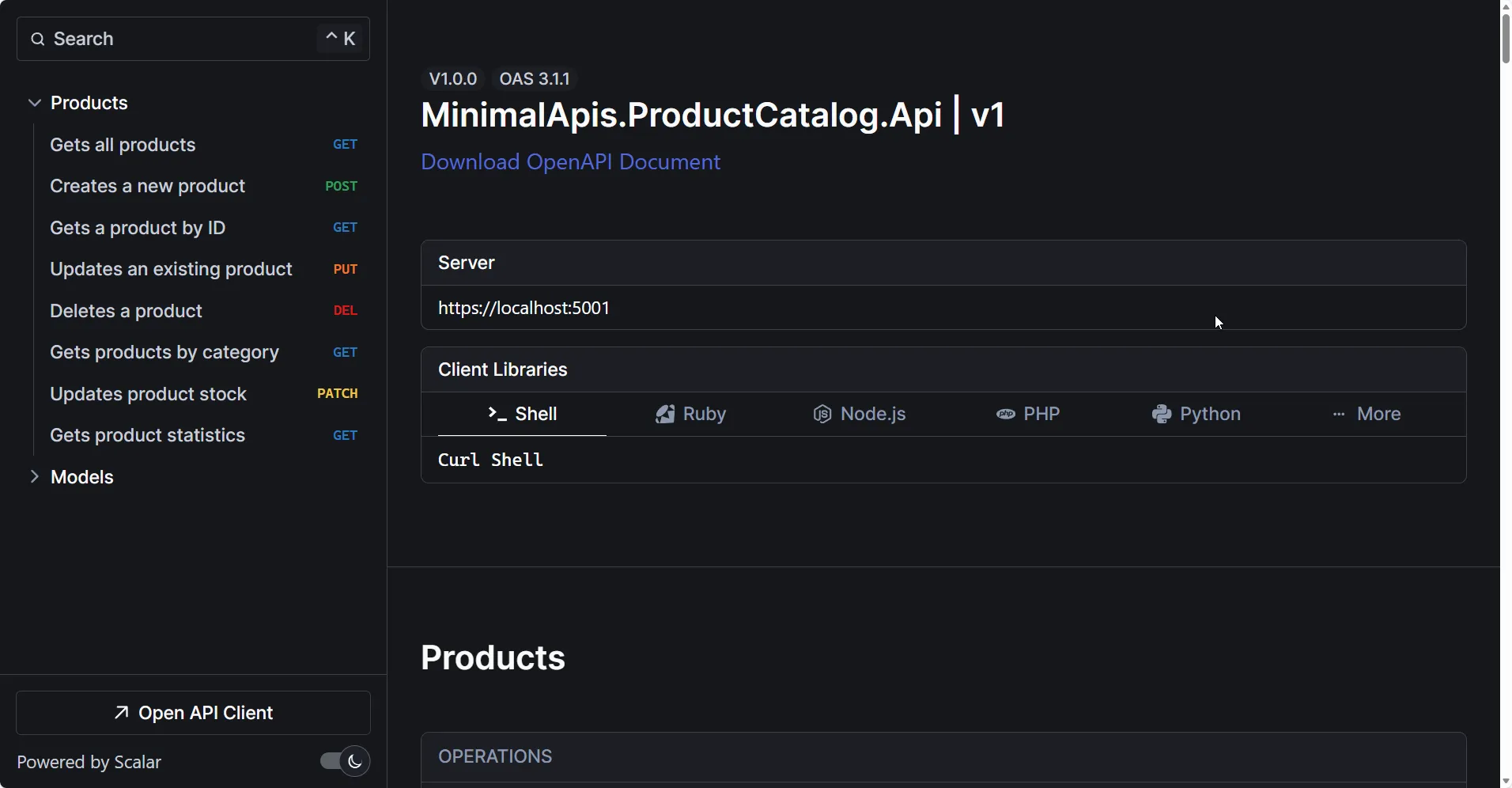
Try creating a product with invalid data to see the validation in action:
Summary
Minimal APIs in .NET 10 are production-ready and feature-complete. You’ve learned:
- Route handlers - Define endpoints with
MapGet,MapPost,MapPut,MapDelete - Parameter binding - Automatic binding from routes, query strings, headers, and body
- TypedResults - Strongly typed responses for better OpenAPI docs and compile-time safety
- Route groups - Organize endpoints and apply common configurations
- Endpoint filters - Implement cross-cutting concerns like logging and validation
- Built-in validation - Native
DataAnnotationssupport withAddValidation() - OpenAPI 3.1 - First-class API documentation with Scalar UI
Minimal APIs aren’t just for small projects anymore. With route groups, filters, validation, and proper organization patterns, they scale to any API size.
This article is part of our FREE .NET Web API Zero to Hero Series → Start the course here
If you found this helpful, share it with your colleagues - and if there’s a specific Minimal API pattern you’d like to see covered, drop a comment and let me know.



What's your Feedback?
Do let me know your thoughts around this article.