


So you want to become a .NET Developer? Whether you’re aiming for backend APIs, building interactive web apps with Blazor, or going full-stack - you’re in the right place.
I’ve been working with .NET for years, and I’ve seen developers struggle not because they lack talent, but because they don’t have a clear path to follow. They jump between tutorials, watch random YouTube videos, and end up with gaps in their knowledge that hurt them in interviews and on the job.
This roadmap is different. It’s practical, opinionated, and based on what actually matters in the industry.
Here’s how it works:
- Shared Foundation - Core skills every .NET developer needs
- Choose Your Path - Specialize in Backend, Blazor, or go Full-Stack
- Level Up - Advanced topics for senior roles
Let’s get into it.

The .NET Developer Roadmap 2026 - Full Walkthrough
Prefer watching over reading? I walk through this entire roadmap on YouTube - every layer of the stack, the Backend, Blazor, and Full-Stack paths, and exactly where to start.
How to Use This Roadmap
This roadmap is organized in three phases:
- Shared Foundation - Start here regardless of your chosen path
- Choose Your Path - Pick Backend, Blazor (Frontend), or Full-Stack
- Senior Level - Advanced topics after you’ve mastered your path
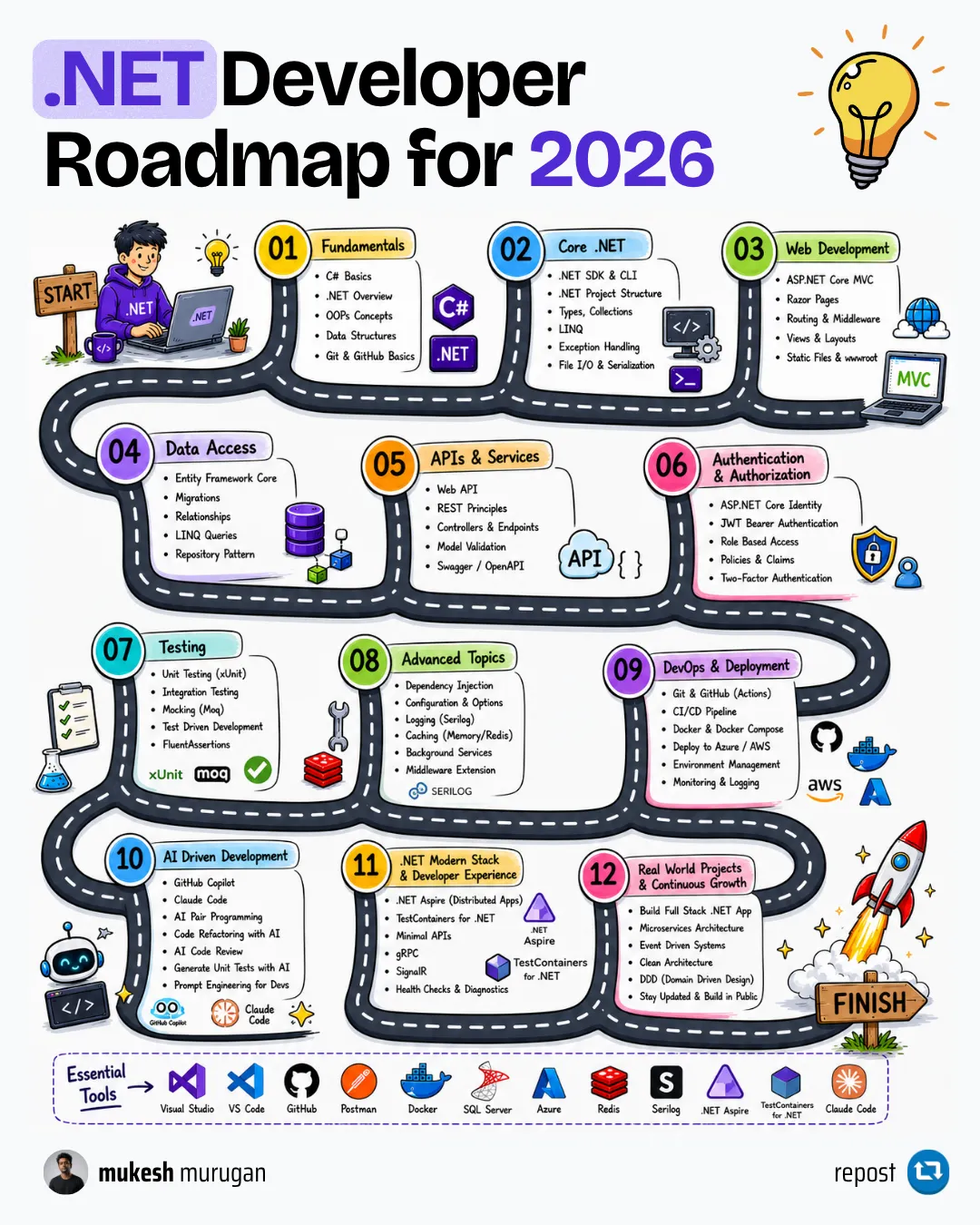
Each section includes:
- Must Learn - Essential skills you cannot skip
- Should Learn - Important for most roles
- Nice to Have - Bonus skills that set you apart
Which Path Should You Choose?
| Path | Best For | You’ll Build |
|---|---|---|
| Backend | API development, microservices, system design | REST APIs, background services, integrations |
| Blazor | Internal tools, dashboards, C#-only teams | Admin panels, enterprise apps, internal tools |
| Full-Stack | End-to-end ownership, startups, small teams | Complete applications from database to UI |
Not sure? Start with Backend. It’s the most in-demand skill and pairs well with ANY frontend - Blazor, React, Next.js, or Vue. I’ll be honest: I’m a Next.js fan for public-facing frontends, but Blazor shines for internal tools and enterprise apps.
Don’t try to learn everything at once. Complete the foundation, pick ONE path, and build projects along the way. Theory without practice is useless.
Track Your Progress
Pick your path below and tick things off as you learn them. Every skill carries an hour estimate, so you always know roughly how much road is left rather than staring at an endless list.
Progress saves in your browser. No account, no email, nothing sent anywhere - close the tab and come back next month and it will still be here.
Your progress
-
81 skills, 456h total
Which path are you on?
Full route: 456h. These are my estimates for a working developer studying part-time, not measured data - treat them as a planning aid, not a promise.
Shared Foundation
0/35 done - 200h left of 200hEvery .NET developer needs these, whichever path you take afterwards. Skip this and you will feel it in interviews and on the job.
When you are done: You can build and run a working ASP.NET Core Web API backed by a real database, and explain every line of it.
Every bug you will ever debug in a Web API lives somewhere in this cycle.
Returning 200 for a failed operation is the single most common API mistake I see.
Read the guideC# is an OO language first. Interfaces and composition are the backbone of everything downstream.
Branch, commit, pull request, resolve a conflict without panicking. Non-negotiable on any team.
Claude Code, Copilot or Cursor. Pick one and learn it properly rather than sampling all three.
Read the guideAn agent with no project context guesses. This is the highest-leverage hour you will spend on AI tooling.
Read the guideThe skill that separates developers who ship faster with AI from developers who ship bugs faster.
Knowing why you are on .NET 10 rather than .NET 8 comes up in interviews constantly.
Types, control flow, collections, exceptions, LINQ basics. The largest single block in the roadmap, and worth every hour.
Primary constructors, records, collection expressions, pattern matching, nullable reference types. Modern C# reads nothing like C# 7.
new, build, run, test, publish. Every CI pipeline you ever write is these commands.
Visual Studio, VS Code with C# Dev Kit, or Rider. Learn the debugger properly in whichever you pick.
Versioning, transitive dependencies, and reading a package's docs before you adopt it.
Both are current and both appear in real codebases. Know when each fits.
Read the guideHow a URL becomes a method call, and where binding silently fails.
ASP.NET Core is built on it. You cannot read a real codebase without understanding it.
Read the guideInjecting a scoped service into a singleton is a captive dependency, and it is a classic interview question.
Read the guideOrder matters enormously here, and getting it wrong breaks auth in ways that are hard to see.
Read the guideStrongly-typed settings per environment, without scattering magic strings through the codebase.
Read the guideCRUD, joins, indexes, execution plans. When EF Core produces something slow, this is how you find out why.
PostgreSQL for most new projects, SQL Server where the shop is Microsoft-first.
MongoDB, DynamoDB and Redis solve specific problems. Knowing when not to reach for them matters more.
Read the guideIt is a unit of work with a scoped lifetime. Treating it as anything else causes concurrency bugs.
Read the guideSchema as version-controlled code. Generate SQL scripts for production, never migrate live from a laptop.
One IEntityTypeConfiguration per entity keeps a large model readable.
One-to-many, many-to-many, and the delete behaviour that decides whether a cascade wipes your data.
The gap between LINQ-to-Objects and LINQ-to-Entities is where most EF Core surprises live.
Include, explicit loading, and AsSplitQuery when multiple includes cause a cartesian explosion.
Soft deletes and multi-tenancy applied once instead of in every query.
Auditing and soft-delete stamping at SaveChanges, rather than in every handler.
Enums as strings, and value objects like Money or Address without a separate table.
RowVersion tokens, so two users editing the same record does not silently lose one edit.
AsNoTracking, projections, ExecuteUpdateAsync and compiled queries for hot paths.
Complex reporting queries and hot read paths. Most teams use both, on the same connection.
Raw SQL with parameterisation and mapping, at close to hand-written ADO.NET speed.
Read the guideBuild this before moving on: A product catalog API
It counts as done when all of these are true:
Path A: Backend Developer
0/19 done - 94h left of 94hAPIs, services and the server-side logic behind everything else. The most in-demand .NET skill by a wide margin.
When you are done: You can ship a secured, tested, observable API that another team can consume without asking you questions.
IExceptionHandler in one place beats try/catch scattered through every endpoint.
Read the guideA standard error shape means clients can handle failures without parsing prose.
Read the guideValidation rules that are testable and reusable, instead of attribute soup on your DTOs.
Read the guideLogging objects rather than interpolated strings is what makes production logs searchable.
Read the guideLogging everything at Information is the same as logging nothing.
One request touching five components should be traceable through a single id.
The cheapest performance win available, and the easiest to get subtly wrong.
Read the guideThe moment you run more than one instance, in-memory caching starts lying to you.
Read the guideThe current default in .NET 10. Two-tier caching with protection against many callers refilling the same key at once.
The default for APIs. Understand validation parameters, not just the copy-paste setup.
Read the guideShort-lived access tokens are only practical once refresh is done properly.
Read the guideKeycloak, Cognito, Auth0 or Entra ID. Most companies will not let you hand-roll identity.
Read the guideSwashbuckle is no longer in the default template. Built-in OpenAPI plus Scalar is the current path.
Read the guideFast tests around business logic. Learn to write them without mocking everything in sight.
Testing the real pipeline - routing, filters, auth, serialisation - catches what unit tests cannot.
A real database in a container beats an in-memory provider that behaves differently from production.
Built in, no dependencies, and enough for a large share of background work.
Read the guidePersistence, retries and a dashboard, for when a lost job actually matters.
Build this before moving on: An order service with auth and background processing
It counts as done when all of these are true:
Senior Level: Architecture and Scale
0/27 done - 162h left of 162hWhat separates mid-level from senior: thinking in systems rather than features, and owning what happens after deploy.
When you are done: You can justify an architecture to a room of engineers, and operate it once it is live.
Mostly this is about knowing why the answer is usually a modular monolith.
Read the guideDependencies pointing inward, and a domain layer that does not know EF Core exists.
Read the guideSeparate read and write paths, with cross-cutting concerns in a pipeline instead of every handler.
Read the guideBounded contexts, aggregates, value objects and domain events. Useful even when you never go full DDD.
Load balancing, read replicas, connection pooling, rate limiting and idempotency.
Retry with backoff, circuit breakers, timeouts and fallbacks. Distributed systems fail constantly and quietly.
The habits that show up in code review long before the architecture does.
Read the guideMulti-stage builds, layer caching by copying csproj files first, and running as a non-root user.
Read the guideOne command brings up your app, its database, its cache and its broker.
Where most container problems actually live, once the image builds.
dotnet publish with PublishContainer produces a good image with no Dockerfile at all.
Read the guideCompose, ECS, Container Apps and Kubernetes, and an honest sense of when each is warranted.
Service discovery, orchestration and an observability dashboard, with OpenTelemetry already wired in.
Read the guideDeep in one cloud beats shallow in three. Every provider has a .NET SDK; the concepts transfer.
VMs, containers, serverless and managed app platforms, and the cost model behind each.
Read the guideSomeone else handling backups, failover and patching is most of the value of cloud.
Least-privilege roles and a secrets manager. Connection strings in appsettings is how breaches start.
Restore, build, test, publish, deploy. Every pipeline is a variation on this.
Promoting the same artifact through environments, with secrets injected rather than committed.
Traces, metrics and logs through one vendor-neutral pipeline.
Following one request across services, and being told about failures before a user reports them.
Independent deployment by separate teams is a reason. Wanting the architecture on your CV is not.
REST, gRPC, queues and event buses, and the consistency trade-off each one buys.
Read the guideYARP or a managed gateway handling routing, auth and rate limiting at one edge.
How work spans services without distributed transactions, which you should not attempt.
A shared database between services is a distributed monolith with extra network hops.
Build this before moving on: Take one application properly to production
It counts as done when all of these are true:
What to deliberately skip
Every roadmap tells you what to add. This is the part that saves you months.
.NET Framework
It is in maintenance and no new project should start there. Learning it first teaches patterns modern .NET has moved past.
Instead: Learn .NET 10. Pick up Framework specifics only if you are handed a legacy codebase, and learn them from that codebase.
WebForms, WCF and legacy Web API 2
These appear in old tutorials and old job descriptions. Time spent here does not transfer to anything current.
Instead: ASP.NET Core Minimal APIs or controllers, and gRPC where you would once have reached for WCF.
Microservices, early
The operational cost is real and lands on you immediately, while the benefits only arrive with multiple teams.
Instead: A modular monolith with genuinely enforced boundaries. Extract a service when a specific pressure demands it.
Full DDD on a CRUD application
Aggregates and domain events around what is really a form over a table adds ceremony without protecting anything.
Instead: Learn the vocabulary because it makes you a better designer, and apply it when the domain has rules worth defending.
Kubernetes, before you need it
It is a large, fast-moving platform that solves problems most teams do not yet have. It will also age out of your memory before you use it.
Instead: Docker Compose locally, then a managed container platform. Learn Kubernetes when a job or a real workload requires it.
A repository layer wrapping EF Core
DbContext is already a unit of work over repositories. Wrapping it usually just hides LINQ and blocks the features you paid for.
Instead: Query EF Core directly from your handlers, or use a query abstraction when you genuinely need to swap the data source.
EF Core lazy loading
It makes N+1 queries invisible. The code looks fine and the database sees hundreds of round trips.
Instead: Explicit Include, projections, and AsSplitQuery when multiple includes multiply rows.
Three clouds at once
Shallow knowledge of AWS, Azure and GCP interviews worse than deep knowledge of one, and none of it sticks.
Instead: Pick the one your target employers use. The concepts transfer; the console menus are not the skill.
Every preview feature
Preview APIs change, and time spent on features that never ship is time not spent on fundamentals that never change.
Instead: Follow releases so you know what is coming, but build on what is stable.
Your progress is saved in this browser only. There is no account, and nothing is sent anywhere.
The C# Roadmap (If You Only Want the Language)
A lot of people searching for a roadmap want the language, not the whole platform. C# and .NET are not the same thing: C# is the language, .NET is the runtime, libraries and tooling it runs on. You can learn a surprising amount of C# before you touch ASP.NET Core at all.
If that is you, here is the language-only order. It is about 45 hours of the foundation above.
| # | Learn | Why it comes here |
|---|---|---|
| 1 | Types, variables, control flow | Nothing else makes sense first |
| 2 | Methods, parameters, ref/out/optional args | Where most beginner confusion actually lives |
| 3 | Classes, structs, records | Records changed how modern C# models data |
| 4 | OOP: inheritance, interfaces, composition | Interfaces are the backbone of dependency injection later |
| 5 | Collections: List, Dictionary, arrays, spans | Choosing the wrong collection is a silent performance bug |
| 6 | Exception handling | Including when not to catch |
| 7 | LINQ | The single highest-leverage feature in the language |
| 8 | async/await and Task | The topic most likely to be probed in an interview |
| 9 | Nullable reference types | Turn them on. They catch a whole bug class at compile time |
| 10 | Modern C# 14 syntax | Primary constructors, collection expressions, pattern matching, raw strings |
| 11 | Generics and constraints | Once you write a library rather than an app |
| 12 | Delegates, events, lambdas | How LINQ and most framework callbacks actually work |
Do not skip step 8. Async is the single most common place I see otherwise-solid developers lose an interview. Knowing that async void is only for event handlers, that blocking on .Result deadlocks in some contexts, and what ConfigureAwait actually does puts you ahead of most candidates.
Once you have those twelve, you know enough C# to be productive. Everything after that is .NET, not C#, and the roadmap above picks it up.
Part 1: Shared Foundation
Before specializing in any path, you need solid fundamentals. Every .NET developer - backend, Blazor, or full-stack - needs these skills. Skip this, and you’ll struggle later.
Developer Fundamentals (Must Learn)
How the Internet Works
- HTTP/HTTPS protocols and request/response cycle
- DNS, IP addresses, and how browsers communicate with servers
- What APIs are and why they matter
HTTP Status Codes
- 2xx (Success): 200, 201, 204
- 4xx (Client Errors): 400, 401, 403, 404
- 5xx (Server Errors): 500, 502, 503
HTTP Status Codes in ASP.NET Core
Learn how to return proper API responses with the right status codes.
Object-Oriented Programming (OOP)
- Classes, objects, inheritance, polymorphism
- Encapsulation and abstraction
- Interfaces and abstract classes
Version Control with Git
- Basic commands: clone, commit, push, pull, branch, merge
- Working with GitHub/GitLab
- Understanding branching strategies (GitFlow basics)
Resources:
AI Assisted Development (Must Learn)
Let me be direct: AI assisted coding is THE high-income skill of 2026.
This isn’t a “nice to have” anymore. Developers who master AI tools are shipping features 2-3x faster than those who don’t. Companies are actively hiring for “AI augmented developers.” If you’re not using these tools, you’re already falling behind.
The Tools You Need to Know:
- Claude Code - My personal favorite. I use it daily for my development workflows. Terminal-based, understands entire codebases, excellent for .NET development
- GitHub Copilot - AI pair programming directly in your IDE
- Cursor - AI first code editor built on VS Code
- Claude / ChatGPT - For explaining concepts, debugging, and learning
Pick one and learn it properly. Sampling all four teaches you four sets of keyboard shortcuts and no actual workflow.
What changed in the last year, and what the job ads now assume
The tools stopped being autocomplete and became agents. Three things are worth your attention:
Project context files. Every agent reads a project instruction file - CLAUDE.md for Claude Code, equivalent files elsewhere. An agent with no project context guesses at your conventions and produces code that looks right and fits nothing. This is the highest-leverage hour you will spend on AI tooling, and it is the difference between an agent that helps and one that generates cleanup work.
MCP (Model Context Protocol). An open standard for connecting agents to tools and data - your database, your issue tracker, your own APIs. It is how an agent stops guessing about your schema and starts reading it. There is an official C# SDK, so you can expose your own services to an agent from .NET directly.
Agentic workflows. Handing over a whole task rather than a single completion: read the failing test, find the cause, fix it, re-run. This is where the actual time savings live, and it is also where unreviewed output does the most damage.
Claude Code for .NET Developers - Setup, CLAUDE.md and Real Costs
The practical setup guide: installation, project context files, and what it actually costs to run daily.
Build an MCP Server in C#
Expose your own .NET services to an AI agent using the official C# SDK.
But Here’s the Critical Truth:
AI tools are assistants, not replacements. They’re incredibly powerful amplifiers, but they amplify what YOU bring to the table.
Here’s what AI cannot do for you:
- Understand your business requirements
- Make architectural decisions with long-term vision
- Debug production issues at 2 AM with incomplete information
- Navigate team dynamics and communicate with stakeholders
- Take ownership and accountability for the code
The developers winning in 2026 are those who:
- Have rock-solid fundamentals (that’s why this roadmap exists)
- Know how to leverage AI to move faster
- Can validate, review, and improve AI generated code
- Understand when AI is wrong (and it will be wrong)
Don’t skip the fundamentals thinking AI will cover for you. The best AI users are developers who deeply understand what they’re building. AI makes good developers great - it doesn’t make beginners into experts overnight.
Learn the craft. Then let AI supercharge it.
Into the World of .NET (Must Learn)
Now let’s get into .NET specifically.
Understanding the .NET Ecosystem in 2026
- .NET is a free, open-source, cross-platform framework
- Current version: .NET 10 (released November 2025) - this is what you should use for new projects
- LTS version: .NET 10 is the current LTS (Long Term Support), supported until November 2028
- Previous LTS: .NET 8 (supported until November 2026, so any project still on it needs a plan)
- .NET 11 is due around November 2026, following the annual November cadence. It will be an STS release, not LTS, so there is no rush to move production workloads onto it
- Never use .NET Framework for new projects - it’s legacy
Which version should you actually learn on? .NET 10. It is the current LTS, it is what new projects target, and it is supported until November 2028. Learn on the LTS, read the release notes for whatever ships next, and only move production code when you have a reason beyond novelty.
The release cadence, in one line: a new major version every November, alternating LTS (3 years of support) and STS (18 months). Even-numbered releases are LTS.
C# Fundamentals
- Variables, data types, operators
- Control flow (if/else, switch, loops)
- Methods and parameters
- Collections (List, Dictionary, arrays)
- Exception handling (try/catch/finally)
- LINQ basics
Modern C# Features (C# 13/14)
- Primary constructors (classes and structs)
- Records and record structs
- Collection expressions (
[1, 2, 3]syntax) - Pattern matching (list patterns, property patterns)
- Nullable reference types
- File-scoped namespaces
- Required members
- Raw string literals
paramscollections (not just arrays)
The .NET CLI
dotnet new webapi -n MyFirstApidotnet builddotnet rundotnet publishIDEs and Tools
- Visual Studio 2022/2026 - Full-featured IDE (Windows/Mac)
- VS Code + C# Dev Kit - Lightweight, cross-platform, excellent with AI assistants
- JetBrains Rider - Excellent alternative (paid)
NuGet Package Management
- Adding packages via CLI:
dotnet add package PackageName - Understanding package versions and dependencies
- Reading package documentation
Resources:
Your First ASP.NET Core Web API (Must Learn)
Time to build something real. Create a simple Web API and understand the basics.
Core Concepts
- Controllers vs Minimal APIs
- Routing and endpoints
- Request/Response handling
- JSON serialization
RESTful API Best Practices for .NET Developers
Learn REST principles and how to design clean, consistent APIs.
Dependency Injection
This is fundamental to ASP.NET Core. Understand it early.
Dependency Injection in ASP.NET Core Explained
Deep dive into DI - what it is, why it matters, and how to use it effectively.
Service Lifetimes
- Transient - Created every time requested
- Scoped - One instance per HTTP request
- Singleton - One instance for the entire application
When to Use Transient, Scoped, or Singleton
Understand the differences and when to use each lifetime.
Middlewares
The request pipeline in ASP.NET Core is built on middlewares. Understanding this is crucial.
Understanding Middlewares in ASP.NET Core
Learn how the request pipeline works and how to create custom middlewares.
Configuration
- appsettings.json and environment-specific settings
- IOptions pattern for strongly-typed configuration
- Environment variables
Options Pattern in ASP.NET Core
Learn to manage configurations effectively with the Options pattern.
Database Fundamentals (Must Learn)
Every .NET developer needs to work with databases - whether you’re building APIs or data-driven Blazor apps.
SQL Basics
- CRUD operations (SELECT, INSERT, UPDATE, DELETE)
- JOINs (INNER, LEFT, RIGHT)
- Indexes and query optimization basics
- Normalization concepts
Relational Databases
- PostgreSQL - My recommendation for most projects. Open source, feature-rich, excellent performance
- SQL Server - Microsoft’s database, great .NET integration
- MySQL - Popular, widely used
NoSQL Databases (Should Learn)
- MongoDB - Document database
- DynamoDB - AWS managed NoSQL (excellent for serverless)
- Redis - In-memory data store (often used for caching)
CRUD with DynamoDB in ASP.NET Core
Learn to work with AWS DynamoDB from your .NET applications.
ORM: Entity Framework Core (Must Learn)
Entity Framework Core is the standard ORM for .NET. Master it - you’ll use it in almost every project.
Why EF Core?
- Productivity - Write C# instead of SQL for most operations
- Type Safety - Compile-time checking catches errors early
- Cross-Database - Same code works with PostgreSQL, SQL Server, MySQL, SQLite
- Migrations - Version control your database schema changes
- LINQ Integration - Query databases with familiar C# syntax
Entity Framework Core in ASP.NET Core - Getting Started
Complete guide to setting up and using EF Core.
Core Concepts
| Topic | What to Learn |
|---|---|
| DbContext & DbSet | Your database session, table representations, scoped lifetime |
| Code First | Define entities in C#, generate schema (recommended for new projects) |
| Migrations | dotnet ef migrations add, dotnet ef database update, SQL scripts for production |
| Fluent API | IEntityTypeConfiguration<T>, property configuration, indexes |
| Relationships | One-to-Many, One-to-One, Many-to-Many with HasOne, HasMany, WithMany |
| LINQ Queries | Where, Select, Include, OrderBy, GroupBy |
Entity Configuration
Use IEntityTypeConfiguration<T> for clean, organized configurations:
- One configuration file per entity
- Apply all with
ApplyConfigurationsFromAssembly() - Configure properties:
HasMaxLength,HasPrecision,IsRequired - Configure relationships:
HasOne,WithMany,HasForeignKey,OnDelete - Configure indexes:
HasIndex,IsUnique
Loading Related Data
| Strategy | When to Use |
|---|---|
Eager Loading (Include) | You know you’ll need related data |
| Explicit Loading | Load on demand after initial query |
Split Queries (AsSplitQuery) | Multiple includes causing cartesian explosion |
| Lazy Loading | Avoid - causes N+1 query problems |
Advanced Topics (Should Learn)
| Topic | Purpose |
|---|---|
| Global Query Filters | Automatic filtering (soft deletes, multi-tenancy) |
| Interceptors | Hook into SaveChanges for auditing, soft deletes, logging |
| Value Conversions | Store enums as strings, custom type mappings |
| Owned Types | Value objects without identity (Address, Money) |
| Concurrency Tokens | RowVersion for optimistic concurrency |
| JSON Columns | Store complex objects as JSON (.NET 7+) |
Performance Essentials
AsNoTracking()for read-only queriesSelect()projections instead of loading full entitiesExecuteUpdateAsync/ExecuteDeleteAsyncfor bulk operations- Compiled queries for hot paths
- Avoid lazy loading
Pro tip: Never apply migrations directly in production. Generate SQL scripts, review them, and apply through your deployment pipeline.
Dapper (Should Learn)
For performance-critical scenarios, Dapper gives you raw SQL with minimal overhead.
When to Use Dapper Over EF Core
- Complex queries that EF Core generates inefficiently
- Bulk operations requiring maximum performance
- Read-heavy scenarios where every millisecond counts
Many teams use both: EF Core for convenience, Dapper for hot paths. They share the same connection.
Dapper in ASP.NET Core with Repository Pattern
Learn to use Dapper for high-performance data access.
Part 2: Choose Your Path
You’ve got the foundation. Now it’s time to specialize. Pick one path to start - you can always expand later.
Path A: Backend Developer
Build APIs, services, and the server-side logic that powers applications. This is the most in-demand .NET skill.
What You’ll Build
- REST APIs and Web Services
- Background processing systems
- Integrations with external services
- Microservices and distributed systems
Error Handling & Validation (Must Learn)
Global Exception Handling
Don’t scatter try/catch blocks everywhere. Handle exceptions centrally.
Global Exception Handling in ASP.NET Core
Implement centralized error handling with IExceptionHandler.
ProblemDetails
Return standardized error responses following RFC 7807.
ProblemDetails in ASP.NET Core
Learn to return consistent, machine-readable error responses.
FluentValidation
Validate incoming requests cleanly and declaratively.
FluentValidation in ASP.NET Core
Write clean, reusable validation rules for your API requests.
Logging & Observability (Must Learn)
You can’t fix what you can’t see.
Structured Logging with Serilog
Serilog is my go-to for every .NET project. Learn it.
Structured Logging with Serilog in ASP.NET Core
Implement structured logging that's actually useful for debugging.
Key Concepts
- Log levels (Debug, Information, Warning, Error, Critical)
- Structured logging vs string interpolation
- Sinks (Console, File, Seq, CloudWatch)
- Correlation IDs for request tracing
Caching (Must Learn)
Improve performance dramatically with proper caching.
In-Memory Caching
In-Memory Caching in ASP.NET Core
Learn the basics of caching for single-instance applications.
Distributed Caching with Redis
Distributed Caching with Redis
Scale your caching across multiple application instances.
Hybrid Caching (.NET 9+)
The modern approach to caching in .NET 10. HybridCache combines in-memory and distributed caching automatically - no more choosing between them. It handles cache stampede protection, serialization, and multi-tier caching out of the box.
// .NET 10 - HybridCache is the recommended approachvar data = await hybridCache.GetOrCreateAsync( "my-key", async token => await GetDataFromDatabaseAsync(token));Authentication & Authorization (Must Learn)
Security is not optional.
JWT Authentication
Build Secure ASP.NET Core API with JWT Authentication
Implement token-based authentication from scratch.
Refresh Tokens
Refresh Tokens in ASP.NET Core
Extend user sessions securely with refresh tokens.
OAuth Providers (Should Learn)
- Keycloak - Open source identity provider
- AWS Cognito - Managed auth service
- Auth0 - Popular SaaS option
- Azure AD - Microsoft’s identity platform
Securing .NET WebAPI with Amazon Cognito
Integrate AWS Cognito for managed authentication.
API Documentation (Must Learn)
OpenAPI / Scalar
Swagger/Swashbuckle is no longer included by default since .NET 9. In .NET 10, use the built-in OpenAPI support with Scalar or other modern API documentation tools.
Swagger is Dead? Here's the Alternative!
Learn about OpenAPI and Scalar for modern API documentation.
Testing (Must Learn)
Write tests. No excuses.
Unit Testing
- xUnit (recommended) or NUnit
- Fluent Assertions for readable assertions
- Moq or NSubstitute for mocking
Integration Testing
- WebApplicationFactory for testing API endpoints
- TestContainers for testing with real databases
Test Data
- Bogus for generating fake data
Background Jobs (Should Learn)
Built-in Options
IHostedServiceandBackgroundService
Third-Party Libraries
- Hangfire - Feature-rich, dashboard included
- Quartz.NET - Enterprise-grade scheduling
Hangfire in ASP.NET Core
Implement background job processing with a visual dashboard.
Path B: Blazor Developer
Build interactive web applications entirely in C#. No JavaScript required (mostly).
What You’ll Build
- Single Page Applications (SPAs)
- Admin dashboards and internal tools
- Real-time collaborative apps
- Progressive Web Apps (PWAs)
A Honest Take on Blazor vs JavaScript Frameworks
Before we dive in, let me be real with you.
I’m a Next.js fan for frontend development. I’ve hit some roadblocks with Blazor - especially around performance. WebAssembly download sizes, initial load times, and SEO challenges are real issues you’ll face in production.
The truth: JavaScript is still the beast when it comes to frontend. React, Next.js, Vue - they have massive ecosystems, better tooling, and battle-tested performance optimizations. If you’re building a public-facing, SEO-critical, performance-sensitive application, JavaScript frameworks are often the better choice.
So when should you choose Blazor?
| Choose Blazor When | Choose JS Frameworks When |
|---|---|
| Internal/enterprise apps | Public-facing websites |
| Your team is all C# developers | SEO is critical |
| Admin dashboards and tools | Maximum performance needed |
| You want code sharing with backend | Large ecosystem/community matters |
| Rapid prototyping with existing .NET skills | You need the latest frontend features |
Blazor is excellent for internal tools, dashboards, and enterprise applications where your team already knows C# and doesn’t want to maintain a separate JavaScript codebase. It’s also great for full-stack .NET developers who want to ship features fast without context-switching between languages.
But if you’re serious about frontend development as a career, learn JavaScript too. Blazor is a fantastic tool in your toolkit - just don’t think it replaces the entire JavaScript ecosystem.
Now, with that context, let’s learn Blazor properly.
Understanding Blazor Hosting Models (Must Learn)
Before writing code, understand the hosting models:
| Model | Runs On | Best For |
|---|---|---|
| Blazor Server | Server (SignalR) | Internal apps, low latency needed, thin clients |
| Blazor WebAssembly | Browser (WASM) | Public apps, offline support, reduced server load |
| Blazor Web App (.NET 8+) | Both | The default in .NET 10. Per-component render mode choice |
In .NET 10, the Blazor Web App template is the standard. It combines the best of Server and WebAssembly, letting you choose render modes per-component:
@rendermode InteractiveServer- Server-side interactivity via SignalR@rendermode InteractiveWebAssembly- Client-side via WASM@rendermode InteractiveAuto- Starts with Server, switches to WASM after download- Static SSR (no attribute) - Pre-rendered, no interactivity
My recommendation: Use the Blazor Web App template and start with
InteractiveServerfor learning. It’s simpler to debug. UseInteractiveAutofor production when you need the best of both worlds.
Blazor Fundamentals (Must Learn)
Component Model
- Components and Razor syntax
- Parameters and cascading values
- Event handling and data binding
- Component lifecycle (
OnInitialized,OnParametersSet, etc.)
Routing
@pagedirective and route parameters- Navigation with
NavigationManager - Route constraints and catch-all routes
Forms and Validation
EditFormand input components- Data annotations validation
- Custom validation with FluentValidation
State Management
- Component state and
StateHasChanged - Cascading values for shared state
- State containers and services
Blazor UI & Styling (Must Learn)
CSS Isolation
- Scoped CSS with
.razor.cssfiles - CSS variables for theming
Component Libraries (Should Learn)
Don’t build everything from scratch. Pick a UI library:
| Library | Type | Best For |
|---|---|---|
| MudBlazor | Material Design | Feature-rich, great docs |
| Radzen Blazor | Bootstrap-based | Free + commercial options |
| Fluent UI Blazor | Microsoft Fluent | Microsoft-style apps |
| Blazorise | Multi-framework | Flexibility in design systems |
I personally like MudBlazor for most projects. Great components, active community, and excellent documentation.
JavaScript Interop (Should Learn)
Sometimes you need JavaScript. Learn how to:
- Call JavaScript from C# (
IJSRuntime) - Call C# from JavaScript
- Work with JavaScript libraries (charts, maps, etc.)
Keep JS interop minimal - the whole point of Blazor is writing C#.
Blazor Performance (Should Learn)
Optimization Techniques
- Virtualization for large lists (
<Virtualize>) - Lazy loading assemblies
- Render optimization with
ShouldRender - Efficient state updates
WebAssembly Specific
- AOT compilation for faster startup
- Trimming to reduce download size
- Lazy loading routes
Authentication in Blazor (Must Learn)
Built-in Auth
AuthenticationStateProviderAuthorizeViewcomponent- Role and policy-based authorization
Integration Options
- ASP.NET Core Identity
- OAuth/OIDC providers (Azure AD, Auth0)
- JWT token handling
Testing Blazor Applications (Should Learn)
bUnit
- The standard for Blazor component testing
- Render components in isolation
- Assert on rendered markup
- Simulate user interactions
[Fact]public void Counter_ShouldIncrementOnClick(){    using var ctx = new TestContext();    var component = ctx.RenderComponent<Counter>();
    component.Find("button").Click();
component.Find("p").MarkupMatches("<p>Current count: 1</p>");}FullStackHero
Free, open-source .NET 10 starter kit - a modular monolith for multi-tenant SaaS
Path C: Full-Stack Developer
Why choose when you can do both? Full-stack .NET developers build complete applications.
What You’ll Build
- Complete web applications with Blazor frontend + API backend
- Self-contained solutions for startups and small teams
- Internal tools with data-driven UIs
Your Learning Path
- Start with Backend - Complete Path A first (APIs, databases, auth)
- Add Blazor - Learn Path B fundamentals
- Connect them - Build apps that use your own APIs
Full-Stack Architecture Patterns
Option 1: Blazor Server + Direct DB Access
- Simplest setup
- Good for internal apps
- Components call services directly
Option 2: Blazor WebAssembly + API Backend
- Separate frontend and backend
- API serves Blazor app and potentially mobile/other clients
- More scalable, more complex
Option 3: Blazor Web App with Minimal APIs (.NET 10)
- The standard approach in .NET 10
- Mix server and client rendering per-component with render modes
- Minimal APIs for data operations
- Best developer experience with Hot Reload and enhanced tooling
My advice: Start with Option 1 for learning and internal tools. Move to Option 2 when you need mobile clients or separate scaling.
Part 3: Senior Level - Architecture & Scale
Time to think bigger. System design, architecture patterns, and cloud infrastructure.
System Design & Architecture (Must Learn)
This is what separates mid-level developers from seniors. You need to think beyond individual features and understand how systems fit together.
20+ .NET 10 Best Practices & Tips from a Senior Developer
Before the architecture, lock in the day-to-day best practices senior .NET developers follow - DI lifetimes, async correctness, EF Core, caching, and security.
Architectural Patterns
| Pattern | When to Use | Trade-offs |
|---|---|---|
| Monolith | Small teams, MVPs, simple domains | Fast to develop, hard to scale teams |
| Modular Monolith | Medium complexity, clear boundaries | Best of both worlds, requires discipline |
| Microservices | Large teams, independent scaling | Operational complexity, network overhead |
My advice: Never start with microservices. A well-designed Modular Monolith is what you need 90% of the time. Extract services only when you have a proven need.
Modular Architecture in ASP.NET Core
Build maintainable monoliths with clear module boundaries.
Clean Architecture / Onion Architecture
The goal is separation of concerns and dependency inversion - your business logic shouldn’t depend on infrastructure.
| Layer | Responsibility | Dependencies |
|---|---|---|
| Domain | Entities, value objects, domain logic | None (innermost) |
| Application | Use cases, commands, queries, DTOs | Domain only |
| Infrastructure | EF Core, external APIs, file system | Application, Domain |
| Presentation | Controllers, Minimal APIs, Blazor | Application |
Key principles:
- Dependencies point inward (Infrastructure → Application → Domain)
- Domain layer has zero external dependencies
- Use interfaces to invert dependencies (e.g.,
IRepositoryin Application, implementation in Infrastructure)
Onion Architecture in ASP.NET Core with CQRS
Implement Clean Architecture with separation of concerns.
CQRS with MediatR
Separate read and write operations for better scalability and cleaner code.
| Concept | Purpose |
|---|---|
| Commands | Write operations that change state (CreateOrderCommand) |
| Queries | Read operations that return data (GetOrderByIdQuery) |
| Handlers | Process commands/queries, contain business logic |
| Pipelines | Cross-cutting concerns: validation, logging, transactions |
Why CQRS matters:
- Different optimization strategies for reads vs writes
- Cleaner code organization - one handler per operation
- Easy to add validation, caching, logging via pipeline behaviors
- Scales well as your application grows
CQRS and MediatR in ASP.NET Core
Build scalable, decoupled APIs with the CQRS pattern.
Domain-Driven Design (DDD) Concepts
You don’t need to go full DDD, but understanding these concepts makes you a better architect:
| Concept | What It Is |
|---|---|
| Bounded Context | A boundary where a domain model applies; different contexts can have different models for the same concept |
| Aggregate | A cluster of entities treated as a single unit; has a root entity that controls access |
| Entity | Object with identity that persists over time (e.g., Order, Customer) |
| Value Object | Object defined by its attributes, no identity (e.g., Money, Address) |
| Domain Events | Something significant that happened in the domain (OrderPlaced, PaymentReceived) |
| Repository | Abstraction for data access, operates on aggregates |
Rich vs Anemic Domain Models
- Anemic: Entities are just data bags, all logic in services (common but often criticized)
- Rich: Entities contain behavior and enforce invariants (DDD approach)
Start simple. You don’t need DDD for a CRUD app. Apply these patterns when your domain complexity justifies it.
System Design Fundamentals
Beyond code architecture, understand how systems scale:
| Topic | What to Learn |
|---|---|
| Load Balancing | Distribute traffic across instances (round-robin, least connections) |
| Horizontal vs Vertical Scaling | Add more machines vs bigger machines |
| Database Scaling | Read replicas, sharding, connection pooling |
| Caching Strategies | Cache-aside, write-through, cache invalidation |
| Rate Limiting | Protect APIs from abuse, implement with sliding window or token bucket |
| Circuit Breaker | Prevent cascade failures when dependencies are down (Polly) |
| Idempotency | Design operations that can be safely retried |
Resilience Patterns with Polly
Build fault-tolerant applications:
- Retry - Automatically retry failed operations with exponential backoff
- Circuit Breaker - Stop calling failing services temporarily
- Timeout - Don’t wait forever for slow responses
- Fallback - Provide default behavior when operations fail
- Bulkhead - Isolate failures to prevent cascade effects
On .NET 10 you reach for Microsoft.Extensions.Http.Resilience rather than wiring Polly by hand. It is first-party, MIT-licensed, and adds the whole pipeline to a typed client in one call.
Polly licensing update (July 2026). Polly now participates in the Open Source Maintenance Fee: from November 16, 2026, organizations earning at least US $20,000 from a product that uses Polly are asked to pay US $20 per month per organization. The source stays open under BSD-3, and individuals, hobbyists and smaller organizations owe nothing.
Microsoft.Extensions.Http.ResilienceshipsPolly.Coretransitively, so this applies even without a direct Polly reference.
Microservices (Should Learn)
If you actually need microservices (and most teams don’t), learn these concepts properly. The complexity is real - don’t underestimate it.
When to Consider Microservices
| Good Reasons | Bad Reasons |
|---|---|
| Multiple teams need independent deployment | ”Netflix does it” |
| Different services need different scaling | Resume-driven development |
| Services have vastly different tech requirements | Avoiding a messy codebase (fix the mess instead) |
| Organizational boundaries match service boundaries | ”It’s more modern” |
Reality check: If you have a team of 5-10 developers working on a single product, you probably don’t need microservices. A well-designed Modular Monolith gives you clean boundaries without the operational overhead.
Communication Patterns
| Pattern | When to Use | Trade-offs |
|---|---|---|
| HTTP/REST | Simple request-response, CRUD operations | Easy to implement, synchronous blocking |
| gRPC | High-performance internal communication | Binary protocol, faster, requires contract |
| Message Queues | Async processing, decoupling, reliability | Eventual consistency, harder to debug |
| Event Bus | Broadcasting events to multiple consumers | Loose coupling, complex event ordering |
Synchronous Communication
- HTTP/REST - Simple, ubiquitous, good for external APIs
- gRPC - Binary protocol, 10x faster than JSON, streaming support, contract-first with Protobuf
Asynchronous Communication
- RabbitMQ - Feature-rich, routing, dead-letter queues
- Apache Kafka - High-throughput event streaming, log retention
- AWS SQS/SNS - Managed, scales automatically, pay-per-use
RabbitMQ with ASP.NET Core Microservice
Implement async communication between services.
Amazon SQS vs SNS - When to Use What
Understand AWS messaging services for .NET applications.
API Gateways
The single entry point for all client requests:
- YARP - .NET native reverse proxy, highly configurable
- AWS API Gateway - Managed, integrates with Lambda/ECS
- Kong / Traefik - Popular open-source options
Responsibilities: routing, authentication, rate limiting, request transformation, SSL termination.
Key Microservices Patterns
| Pattern | Purpose |
|---|---|
| Service Discovery | Services find each other dynamically (Consul, Kubernetes DNS) |
| Saga Pattern | Distributed transactions across services (choreography vs orchestration) |
| Event Sourcing | Store events instead of state, rebuild state from event log |
| Outbox Pattern | Reliable event publishing with database transactions |
| Circuit Breaker | Prevent cascade failures when a service is down |
| Sidecar Pattern | Cross-cutting concerns in a separate container (logging, proxying) |
Data Management Challenges
| Challenge | Solution |
|---|---|
| Data consistency | Eventual consistency, saga pattern, compensating transactions |
| Distributed transactions | Avoid them - use sagas instead |
| Database per service | Each service owns its data, no shared databases |
| Cross-service queries | API composition, CQRS read models, event-driven sync |
Observability is Non-Negotiable
In microservices, debugging spans multiple services. You need:
- Distributed Tracing - Follow a request across services (OpenTelemetry, Jaeger)
- Correlation IDs - Track related logs across services
- Centralized Logging - Aggregate logs from all services (ELK, CloudWatch)
- Health Checks - Know when services are healthy or degraded
Containers & Docker (Must Learn)
Containers are the standard deployment unit in 2026. Every backend developer needs Docker skills - no exceptions.
Why Containers?
- Consistency - Same environment from dev to production
- Isolation - Dependencies don’t conflict
- Portability - Run anywhere Docker runs
- Scalability - Spin up/down instances in seconds
Docker Guide for .NET Developers
Complete step-by-step tutorial for containerizing .NET applications.
Essential Docker Skills
| Skill | What to Learn |
|---|---|
| Dockerfile Basics | FROM, WORKDIR, COPY, RUN, EXPOSE, ENTRYPOINT |
| Multi-stage Builds | Separate build and runtime images, smaller final images |
| Docker Compose | Define multi-container apps, local development environments |
| Networking | Bridge networks, container-to-container communication |
| Volumes | Persist data, mount configuration files |
| Environment Variables | Configure containers at runtime |
Dockerfile Best Practices for .NET
- Use official Microsoft images (
mcr.microsoft.com/dotnet/aspnet,mcr.microsoft.com/dotnet/sdk) - Multi-stage builds: SDK for build, ASP.NET runtime for final image
- Copy
.csprojfiles first, restore, then copy source (layer caching) - Run as non-root user for security
- Use
.dockerignoreto excludebin/,obj/,.git/
Docker Compose for Local Development
Essential for running your app with dependencies:
- Database (PostgreSQL, SQL Server)
- Cache (Redis)
- Message broker (RabbitMQ)
- Other services your app depends on
One docker compose up spins up everything.
Built-In Container Support in .NET
Create Docker images without writing Dockerfiles using dotnet publish.
.NET 10 Built-In Container Support
In .NET 10, you don’t even need a Dockerfile for most scenarios:
dotnet publish --os linux --arch x64 /t:PublishContainer
This creates optimized, minimal container images automatically. Configure in your .csproj:
- Base image selection
- Image name and tags
- Ports and environment variables
- Container user
Container Orchestration
| Platform | Best For |
|---|---|
| Docker Compose | Local development, simple deployments |
| Kubernetes (K8s) | Production, auto-scaling, self-healing |
| AWS ECS | Managed containers on AWS without K8s complexity |
| AWS EKS / Azure AKS | Managed Kubernetes |
| Azure Container Apps | Serverless containers, simpler than K8s |
My advice: Learn Docker Compose first. Move to ECS or Container Apps for simple production workloads. Only invest in Kubernetes when you have the team size and complexity to justify it.
.NET Aspire (Should Learn)
.NET Aspire is mature in .NET 10 and is Microsoft’s recommended approach for cloud-native .NET development.
| Feature | Benefit |
|---|---|
| Service Discovery | Automatic connection string management between services |
| Orchestration | Spin up databases, caches, queues with one command |
| Dashboard | Built-in observability: logs, traces, metrics |
| Deployment | Generate manifests for Kubernetes, Azure, AWS |
| Components | Pre-built integrations: Redis, PostgreSQL, RabbitMQ, Azure services |
Why Aspire matters:
- Eliminates boilerplate for distributed apps
- Consistent local development experience
- OpenTelemetry baked in
- Reduces time from “docker compose up” to production
Aspire for .NET Developers - Deep Dive
Learn about .NET's orchestration and observability platform.
Cloud (Must Learn)
Cloud is not optional in 2026. Pick one provider, learn it deeply, and expand from there.
Pick a Cloud Provider
| Provider | Strengths | Best For |
|---|---|---|
| AWS | Largest market share, most services, great .NET support | General recommendation, enterprise |
| Azure | Best .NET integration, Microsoft ecosystem | .NET shops, enterprises using Microsoft |
| GCP | Strong data/ML, Kubernetes expertise | Data-heavy workloads, K8s-first teams |
My recommendation: AWS. It has the largest market share, most job opportunities, and excellent .NET tooling. But if your company uses Azure, learn Azure. Being deep in one cloud beats being shallow in three.
AWS for .NET Developers
I focus on AWS, and I recommend you do too if you’re unsure where to start.
Essential AWS Services for .NET Developers
The core AWS services every .NET developer should know.
AWS Services by Category
| Category | Services | What They Do |
|---|---|---|
| Compute | EC2, Lambda, App Runner, ECS, EKS | Run your code (VMs, serverless, containers) |
| Database | RDS, DynamoDB, Aurora, ElastiCache | Store your data (relational, NoSQL, caching) |
| Storage | S3, EBS, EFS | Store files and objects |
| Messaging | SQS, SNS, EventBridge | Async communication between services |
| Networking | VPC, API Gateway, CloudFront, Route 53 | Network isolation, APIs, CDN, DNS |
| Security | IAM, Cognito, Secrets Manager, KMS | Auth, secrets, encryption |
| Monitoring | CloudWatch, X-Ray | Logs, metrics, distributed tracing |
Compute Options Compared
| Option | Best For | Scaling | Cost Model |
|---|---|---|---|
| EC2 | Full control, legacy apps | Manual/Auto Scaling Groups | Pay for running time |
| Lambda | Event-driven, sporadic workloads | Automatic, instant | Pay per invocation |
| App Runner | Simple containerized apps | Automatic | Pay for running time |
| ECS | Container workloads | Auto Scaling | Pay for underlying resources |
| EKS | Kubernetes workloads, multi-cloud | Auto Scaling | Pay for control plane + nodes |
AWS Lambda with .NET
Build serverless applications with AWS Lambda.
Deploy ASP.NET Core to Amazon ECS
Run containerized .NET applications on AWS.
Serverless vs Containers
| Approach | Pros | Cons |
|---|---|---|
| Serverless (Lambda) | No infrastructure, auto-scaling, pay-per-use | Cold starts, execution limits, vendor lock-in |
| Containers (ECS/EKS) | Full control, consistent environment, portable | More ops overhead, always-on cost |
My take: Start with Lambda for simple APIs and event handlers. Move to containers when you need long-running processes, WebSockets, or want more control.
Database Options
| Type | AWS Service | When to Use |
|---|---|---|
| Relational | RDS (PostgreSQL, MySQL, SQL Server), Aurora | Structured data, complex queries, ACID |
| NoSQL Document | DynamoDB | High scale, simple access patterns, key-value |
| In-Memory Cache | ElastiCache (Redis, Memcached) | Session storage, caching, real-time |
| Serverless SQL | Aurora Serverless | Variable workloads, auto-scaling database |
Azure Equivalent Services
If you’re on Azure instead:
| AWS | Azure Equivalent |
|---|---|
| EC2 | Virtual Machines |
| Lambda | Azure Functions |
| ECS | Container Apps, ACI |
| S3 | Blob Storage |
| RDS | Azure SQL, Azure Database |
| SQS/SNS | Service Bus, Event Grid |
| CloudWatch | Application Insights, Monitor |
| Cognito | Azure AD B2C |
Infrastructure as Code (Should Learn)
Don’t click around in the console. Define your infrastructure in code.
| Tool | Language | Best For |
|---|---|---|
| Terraform | HCL | Multi-cloud, industry standard |
| AWS CDK | C#, TypeScript | AWS-only, .NET developers |
| Pulumi | C#, TypeScript | Modern alternative, multi-cloud |
| CloudFormation | YAML/JSON | AWS native, no external tools |
Benefits of IaC:
- Version control your infrastructure
- Reproducible environments (dev, staging, prod)
- Code review infrastructure changes
- Disaster recovery - recreate everything from code
Terraform for .NET Developers
Automate your AWS infrastructure with Terraform.
Cloud Security Essentials
| Concept | What to Learn |
|---|---|
| IAM | Least privilege, roles vs users, policies |
| Secrets Management | Never hardcode secrets, use Secrets Manager or Parameter Store |
| VPC | Network isolation, private subnets, security groups |
| Encryption | At rest (KMS), in transit (TLS), client-side |
| Compliance | Understand your industry requirements (HIPAA, SOC2, GDPR) |
Critical: IAM is the single most important security concept. Understand it deeply. A misconfigured IAM policy is how most cloud breaches happen.
CI/CD (Must Learn)
Automate your deployments.
GitHub Actions
GitHub Actions - Deploy .NET WebAPI to Amazon ECS
Set up automated deployments with GitHub Actions.
Other Options
- Azure DevOps Pipelines
- AWS CodePipeline
- Jenkins
Observability at Scale (Should Learn)
OpenTelemetry
- Distributed tracing
- Metrics collection
- Works with Jaeger, Zipkin, Prometheus
Dashboards
- Grafana for visualization
- Prometheus for metrics
- ELK Stack (Elasticsearch, Logstash, Kibana) for logs
Essential Libraries Every .NET Developer Should Know
For All Developers
| Library | Purpose |
|---|---|
| Serilog | Structured logging |
| FluentValidation | Request/input validation |
| xUnit | Unit testing |
| Bogus | Fake data generation |
| Mapster/Mapperly | Object mapping (compile-time) |
| BenchmarkDotNet | Performance benchmarking |
For Backend Developers
| Library | Purpose |
|---|---|
| MediatR | CQRS, mediator pattern |
| Polly | Retry policies, circuit breakers (now under the Open Source Maintenance Fee) |
| Refit | Type-safe HTTP clients |
| Scrutor | Auto-register dependencies |
| Carter | Better Minimal API routing |
| Hangfire | Background job processing |
For Blazor Developers
| Library | Purpose |
|---|---|
| MudBlazor | Material Design component library |
| Blazorise | Multi-framework UI components |
| Fluxor | Redux-style state management |
| bUnit | Blazor component testing |
| Blazored.LocalStorage | Browser local storage access |
| Blazored.Toast | Toast notifications |
Soft Skills That Matter
Technical skills get you hired. Soft skills get you promoted.
Communication
- Write clear documentation
- Explain technical concepts to non-technical stakeholders
- Participate in code reviews constructively
Problem Solving
- Break down complex problems into smaller pieces
- Research effectively (read documentation!)
- Know when to ask for help
Career Growth
- Build an online presence (blog, GitHub, LinkedIn)
- Contribute to open source
- Network with other developers
- Keep learning (but don’t burn out)
How Long Does This Actually Take?
Every roadmap dodges this question. Here is my answer, with the caveat that these are estimates for a working developer studying part-time, not measured data.
| Route | Total hours | At 10h/week | At 20h/week |
|---|---|---|---|
| Foundation + Backend + Senior | 456h | ~46 weeks | ~23 weeks |
| Foundation + Blazor + Senior | 430h | ~43 weeks | ~22 weeks |
| Foundation + Full-Stack + Senior | 546h | ~55 weeks | ~27 weeks |
The shared foundation alone is 200 hours. That is the part people try to rush, and it is the part that decides whether the rest lands.
Two things worth saying plainly about those numbers:
You do not need the whole route to get hired. The foundation plus most of a path is enough for a junior role. The senior track is what you work through over the following couple of years, usually on someone else’s payroll.
Consistency beats intensity. An hour a day genuinely beats ten hours every other Saturday, because the gap between sessions is where the forgetting happens. Ten hours a week for a year is a career change. Ten hours in one weekend is a lost weekend.
Track your position on the interactive roadmap above - it recalculates the hours remaining as you tick things off.
What Does .NET Actually Pay?
Fair question if you are about to spend 400+ hours on this. Here is what the aggregators report, with a caveat I want to put before the numbers rather than after them.
Read these as ranges, not targets. All of it is self-reported data from salary aggregators. The samples skew toward people who bother to submit, job titles are inconsistent between companies, and the India figures in particular blend service companies with product companies whose pay is far higher. Use the spread, ignore the average.
United States (Glassdoor, May 2026):
| Percentile | Base salary |
|---|---|
| 25th | $110,186 |
| Average | $133,495 |
| 75th | $163,329 |
| 90th | $195,127 |
India (Glassdoor, May 2026, from 1,572 reported salaries):
| Percentile | Base salary |
|---|---|
| 25th | ₹3,80,000 |
| Average | ₹5,79,000 |
| 75th | ₹8,59,720 |
| 90th | ₹17,64,189 |
That Indian 90th percentile is the number worth staring at. It is roughly 4.6x the median, which is a far wider spread than the US market shows. In practice that gap is product companies and remote roles for overseas employers versus domestic service work. The skills in the senior track above - architecture, cloud, containers, observability - are most of what separates those two groups.
Two honest observations from watching this market:
The foundation does not pay well on its own. CRUD endpoints and EF Core basics are table stakes now, partly because an agent can produce them. What pays is the judgment layer: choosing the architecture, knowing why the query is slow, being the person who can operate the thing at 2am.
Specialisation beats breadth at the top end. Deep .NET plus deep AWS pays better than shallow .NET plus shallow everything. That is the whole argument behind picking one path and one cloud rather than sampling.
What Next?
This roadmap gives you the big picture. My free .NET Web API Zero to Hero course (linked above) gives you the detailed, step-by-step implementation - REST fundamentals, dependency injection, EF Core, auth, Clean Architecture, Docker, and deployment.
Frequently Asked Questions
How long does it take to become a .NET developer?
Around 456 hours for the backend route, covering the shared foundation, the backend path and the senior track. At 10 hours a week that is roughly 46 weeks; at 20 hours a week it is about 23 weeks. You do not need the full route to get hired though. The 200-hour shared foundation plus most of one path is enough for a junior role, and the senior material is what you work through over the following couple of years on the job. These are estimates for a working developer studying part-time, not measured data.
Should I learn C# or .NET first?
C# first, but only just. C# is the language and .NET is the runtime, libraries and tooling around it. Learn roughly 45 hours of core C# - types, OOP, collections, LINQ, async and modern syntax - before you open an ASP.NET Core template. Trying to learn both at once is why beginners cannot tell whether a problem is a language problem or a framework problem.
Which .NET version should I learn in 2026?
.NET 10. It is the current Long Term Support release, supported until November 2028, and it is what new projects target. .NET 11 arrives around November 2026 but is a Standard Term Support release with 18 months of support, so there is no reason to move production workloads onto it just because it is newer. Never start a new project on .NET Framework.
Is .NET still worth learning in 2026?
Yes, particularly for backend work. It is open source, cross-platform, and heavily used in enterprise where the roles are stable and well paid. The honest caveat is that basic CRUD skills alone no longer command a premium, partly because AI agents produce that code competently. The value is in the judgment layer above it: architecture, performance, security and operating systems in production.
Should I learn Blazor or a JavaScript framework?
Blazor is the stronger choice for internal tools, admin dashboards and line-of-business apps where the team is already all C# and you do not want to maintain a separate JavaScript codebase. JavaScript frameworks are the better choice for public-facing, SEO-critical and performance-sensitive applications, where the ecosystem and tooling are simply deeper. If you are serious about frontend as a career, learn JavaScript as well rather than instead.
What should I deliberately not learn?
Skip .NET Framework, WebForms and WCF unless a legacy codebase forces your hand. Skip microservices until multiple teams need independent deployment - a modular monolith is the right answer far more often. Skip Kubernetes until a real workload requires it. Skip a repository layer wrapping EF Core, since DbContext is already a unit of work. Skip EF Core lazy loading entirely, because it hides N+1 queries. And pick one cloud rather than learning three shallowly.
Do I need to learn AI coding tools to get a .NET job?
Increasingly yes, but not in the way people assume. Employers are not testing whether you can prompt a chatbot. They care whether you can work with an agent on a real codebase: giving it project context, reviewing what it produces, and recognising when it is confidently wrong. Pick one tool and learn it properly rather than sampling several. The fundamentals still matter more, because reviewing generated code requires understanding what correct looks like.
Can I get a .NET job with just the shared foundation?
For a junior role, the 200-hour foundation plus most of one path is realistic, provided you have projects to show. What gets a junior hired is evidence you have built and debugged something real, not a list of technologies. One deployed application you can explain end to end beats five half-finished tutorials every time.
Do I need a computer science degree to become a .NET developer?
No. A degree helps with the first interview and matters at some large enterprises, but portfolio and demonstrable skill carry more weight in most hiring processes. What a degree does give you is the fundamentals that are harder to pick up on the job - data structures, algorithms, how databases and networks actually work. If you skip the degree, do not skip those topics.
What is the difference between .NET, .NET Core and .NET Framework?
.NET Framework is the original Windows-only platform, now legacy and in maintenance. .NET Core was the cross-platform open-source rewrite, and its versions ran from 1.0 to 3.1. From version 5 onward the name was shortened to just .NET, and .NET 10 is the current release. In practice, when someone says .NET in 2026 they mean the modern cross-platform one, and .NET Core is a name you will only see in older documentation.
Final Thoughts
The .NET ecosystem is massive, and you can’t learn everything at once. Focus on fundamentals first, build projects, and gradually add more advanced skills to your toolkit.
Remember:
- Consistency beats intensity - 1 hour daily beats 10 hours on weekends
- Build projects - Tutorial hell is real. Build something
- Read code - Explore open-source .NET projects on GitHub
- Stay updated - Follow .NET releases, but don’t chase every new feature
The roadmap isn’t about checking boxes. It’s about becoming a developer who can build real solutions to real problems.
You’ve got this.
Happy Coding :)
Have questions about the roadmap? Want to suggest additions? Drop a comment below or reach out on Twitter/X @iammukeshm.



What's your take?
Push back, share a war story, or ask the obvious question someone else is wondering. I read every comment.