
You uploaded a critical configuration file to S3. Someone on your team accidentally overwrote it with the wrong version. Or worse - deleted it entirely. Without versioning, that file is gone forever.
S3 Versioning solves this. Every time you upload, overwrite, or delete an object, S3 keeps the previous version. You can list all versions, restore any previous state, and even recover “deleted” files. It’s like Git for your S3 objects.
In this article, we’ll build a .NET minimal API that enables versioning, uploads files, lists all versions of an object, restores previous versions, recovers deleted files, and permanently deletes specific versions. You’ll see exactly how versioning works under the hood and have working code to integrate into your own projects.
The complete source code is available at github.com/iammukeshm/s3-versioning-restore-dotnet.
This article is sponsored by AWS. Huge thanks for helping me produce more .NET on AWS content!
What is S3 Versioning?
When you enable versioning on an S3 bucket, every object gets a unique version ID. Here’s what happens:
| Action | Without Versioning | With Versioning |
|---|---|---|
| Upload new file | Creates object | Creates object with version ID |
| Overwrite file | Replaces object (old is lost) | Creates new version (old is preserved) |
| Delete file | Object is gone | Adds “delete marker” (object appears deleted but isn’t) |
| Permanent delete | N/A | Must specify version ID to truly delete |
The key insight: with versioning enabled, you cannot accidentally lose data. Overwrites create new versions. Deletes add markers that hide the object but don’t remove it. Only explicit version-specific deletes permanently remove data.
Version IDs
Every version has a unique ID like 3sL4kqtJlcpXroDTDmJ.XpBQkZ8F.hOq. When you fetch an object without specifying a version, S3 returns the latest version. To access a specific version, you include the version ID in your request.
Delete Markers
When you delete an object in a versioned bucket, S3 doesn’t actually delete anything. It adds a delete marker - a special version that tells S3 “this object is deleted.” The object appears gone when you list the bucket normally, but all previous versions still exist. To restore, you simply delete the delete marker.
Prerequisites
- .NET 10 SDK
- AWS Account with S3 access
- AWS CLI configured with credentials
- Visual Studio 2026 or VS Code
Required NuGet Package
<PackageReference Include="AWSSDK.S3" Version="4.0.16" />Step 1: Create and Configure the S3 Bucket
Via AWS Console
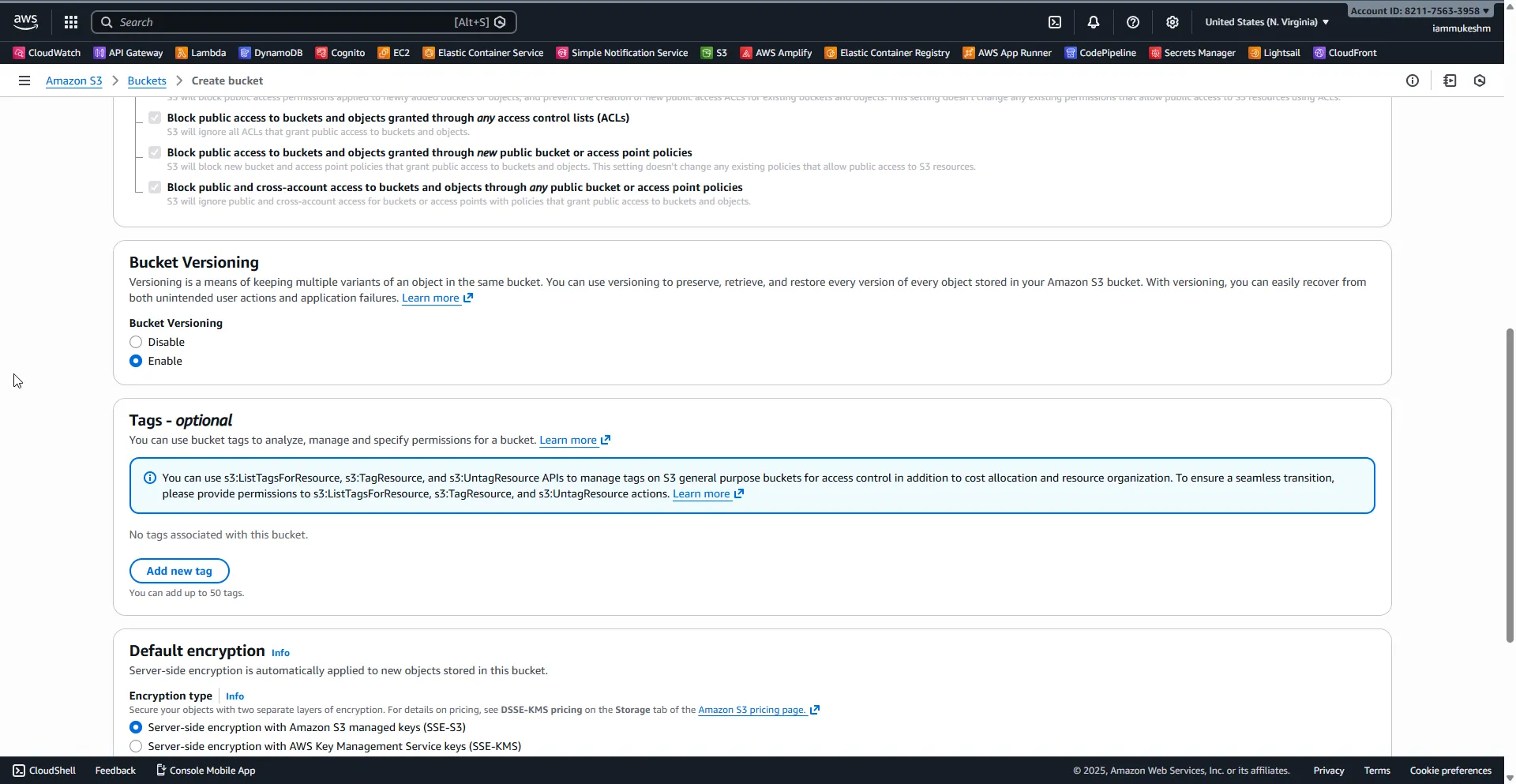
- Go to S3 → Create bucket
- Name it
my-versioned-bucket-demo(must be globally unique) - Region:
us-east-1(or your preferred region) - Under Bucket Versioning, select Enable
- Leave other settings as default → Create bucket
Via AWS CLI
aws s3api create-bucket --bucket my-versioned-bucket-demo --region us-east-1
aws s3api put-bucket-versioning --bucket my-versioned-bucket-demo --versioning-configuration Status=Enabled
Verify versioning is enabled:
aws s3api get-bucket-versioning --bucket my-versioned-bucket-demoExpected output:
{ "Status": "Enabled"}Step 2: Create the .NET Project
Create a new minimal API project:
dotnet new webapi -n S3VersioningDemo -o S3VersioningDemocd S3VersioningDemodotnet add package AWSSDK.S3dotnet add package Microsoft.AspNetCore.OpenApidotnet add package Scalar.AspNetCoreStep 3: Configure the Application
Update appsettings.json:
{ "Logging": { "LogLevel": { "Default": "Information", "Microsoft.AspNetCore": "Warning" } }, "AllowedHosts": "*", "AWS": { "Region": "us-east-1", "BucketName": "my-versioned-bucket-demo" }}Step 4: Build the API
Replace Program.cs with the following:
using Amazon;using Amazon.S3;using Amazon.S3.Model;using Scalar.AspNetCore;
var builder = WebApplication.CreateBuilder(args);
builder.Services.AddOpenApi();
var region = builder.Configuration["AWS:Region"] ?? "us-east-1";var bucketName = builder.Configuration["AWS:BucketName"] ?? "my-versioned-bucket-demo";
builder.Services.AddSingleton<IAmazonS3>(_ => new AmazonS3Client(RegionEndpoint.GetBySystemName(region)));
var app = builder.Build();
app.MapOpenApi();app.MapScalarApiReference();
app.MapGet("/", () => Results.Ok("S3 Versioning Demo API"));
// Upload a file (creates a new version if object exists)app.MapPost("/files/{key}", async (string key, IFormFile file, IAmazonS3 s3) =>{    using var stream = file.OpenReadStream();
    var request = new PutObjectRequest    {        BucketName = bucketName,        Key = key,        InputStream = stream,        ContentType = file.ContentType    };
    var response = await s3.PutObjectAsync(request);
    return Results.Ok(new    {        Message = "File uploaded successfully",        Key = key,        VersionId = response.VersionId    });}).DisableAntiforgery();
// List all versions of an object (including delete markers)app.MapGet("/files/{key}/versions", async (string key, IAmazonS3 s3) =>{    var request = new ListVersionsRequest    {        BucketName = bucketName,        Prefix = key    };
    var response = await s3.ListVersionsAsync(request);
    // S3ObjectVersion includes both regular versions and delete markers    // The IsDeleteMarker property indicates if it's a delete marker    var allVersions = response.Versions        .Where(v => v.Key == key)        .OrderByDescending(v => v.LastModified)        .Select(v => new        {            v.VersionId,            v.IsLatest,            v.LastModified,            Size = (v.IsDeleteMarker == true) ? 0L : v.Size,            IsDeleteMarker = v.IsDeleteMarker ?? false        })        .ToList();
    return Results.Ok(new    {        Key = key,        TotalVersions = allVersions.Count,        Versions = allVersions    });});
// Download a specific versionapp.MapGet("/files/{key}/versions/{versionId}", async (string key, string versionId, IAmazonS3 s3) =>{    try    {        var request = new GetObjectRequest        {            BucketName = bucketName,            Key = key,            VersionId = versionId        };
        var response = await s3.GetObjectAsync(request);
        return Results.Stream(response.ResponseStream, response.Headers.ContentType, key);    }    catch (AmazonS3Exception ex) when (ex.StatusCode == System.Net.HttpStatusCode.NotFound)    {        return Results.NotFound(new { Message = "Version not found", Key = key, VersionId = versionId });    }});
// Download the latest versionapp.MapGet("/files/{key}", async (string key, IAmazonS3 s3) =>{    try    {        var request = new GetObjectRequest        {            BucketName = bucketName,            Key = key        };
        var response = await s3.GetObjectAsync(request);
        return Results.Stream(response.ResponseStream, response.Headers.ContentType, key);    }    catch (AmazonS3Exception ex) when (ex.StatusCode == System.Net.HttpStatusCode.NotFound)    {        return Results.NotFound(new { Message = "File not found or deleted", Key = key });    }});
// Soft delete (adds delete marker)app.MapDelete("/files/{key}", async (string key, IAmazonS3 s3) =>{    var request = new DeleteObjectRequest    {        BucketName = bucketName,        Key = key    };
    var response = await s3.DeleteObjectAsync(request);
    return Results.Ok(new    {        Message = "Delete marker added (file hidden but not permanently deleted)",        Key = key,        DeleteMarkerVersionId = response.VersionId    });});
// Restore a previous version (copies old version to become the new latest)app.MapPost("/files/{key}/restore/{versionId}", async (string key, string versionId, IAmazonS3 s3) =>{    var copyRequest = new CopyObjectRequest    {        SourceBucket = bucketName,        SourceKey = key,        SourceVersionId = versionId,        DestinationBucket = bucketName,        DestinationKey = key    };
    var response = await s3.CopyObjectAsync(copyRequest);
    return Results.Ok(new    {        Message = "Version restored successfully",        Key = key,        RestoredFromVersionId = versionId,        NewVersionId = response.VersionId    });});
// Recover a deleted file (removes the delete marker)app.MapPost("/files/{key}/recover", async (string key, IAmazonS3 s3) =>{    // Find the delete marker    var listRequest = new ListVersionsRequest    {        BucketName = bucketName,        Prefix = key    };
    var listResponse = await s3.ListVersionsAsync(listRequest);
    // Find the latest delete marker for this key    var deleteMarker = listResponse.Versions        .FirstOrDefault(v => v.Key == key && v.IsLatest == true && v.IsDeleteMarker == true);
    if (deleteMarker == null)    {        return Results.BadRequest(new { Message = "No delete marker found - file is not deleted", Key = key });    }
    // Delete the delete marker to restore the object    var deleteRequest = new DeleteObjectRequest    {        BucketName = bucketName,        Key = key,        VersionId = deleteMarker.VersionId    };
    await s3.DeleteObjectAsync(deleteRequest);
    return Results.Ok(new    {        Message = "File recovered successfully",        Key = key,        RemovedDeleteMarkerVersionId = deleteMarker.VersionId    });});
// Permanently delete a specific versionapp.MapDelete("/files/{key}/versions/{versionId}", async (string key, string versionId, IAmazonS3 s3) =>{    var request = new DeleteObjectRequest    {        BucketName = bucketName,        Key = key,        VersionId = versionId    };
    await s3.DeleteObjectAsync(request);
    return Results.Ok(new    {        Message = "Version permanently deleted",        Key = key,        DeletedVersionId = versionId    });});
// Permanently delete ALL versions of an objectapp.MapDelete("/files/{key}/all-versions", async (string key, IAmazonS3 s3) =>{    var listRequest = new ListVersionsRequest    {        BucketName = bucketName,        Prefix = key    };
    var listResponse = await s3.ListVersionsAsync(listRequest);
    // Get all versions (including delete markers) for this specific key    var objectsToDelete = listResponse.Versions        .Where(v => v.Key == key)        .Select(v => new KeyVersion { Key = v.Key, VersionId = v.VersionId })        .ToList();
    if (objectsToDelete.Count == 0)    {        return Results.NotFound(new { Message = "No versions found", Key = key });    }
    var deleteRequest = new DeleteObjectsRequest    {        BucketName = bucketName,        Objects = objectsToDelete    };
    var response = await s3.DeleteObjectsAsync(deleteRequest);
    return Results.Ok(new    {        Message = "All versions permanently deleted",        Key = key,        DeletedCount = response.DeletedObjects.Count    });});
app.Run();
Code Walkthrough
POST /files/{key}
Uploads a file to S3 with the given key. If versioning is enabled (which it is), S3 automatically assigns a version ID. Uploading to the same key creates a new version while preserving the old one.
GET /files/{key}/versions
Lists all versions of an object, including delete markers. This is how you see the complete history of a file - every upload, overwrite, and delete. The response shows version IDs, timestamps, sizes, and which version is current.
GET /files/{key}/versions/{versionId}
Downloads a specific version by its ID. This is how you access old versions even after the object has been overwritten multiple times.
GET /files/{key}
Downloads the latest version. If the object has a delete marker as the latest version, this returns 404 - the object appears deleted even though previous versions exist.
DELETE /files/{key}
Adds a delete marker. The object appears deleted to normal GET requests, but all versions remain intact. This is a “soft delete” that can be undone.
POST /files/{key}/restore/{versionId}
Restores a previous version by copying it to become the new latest version. The old version remains untouched; a new version is created with the same content.
POST /files/{key}/recover
Finds and removes the delete marker, effectively “undeleting” the file. The object becomes visible again with its previous latest version restored.
DELETE /files/{key}/versions/{versionId}
Permanently deletes a specific version. This is irreversible - once a version is deleted with its version ID specified, it’s gone.
DELETE /files/{key}/all-versions
Nuclear option: permanently deletes every version and delete marker for an object. Use with caution.
Step 5: Test the API
Run the application:
dotnet runOpen Scalar UI at https://localhost:5001/scalar/v1 (or your configured port).
Test Scenario: Complete Versioning Workflow
1. Upload the initial version
I created a file config.json with content:
{ "version": 1}Response:
{ "message": "File uploaded successfully", "key": "config", "versionId": "3sL4kqtJlcpXroDTDmJ.XpBQkZ8F.hOq"}2. Upload a second version (overwrite)
I modified the config.json file, incremented the version number, and uploaded again:
Response:
{ "message": "File uploaded successfully", "key": "config", "versionId": "9Xnz.M7yZ5hJ2kLpQrS.AbCdEfGh.IjK"}3. List all versions
curl "https://localhost:5001/files/config/versions"Response:
{ "key": "config", "totalVersions": 2, "versions": [ { "versionId": "zlF7oUfsswhwJrN1y1eTYKzOVlG_j8Vp", "isLatest": true, "lastModified": "2025-12-30T06:10:13Z", "size": 22, "isDeleteMarker": false }, { "versionId": "AqBPh_tzleT.QxWkYPfm4WhnRpAwzsaQ", "isLatest": false, "lastModified": "2025-12-30T06:09:13Z", "size": 22, "isDeleteMarker": false } ]}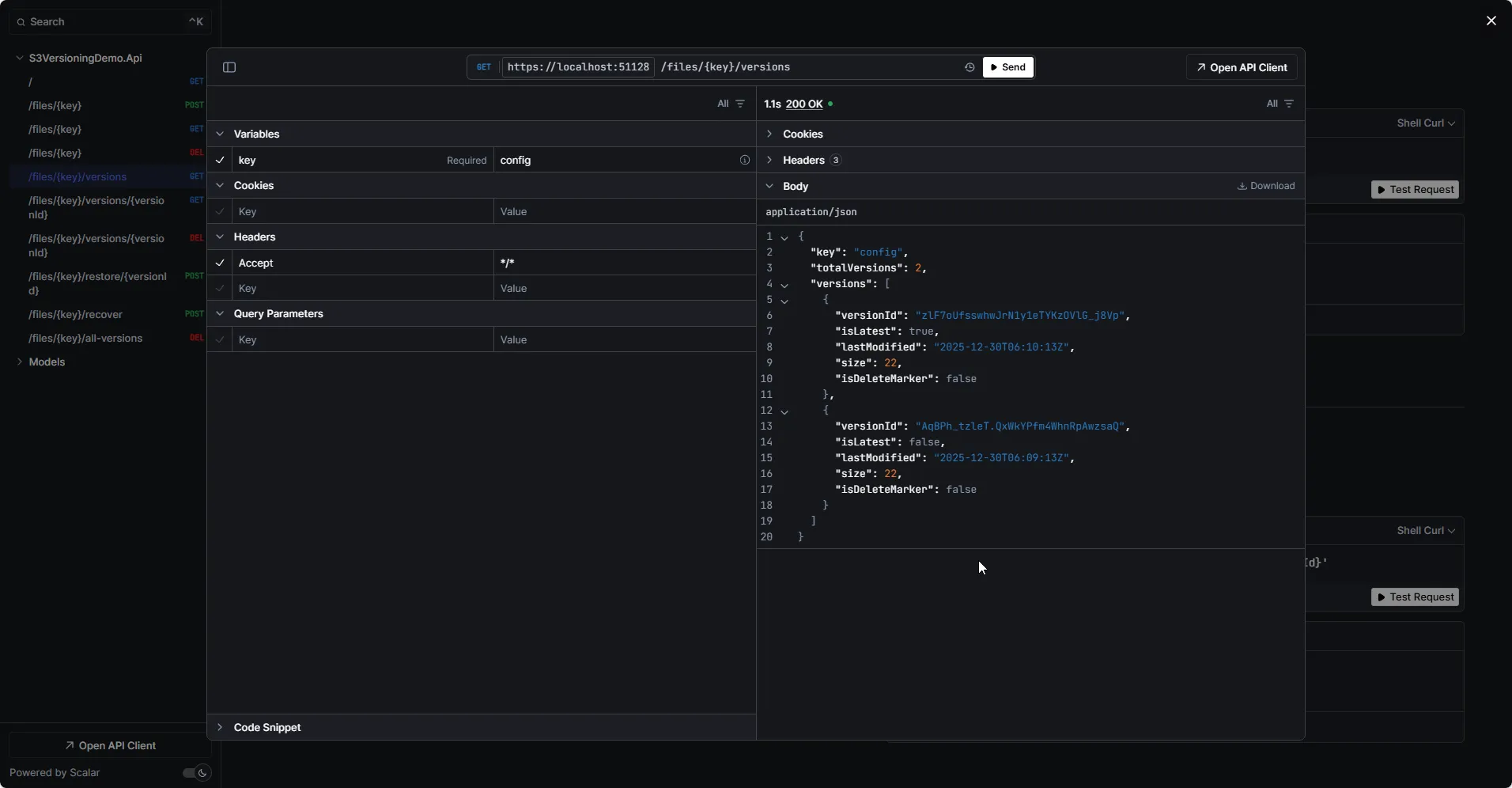
4. Restore the first version
curl -X POST "https://localhost:5001/files/config/restore/3sL4kqtJlcpXroDTDmJ.XpBQkZ8F.hOq"Response:
{ "message": "Version restored successfully", "key": "config", "restoredFromVersionId": "AqBPh_tzleT.QxWkYPfm4WhnRpAwzsaQ", "newVersionId": "QlYX8HOS2GOFZq0djw1OLx7esMKOAKoj"}Now config has 3 versions, with the newest being a copy of the original.
5. Delete the file (soft delete)
curl -X DELETE "https://localhost:5001/files/config"Response:
{ "message": "Delete marker added (file hidden but not permanently deleted)", "key": "config", "deleteMarkerVersionId": "MtGkBRNsfupSAWuSBivE3Uhwa3WNcPR5"}6. Try to download (will fail)
curl "https://localhost:5001/files/config"Response: 404 Not Found
{ "message": "File not found or deleted", "key": "config"}7. Recover the deleted file
curl -X POST "https://localhost:5001/files/config/recover"Response:
{ "message": "File recovered successfully", "key": "config", "removedDeleteMarkerVersionId": "MtGkBRNsfupSAWuSBivE3Uhwa3WNcPR5"}8. Download works again
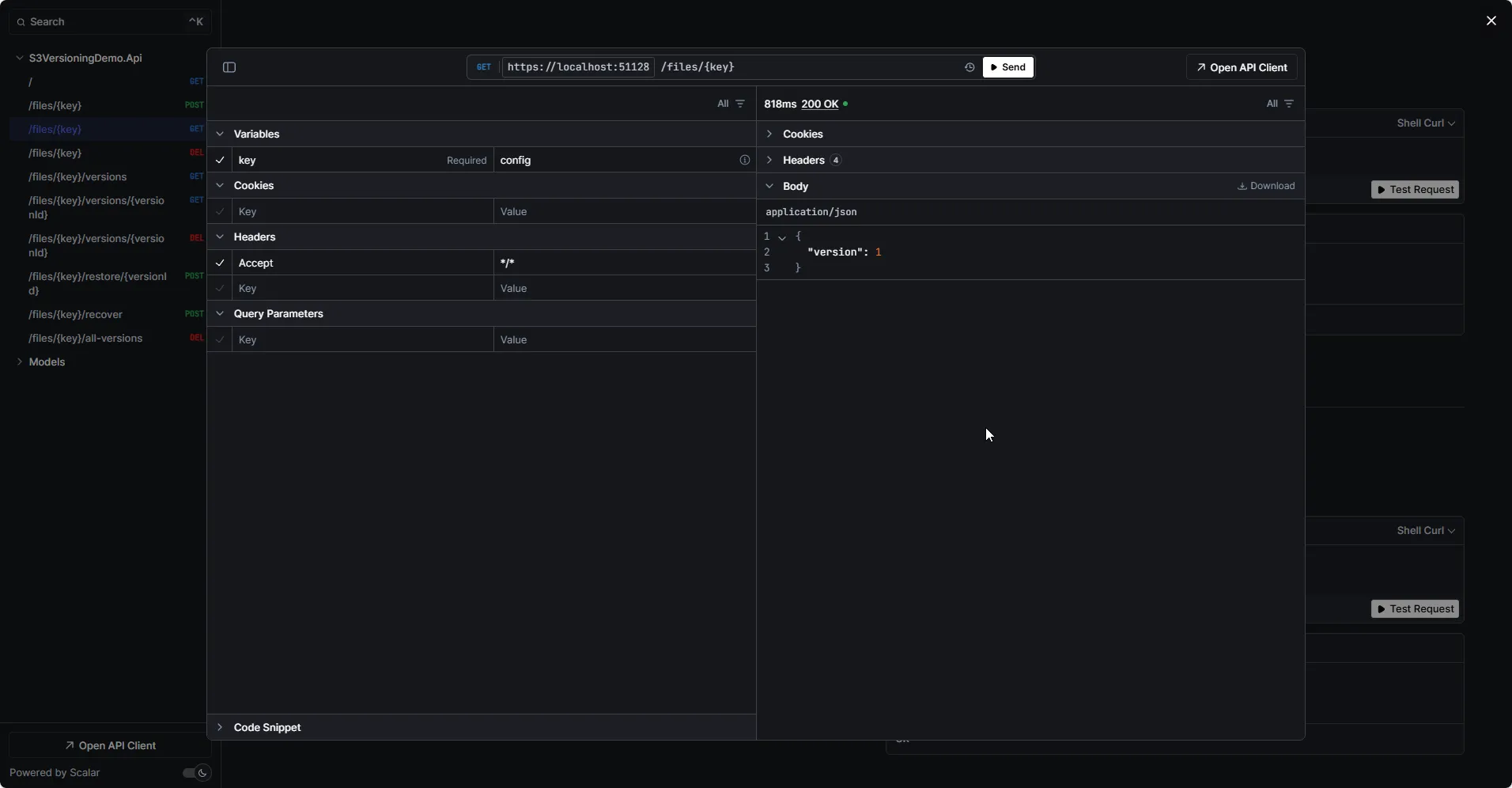
curl "https://localhost:5001/files/config"Returns the file content.
Cost Implications
Versioning increases storage costs because every version is stored separately. Consider these factors:
| Factor | Impact |
|---|---|
| Storage | Every version consumes storage space |
| Requests | Listing versions, restoring = additional API calls |
| Data transfer | Downloading old versions incurs transfer costs |
Cost Optimization with Lifecycle Policies
Use S3 Lifecycle policies to automatically manage old versions:
{ "Rules": [ { "ID": "DeleteOldVersions", "Status": "Enabled", "NoncurrentVersionExpiration": { "NoncurrentDays": 30 } } ]}This automatically deletes versions older than 30 days while keeping the current version.
MFA Delete for Extra Protection
For critical data, enable MFA Delete. This requires multi-factor authentication to:
- Permanently delete any version
- Change the versioning state of the bucket
Enable via CLI (requires root account):
aws s3api put-bucket-versioning --bucket my-versioned-bucket-demo --versioning-configuration Status=Enabled,MFADelete=Enabled --mfa "arn:aws:iam::123456789012:mfa/root-account-mfa-device 123456"With MFA Delete enabled, even if credentials are compromised, attackers cannot permanently delete your data without the MFA device.
IAM Permissions
Your application needs these permissions:
{ "Version": "2012-10-17", "Statement": [ { "Effect": "Allow", "Action": [ "s3:PutObject", "s3:GetObject", "s3:GetObjectVersion", "s3:DeleteObject", "s3:DeleteObjectVersion", "s3:ListBucketVersions" ], "Resource": [ "arn:aws:s3:::my-versioned-bucket-demo", "arn:aws:s3:::my-versioned-bucket-demo/*" ] } ]}Key permissions explained:
GetObjectVersion- Required to download specific versionsDeleteObjectVersion- Required to permanently delete versions or remove delete markersListBucketVersions- Required to list all versions of objects
Common Patterns
Audit Trail for Configuration Files
Store configuration changes with metadata:
var request = new PutObjectRequest{ BucketName = bucketName, Key = "config/app-settings.json", InputStream = stream, Metadata = { ["x-amz-meta-changed-by"] = userId, ["x-amz-meta-change-reason"] = "Updated database connection string" }};Rollback to Last Known Good
public async Task<string> RollbackToLastGoodVersion(string key, Func<Stream, bool> validator){    var versions = await ListVersionsAsync(key);
    foreach (var version in versions.Where(v => !v.IsDeleteMarker))    {        var content = await GetVersionAsync(key, version.VersionId);        if (validator(content))        {            await RestoreVersionAsync(key, version.VersionId);            return version.VersionId;        }    }
    throw new InvalidOperationException("No valid version found");}
Scheduled Version Cleanup
For buckets without lifecycle policies, clean up old versions programmatically:
public async Task CleanupOldVersions(string key, int keepCount){    var versions = await ListVersionsAsync(key);
    var toDelete = versions        .Where(v => !v.IsLatest && !v.IsDeleteMarker)        .OrderByDescending(v => v.LastModified)        .Skip(keepCount)        .ToList();
    foreach (var version in toDelete)    {        await PermanentlyDeleteVersionAsync(key, version.VersionId);    }}
Wrap-Up
S3 Versioning is your safety net against data loss. With versioning enabled:
- Overwrites are reversible - Every upload creates a new version
- Deletes are recoverable - Delete markers hide objects but don’t destroy them
- You have complete history - Access any previous version by its ID
- Permanent deletion requires intent - Must specify version ID to truly delete
The API we built gives you full control over versioned objects: upload, list versions, restore previous versions, recover deleted files, and permanently delete when needed.
Key takeaways:
- Enable versioning on buckets containing important data
- Use lifecycle policies to control storage costs
- Consider MFA Delete for critical buckets
- Include version-related permissions in your IAM policies
- Build restore and recovery into your application from the start
Grab the complete source code from github.com/iammukeshm/s3-versioning-restore-dotnet and start protecting your S3 data today.
Have questions about versioning patterns or cost optimization? Drop a comment below - I’d love to hear how you’re using S3 versioning in your .NET applications.
Happy Coding :)



What's your Feedback?
Do let me know your thoughts around this article.