
Your CLAUDE.md file is the difference between Claude Code being a glorified autocomplete and a senior engineer who truly understands your codebase.
I’ve spent months refining my CLAUDE.md files across dozens of .NET projects - from simple APIs to enterprise multi-tenant systems. The patterns I’m sharing today come from real-world usage, official Anthropic documentation, and lessons learned from watching Claude either nail implementations or completely miss the mark.
In my previous Claude Code tutorial, I introduced CLAUDE.md as a way to onboard Claude onto your project. Today, we go deep - covering memory hierarchy, the WHAT-WHY-HOW framework, import syntax, and most importantly, a production-ready template for .NET developers that you can copy into your projects today.

Let’s get into it.
What is CLAUDE.md and Why Does It Matter?
CLAUDE.md is a special Markdown file that becomes part of Claude’s system prompt. Every time you start a Claude Code session in a directory containing this file, its contents are automatically loaded into context.
Think of it as writing onboarding documentation for a new team member - except this team member:
- Has perfect memory within the session
- Follows instructions precisely
- Never gets annoyed when you repeat yourself
- Can hold 200,000 tokens of context
Without CLAUDE.md, Claude starts every session blind. It doesn’t know your project structure, your coding conventions, your preferred patterns, or even how to run your tests. You end up repeating the same context over and over.
With a well-crafted CLAUDE.md, Claude hits the ground running. It knows your architecture, respects your patterns, and makes decisions aligned with your codebase from the first prompt.
According to Anthropic’s official Claude Code documentation, CLAUDE.md files should be “refined like any frequently used prompt.” Teams that iterate on their CLAUDE.md see significantly better results than those who set it and forget it.
Claude Code Memory Hierarchy - How Context is Loaded
Before we write a single line, you need to understand Claude Code’s memory system. It’s hierarchical, and knowing how it works helps you organize your instructions effectively.
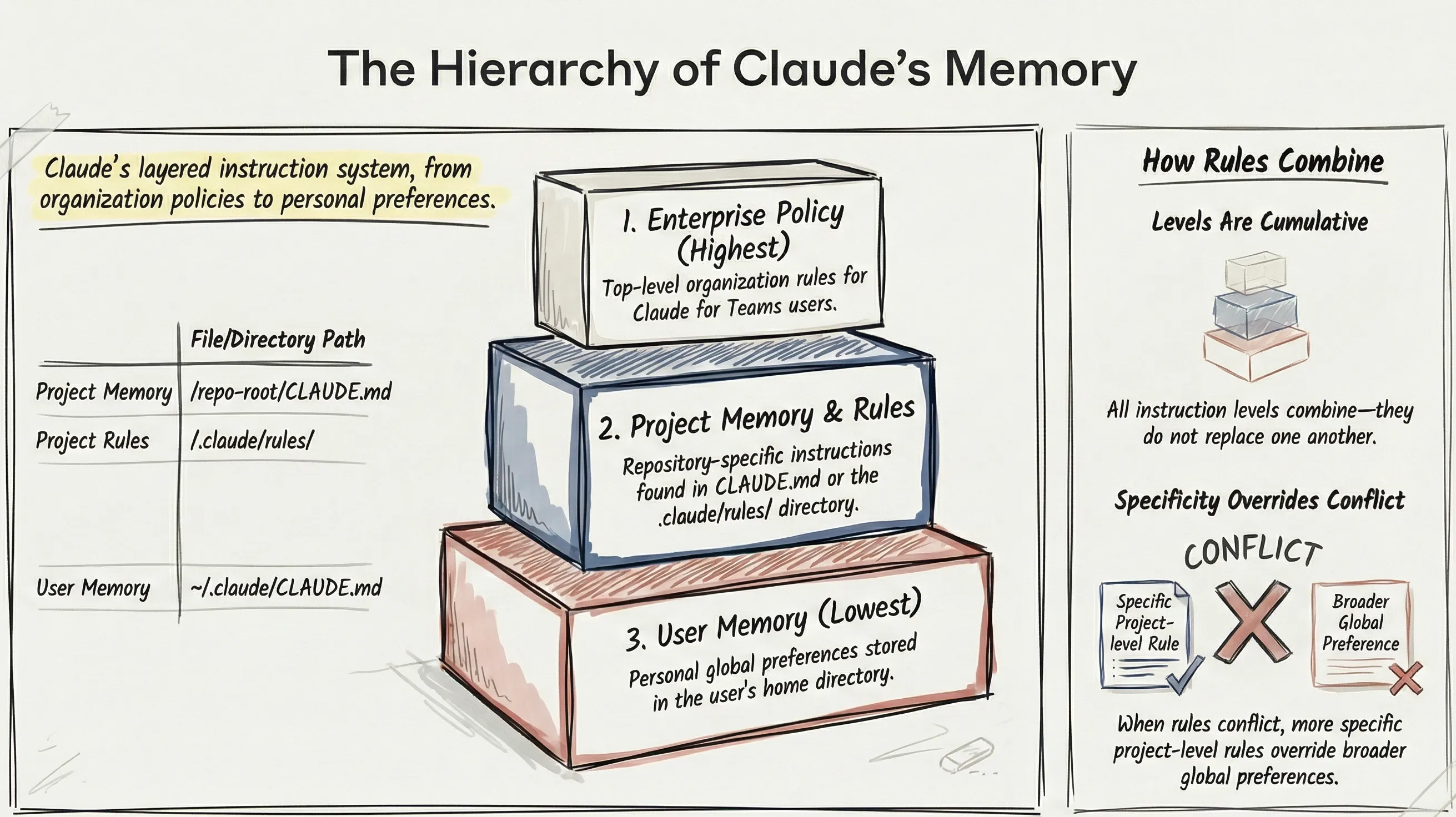
Memory Levels (Highest to Lowest Priority)
- Enterprise Policy - Organization-level rules (if using Claude for Teams)
- Project Memory -
CLAUDE.mdin your repository root - Project Rules - Files in
.claude/rules/directory - User Memory -
~/.claude/CLAUDE.mdfor personal global preferences
Key insight: All levels combine - they don’t replace each other. More specific rules override on conflicts. This means you can have global preferences in your home directory and project-specific overrides in each repository.
File Locations and Their Purpose
| Location | Purpose | Commit to Git? |
|---|---|---|
./CLAUDE.md | Project-wide instructions shared with team | Yes |
./CLAUDE.local.md | Your personal project preferences | No (add to .gitignore) |
./.claude/rules/*.md | Task-specific or folder-specific rules | Yes |
~/.claude/CLAUDE.md | Global preferences across all projects | N/A |
The Import Syntax
For larger projects, you can split instructions across multiple files using the import syntax:
@.claude/rules/architecture.md@.claude/rules/testing.md@.claude/rules/api-conventions.mdThis keeps your root CLAUDE.md clean while organizing detailed instructions into focused files. Imports are resolved recursively up to 5 levels deep.
Pro Tip: Use imports to reference files in team members’ home directories for individual preferences that shouldn’t be committed:
@~/personal-dotnet-preferences.md
The WHAT-WHY-HOW Framework
Anthropic recommends organizing your CLAUDE.md around three layers. This framework ensures Claude has complete context without unnecessary bloat.
WHAT - Your Tech Stack and Structure
Tell Claude exactly what technologies you’re using and how the project is organized.
## Tech Stack- .NET 10, ASP.NET Core Minimal APIs- Entity Framework Core 10 with PostgreSQL- Mediator for CQRS pattern (source-generated)- FluentValidation for request validation- Scalar for API documentation (OpenAPI)
## Project Structure- `src/Api/` - Entry point, endpoints, middleware- `src/Application/` - Commands, queries, handlers, DTOs- `src/Domain/` - Entities, value objects, domain events- `src/Infrastructure/` - EF Core, external integrations- `tests/` - Unit and integration tests
WHY - Purpose and Architectural Decisions
Explain the reasoning behind your architecture. This helps Claude make decisions that align with your design philosophy.
## Architecture PhilosophyWe follow Clean Architecture with CQRS separation:- **Domain** has zero dependencies - pure business logic- **Application** orchestrates use cases via Mediator handlers- **Infrastructure** implements interfaces defined in Application- **Api** is thin - just endpoint definitions and DI wiring
Why CQRS? We need different read/write models for performance.Why Mediator? Decouples handlers from HTTP layer, enables pipeline behaviors, source-generated for better performance.
HOW - Commands and Workflow Rules
Document the commands Claude should know and the workflow rules you expect it to follow.
## Commands- Build: `dotnet build`- Test: `dotnet test --no-build`- Run: `dotnet run --project src/Api`- Migrations: `dotnet ef migrations add <Name> --project src/Infrastructure --startup-project src/Api`
## Workflow Rules- ALWAYS create a feature branch before making changes- Run `dotnet test` after every implementation- Never modify files in `src/Domain/` without explicit approval- Keep commits atomic - one logical change per commit
New to these patterns? Check out my detailed guides on CQRS in ASP.NET Core (concepts apply to Mediator too), FluentValidation, and Clean/Onion Architecture.
What to Include (And What NOT to Include)
This is where most developers go wrong. They either include too little (Claude operates blind) or too much (wastes context tokens on irrelevant details).
Include These
- Tech stack and versions - Be specific: “Entity Framework Core 10” not just “EF Core”
- Project structure - Map folders to their purpose
- Common commands - Build, test, run, migrations
- Coding conventions - Naming, patterns, style preferences
- Patterns you use - Mediator, Result pattern, CQRS
- Patterns you DON’T use - Equally important to prevent unwanted suggestions
- Domain terminology - Business terms that map to code entities
- Testing instructions - How to run tests, what frameworks you use
- Repository workflow - Branch naming, commit conventions, PR process
Do NOT Include
- Secrets or credentials - Never put API keys, connection strings, or passwords
- Code style rules that linters handle - Use Prettier/ESLint/dotnet format instead
- Obvious framework knowledge - Claude knows how ASP.NET Core works
- Excessive documentation - Link to docs instead of copying content
- Historical context - Focus on current state, not project history
Important: Every word in CLAUDE.md consumes context tokens. Keep it under 300 lines. Ideally, aim for 50-100 lines in the root file with imports for detailed sections.
The Complete .NET CLAUDE.md Template
Here’s my battle-tested template for .NET projects. Customize it to match your specific stack and conventions.
# CLAUDE.md - [Project Name]
## Overview[One-sentence description of what this project does]
## Tech Stack- .NET 10, ASP.NET Core Minimal APIs- Entity Framework Core 10 with PostgreSQL- Mediator for CQRS (source-generated, https://github.com/martinothamar/Mediator)- FluentValidation for request validation- Scalar for OpenAPI documentation- xUnit + FluentAssertions for testing
## Project Structure- `src/Api/` - Endpoints, middleware, DI configuration- `src/Application/` - Commands, queries, handlers, validators- `src/Domain/` - Entities, value objects, enums, domain events- `src/Infrastructure/` - EF Core, external services, repositories- `tests/UnitTests/` - Domain and application layer tests- `tests/IntegrationTests/` - API and database tests
## Commands- Build: `dotnet build`- Test: `dotnet test`- Run API: `dotnet run --project src/Api`- Add Migration: `dotnet ef migrations add <Name> -p src/Infrastructure -s src/Api`- Update Database: `dotnet ef database update -p src/Infrastructure -s src/Api`- Format: `dotnet format`
## Architecture Rules- Domain layer has ZERO external dependencies- Application layer defines interfaces, Infrastructure implements them- All database access goes through EF Core DbContext (no repository pattern)- Use Mediator for all command/query handling- API layer is thin - endpoint definitions only
## Code Conventions
### Naming- Commands: `Create[Entity]Command`, `Update[Entity]Command`- Queries: `Get[Entity]Query`, `List[Entities]Query`- Handlers: `[Command/Query]Handler`- DTOs: `[Entity]Dto`, `Create[Entity]Request`
### Patterns We Use- Primary constructors for DI- Records for DTOs and commands- Result<T> pattern for error handling (no exceptions for flow control)- File-scoped namespaces- Always pass CancellationToken to async methods
### Patterns We DON'T Use (Never Suggest)- Repository pattern (use EF Core directly)- AutoMapper (write explicit mappings)- Exceptions for business logic errors- Stored procedures
## Validation- All request validation in FluentValidation validators- Validators auto-registered via assembly scanning- Validation runs in Mediator pipeline behavior
## Testing- Unit tests: Domain logic and handlers- Integration tests: Full API endpoint testing with WebApplicationFactory- Use FluentAssertions for readable assertions- Test naming: `[Method]_[Scenario]_[ExpectedResult]`
## Git Workflow- Branch naming: `feature/`, `bugfix/`, `hotfix/`- Commit format: `type: description` (feat, fix, refactor, test, docs)- Always create a branch before changes- Run tests before committing
## Domain Terms- [Term 1] - [Maps to Entity/Concept]- [Term 2] - [Maps to Entity/Concept]
Organizing CLAUDE.md for Large .NET Projects
For enterprise solutions with multiple teams or modules, a single CLAUDE.md becomes unwieldy. Use the .claude/rules/ directory to organize instructions.
Directory Structure
.claude/├── rules/│ ├── architecture.md # Layer rules and dependencies│ ├── api-conventions.md # Endpoint patterns│ ├── testing.md # Test patterns and naming│ ├── database.md # EF Core conventions│ └── modules/│ ├── identity.md # Identity module specifics│ ├── catalog.md # Catalog module specifics│ └── orders.md # Orders module specificsScoped Rules with Frontmatter
You can scope rules to specific paths using YAML frontmatter:
---paths:  - src/Modules/Identity/**  - tests/**/Identity*---
# Identity Module Rules
This module handles authentication and authorization.
## Patterns- Use ASP.NET Core Identity for user management- JWT tokens for API authentication- Refresh token rotation enabled- Password rules defined in IdentitySettings
## Testing- Mock IIdentityService for unit tests- Use test users defined in IdentityTestDataCommon Mistakes and How to Avoid Them
Mistake 1: Using CLAUDE.md as a Linter
Wrong:
- Use 4 spaces for indentation- Always add trailing commas- Maximum line length: 120 charactersRight: Use .editorconfig and dotnet format for style rules. CLAUDE.md is for architectural context, not formatting.
Mistake 2: Including Everything From /init
The /init command generates a starter CLAUDE.md by scanning your project. Always review and trim it. Auto-generated content often includes:
- Redundant descriptions
- Obvious framework patterns
- Excessive folder listings
Keep only what’s unique to YOUR project.
Mistake 3: Forgetting to Update
Your CLAUDE.md should evolve with your codebase. When you:
- Add a new library → Update tech stack
- Change architecture patterns → Update rules
- Add new modules → Add module-specific rules
Treat it as living documentation, not a one-time setup.
Mistake 4: Duplicating Official Docs
Wrong:
## How Mediator WorksMediator is a library that implements the mediator pattern...[500 words explaining Mediator]Right:
## Mediator UsageWe use Mediator for CQRS. See: https://github.com/martinothamar/Mediator
Our conventions:- One handler per file- Handlers in same folder as command/query- Pipeline behaviors: Validation → Logging → Transaction
Real Results: Before and After
Let me show you the difference a good CLAUDE.md makes.
Before CLAUDE.md
Prompt: “Add a new endpoint to create a product”
Claude’s response: Creates a controller with repository pattern, adds AutoMapper configuration, puts validation in the controller, ignores existing patterns.
Result: 30 minutes fixing Claude’s assumptions to match your architecture.
After CLAUDE.md
Prompt: “Add a new endpoint to create a product”
Claude’s response: Creates a CreateProductCommand with Mediator, adds FluentValidation validator, uses your DTO patterns, follows your folder structure, even creates the branch first.
Result: Code that matches your codebase perfectly. Merge and move on.
Comparing CLAUDE.md with Other AI Tools
If you’re coming from other AI coding assistants, here’s how CLAUDE.md compares to similar project context files.
| Tool | File | Key Differences |
|---|---|---|
| Claude Code | CLAUDE.md | Hierarchical memory, import syntax, scoped rules |
| Cursor | .cursorrules | Deprecated in favor of .cursor/rules/ directory |
| GitHub Copilot | .github/copilot-instructions.md | Path-specific rules with glob patterns |
| Windsurf | .windsurfrules.md | Living document actively enforced by AI |
| Aider | CONVENTIONS.md | Simple bullet points, loaded via /read |
What makes CLAUDE.md different:
- Hierarchical loading - User, project, and rules levels combine
- Import syntax - Reference other files with
@path/to/file.md - Scoped rules - Apply rules to specific paths via frontmatter
- 200K token context - Can handle more detailed instructions
If you’re migrating from Cursor’s .cursorrules, the structure is similar but CLAUDE.md supports more advanced organization through the .claude/rules/ directory.
Pro Tips from Real-World Usage
After using Claude Code across dozens of .NET projects, here are patterns that consistently improve results.
1. Use the Hash Key for Live Updates
During a session, press # to give Claude an instruction it will automatically save to your CLAUDE.md. This is perfect for capturing patterns as you discover them.
# Always use Result<T> instead of throwing exceptions for validation failuresClaude adds this to your CLAUDE.md without interrupting your flow.
2. Document Your “Not Obvious” Commands
Every project has commands that aren’t obvious. Document them:
## Non-Obvious Commands- Reset test DB: `docker-compose down -v && docker-compose up -d db`- Generate client: `npm run generate-api-client --prefix src/Web`- Clear Redis: `docker exec redis redis-cli FLUSHALL`3. Include Error Workarounds
If your project has known issues or workarounds, document them:
## Known Issues & Workarounds- EF Core migration fails on Mac M1: Add `--runtime osx-arm64` flag- Hot reload breaks SignalR: Restart `dotnet watch` after hub changes- Tests timeout on first run: Run `dotnet build` first to warm up4. Reference Canonical Code Examples
Instead of explaining patterns in prose, point to existing code:
## Code Examples- New command implementation: See `src/Application/Products/Commands/CreateProduct/`- Integration test pattern: See `tests/IntegrationTests/Products/CreateProductTests.cs`- Endpoint with auth: See `src/Api/Endpoints/Orders/CreateOrderEndpoint.cs`This uses fewer tokens and shows real patterns from your codebase.
5. Specify Working Directories for Commands
Commands that need to run from specific directories should say so:
## Commands- API tests: `dotnet test` (run from `tests/Api.IntegrationTests/`)- Generate migrations: `dotnet ef migrations add <Name>` (run from solution root)- Frontend build: `npm run build` (run from `src/Web/`)Quick Reference: CLAUDE.md Checklist
Before committing your CLAUDE.md, verify:
- Tech stack with specific versions listed
- Project structure with folder purposes
- Build, test, and run commands
- Architecture philosophy (why, not just what)
- Naming conventions for your patterns
- Patterns you use AND patterns you avoid
- Git workflow and branch naming
- Domain terminology mapped to code
- No secrets, credentials, or connection strings
- Under 300 lines (use imports for details)
- Tested with a real prompt to verify effectiveness
Frequently Asked Questions
What is CLAUDE.md?
CLAUDE.md is a special Markdown file that becomes part of Claude Code's system prompt. When you start a Claude Code session in a directory containing this file, its contents are automatically loaded into context. It serves as onboarding documentation that tells Claude about your project structure, coding conventions, tech stack, and workflow rules.
Where should I put CLAUDE.md?
Place your main CLAUDE.md file in your repository root. For personal preferences that shouldn't be committed, use CLAUDE.local.md (add it to .gitignore). For global preferences across all projects, use ~/.claude/CLAUDE.md. For task-specific rules, create files in the .claude/rules/ directory.
How long should CLAUDE.md be?
Keep your root CLAUDE.md under 300 lines, ideally 50-100 lines. Use the import syntax (@path/to/file.md) to reference detailed instructions in separate files. Every word consumes context tokens, so focus on what's unique to your project rather than general framework knowledge.
What should I include in CLAUDE.md?
Include your tech stack with specific versions, project structure with folder purposes, common commands (build, test, run), coding conventions and naming patterns, architectural decisions and the reasoning behind them, patterns you use AND patterns you explicitly avoid, git workflow rules, and domain terminology that maps to code entities.
What should I NOT include in CLAUDE.md?
Never include secrets, API keys, or connection strings. Avoid code style rules that linters handle (use .editorconfig instead), obvious framework knowledge that Claude already knows, excessive documentation (link to docs instead), and historical project context that isn't relevant to current development.
How do I import other files into CLAUDE.md?
Use the @ syntax to import other Markdown files: @.claude/rules/architecture.md. Imports are resolved recursively up to 5 levels deep. This lets you organize detailed instructions into focused files while keeping your root CLAUDE.md clean.
How is CLAUDE.md different from .cursorrules?
CLAUDE.md offers hierarchical memory (user, project, and rules levels that combine), import syntax for referencing other files, scoped rules via YAML frontmatter that apply to specific paths, and 200K token context capacity. Cursor's .cursorrules is simpler but lacks these organizational features.
How do I update CLAUDE.md during a session?
Press the # key during a Claude Code session to give an instruction that will be automatically saved to your CLAUDE.md. This is useful for capturing patterns as you discover them without interrupting your workflow.
Beyond CLAUDE.md: Skills and Subagents
CLAUDE.md tells Claude what your project is and how you work. But for maximum productivity, you’ll want to combine it with two powerful features:
Custom Skills
Skills are reusable commands like /pr, /review, and /migrate that encode your team’s workflows into executable prompts. When you run a skill, Claude automatically loads your CLAUDE.md context - so your coding conventions, architecture rules, and project structure inform every skill execution.
For example, a /pr skill in a Clean Architecture project will generate PR descriptions that reference your layer structure, mention the Mediator handlers involved, and follow your commit conventions - all because it reads your CLAUDE.md first.
Subagents
When Claude tackles complex, multi-file tasks, it spawns subagents - specialized workers that handle different parts of the problem in parallel. Each subagent inherits your CLAUDE.md context, which means they all understand your architecture without you repeating yourself.
A well-written CLAUDE.md is the difference between subagents that stumble through your codebase and subagents that navigate it like senior developers on your team.
Bottom line: CLAUDE.md is the foundation. Skills and subagents are force multipliers that build on that foundation. Master CLAUDE.md first - then level up with skills and agents.
What’s Next?
We’ll cover skills, hooks, and subagents in dedicated articles:
- Custom Commands (Skills) - Build
/pr,/review, and/migratecommands - Hooks - Automate testing and linting after every change
- MCP Integration - Connect Claude to GitHub, Jira, and databases
- Subagents - How Claude handles complex multi-file tasks
If you’re serious about AI assisted development, mastering CLAUDE.md is the single highest-leverage investment you can make. It transforms Claude from a generic AI into a teammate who truly understands your codebase.
What patterns have you found useful in your CLAUDE.md files? Share your tips in the comments - I’m always looking to refine my templates based on what works for other developers.
Happy Coding :)



What's your Feedback?
Do let me know your thoughts around this article.