


Your CLAUDE.md file is the difference between Claude Code being a glorified autocomplete and a senior engineer who truly understands your codebase.
I’ve spent months refining my CLAUDE.md files across dozens of .NET projects - from simple APIs to enterprise multi-tenant systems. The patterns I’m sharing today come from real-world usage, official Anthropic documentation, and lessons learned from watching Claude either nail implementations or completely miss the mark.
In my previous Claude Code tutorial, I introduced CLAUDE.md as a way to onboard Claude onto your project. Today, let’s go deep - covering the memory hierarchy, the new auto memory feature, the WHAT-WHY-HOW framework, import syntax, AGENTS.md interop, and most importantly, a production-ready template for .NET developers that you can copy into your projects today. Everything verified against the official docs as of June 2026.

Let’s get into it.
What is CLAUDE.md and Why Does It Matter?
CLAUDE.md is a special Markdown file that becomes part of Claude’s system prompt. Every time you start a Claude Code session in a directory containing this file, its contents are automatically loaded into context.
Think of it as writing onboarding documentation for a new team member - except this team member:
- Has perfect memory within the session
- Follows instructions precisely
- Never gets annoyed when you repeat yourself
- Can hold up to 1 million tokens of context (on Fable 5, Opus 5, and Sonnet 5)
Without CLAUDE.md, Claude starts every session blind. It doesn’t know your project structure, your coding conventions, your preferred patterns, or even how to run your tests. You end up repeating the same context over and over.
With a well-crafted CLAUDE.md, Claude hits the ground running. It knows your architecture, respects your patterns, and makes decisions aligned with your codebase from the first prompt.
Anthropic’s guidance in the official memory documentation is direct: the more specific and concise your instructions, the more consistently Claude follows them. Teams that iterate on their CLAUDE.md see significantly better results than those who set it and forget it.
Claude Code Memory Hierarchy - How Context is Loaded
Before you write a single line, you need to understand Claude Code’s memory system. It’s hierarchical, and knowing how it works helps you organize your instructions effectively.
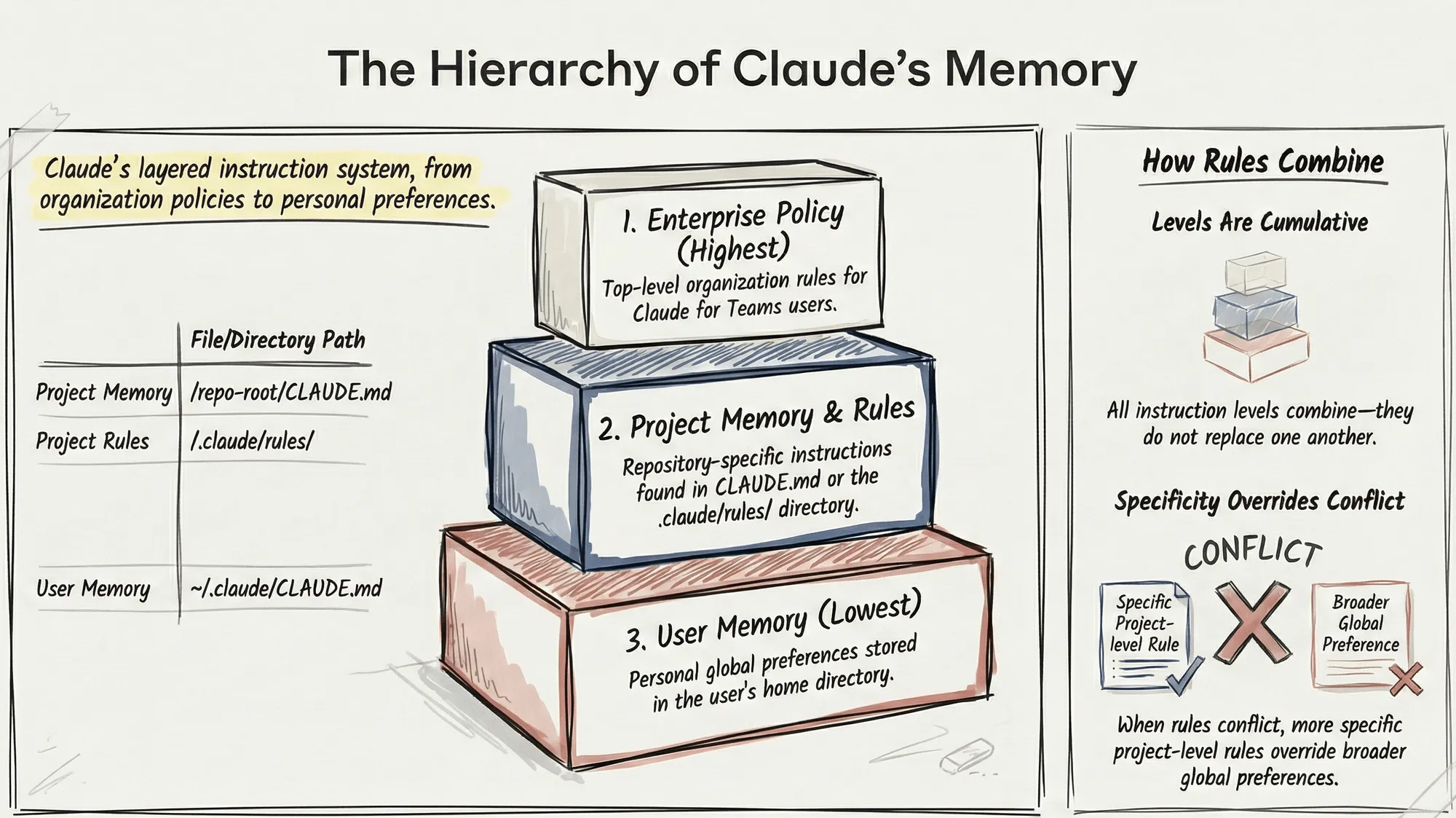
Memory Levels (Broadest to Most Specific)
Files load in this order, from broadest scope to most specific - so project instructions appear in context after user instructions, and your personal local notes are read last:
- Managed Policy - Organization-wide instructions deployed by IT/DevOps (e.g.
/etc/claude-code/CLAUDE.mdon Linux,C:\Program Files\ClaudeCode\CLAUDE.mdon Windows) - User Memory -
~/.claude/CLAUDE.mdfor personal global preferences - Project Memory -
./CLAUDE.mdor./.claude/CLAUDE.mdin your repository, plus files in.claude/rules/ - Local Memory -
./CLAUDE.local.mdfor personal project-specific preferences
Key insight: All levels combine - they don’t replace each other. Everything gets concatenated into context, and because more specific files load later, they effectively win when instructions overlap. This means you can have global preferences in your home directory and project-specific guidance in each repository.
File Locations and Their Purpose
| Location | Purpose | Commit to Git? |
|---|---|---|
./CLAUDE.md (or ./.claude/CLAUDE.md) | Project-wide instructions shared with team | Yes |
./CLAUDE.local.md | Your personal project preferences | No (add to .gitignore) |
./.claude/rules/*.md | Task-specific or folder-specific rules | Yes |
~/.claude/CLAUDE.md | Global preferences across all projects | N/A |
~/.claude/rules/*.md | Personal rules applied to every project | N/A |
One more detail worth knowing: Claude walks up the directory tree from wherever you launch it, loading every CLAUDE.md and CLAUDE.local.md it finds along the way. Files in subdirectories below you load on demand, when Claude reads files in those directories. In a monorepo, that means launching from src/ModuleA/ still picks up the repo-root CLAUDE.md.
The Import Syntax
For larger projects, you can split instructions across multiple files using the import syntax:
@.claude/rules/architecture.md@.claude/rules/testing.md@.claude/rules/api-conventions.mdThis keeps your root CLAUDE.md clean while organizing detailed instructions into focused files. Imported files can recursively import other files, with a maximum depth of four hops. Relative paths resolve relative to the file containing the import, not your working directory.
One thing imports do NOT do: save context. Imported files are expanded and loaded at launch alongside the CLAUDE.md that references them. Use imports for organization; use path-scoped rules when you want instructions to load only for matching files.
Pro Tip: Use imports to reference files in your home directory for individual preferences that shouldn’t be committed:
@~/.claude/my-project-instructions.md. This also solves the git worktree problem - a gitignored CLAUDE.local.md only exists in the worktree where you created it, but a home-directory import follows you everywhere. The first time Claude encounters external imports in a project, it shows an approval dialog.
Auto Memory - Claude’s Own Notes vs Your CLAUDE.md
This is the biggest change to Claude Code’s memory system since I first published this guide. Since v2.1.59, Claude Code ships with auto memory: Claude writes notes for itself as it works, and loads them at the start of every session - no setup required.
Here’s how the two systems divide the work:
| CLAUDE.md files | Auto memory | |
|---|---|---|
| Who writes it | You | Claude |
| What it contains | Instructions and rules | Learnings and patterns |
| Scope | Project, user, or org | Per repository, shared across worktrees |
| Loaded into | Every session, in full | Every session (first 200 lines or 25KB of the index) |
| Use for | Coding standards, workflows, architecture | Build quirks, debugging insights, preferences Claude discovers |
Auto memory lives in ~/.claude/projects/<project>/memory/. The directory contains a MEMORY.md index that loads at session start, plus topic files (like debugging.md or api-conventions.md) that Claude reads on demand:
~/.claude/projects/<project>/memory/├── MEMORY.md # Concise index, loaded into every session├── debugging.md # Detailed notes on debugging patterns└── api-conventions.md # API design decisionsWhen you see “Writing memory” or “Recalled memory” in the interface, that’s this system at work. Everything is plain markdown you can read, edit, or delete - run /memory to browse it.
What this changes for your CLAUDE.md strategy: before auto memory, every correction you gave Claude was lost unless you manually wrote it into CLAUDE.md. Now Claude captures those itself. My rule of thumb:
- Rules you want enforced (architecture, conventions, workflows) → write them in CLAUDE.md
- Discoveries and corrections (“the integration tests need Docker running”) → just tell Claude once; auto memory keeps it
One failure mode worth knowing, because it’s silent: only the first 200 lines or 25KB of MEMORY.md load at session start, and anything past that is simply dropped. Claude Code now measures the file after each write and nudges Claude to shorten it - one line per entry, detail pushed into topic files, stale entries merged or removed - and returns an error if the index is already over the limit. If you’ve been running Claude on the same repo for months and it seems to have forgotten something it definitely learned, an overgrown index is the first thing to check. Note that the limit applies only to MEMORY.md; CLAUDE.md files load in full regardless of length.
Files that carry YAML frontmatter also get a modified timestamp written on each update, which is a genuinely useful signal - both for you when auditing, and for Claude when weighing whether a note it wrote in March still holds.
Auto memory is on by default. To turn it off, toggle it in /memory or set "autoMemoryEnabled": false in your settings. It’s machine-local - notes don’t sync across machines or to teammates, which is exactly why team-level rules still belong in a committed CLAUDE.md.
The WHAT-WHY-HOW Framework
Anthropic recommends organizing your CLAUDE.md around three layers. This framework ensures Claude has complete context without unnecessary bloat.
WHAT - Your Tech Stack and Structure
Tell Claude exactly what technologies you’re using and how the project is organized.
## Tech Stack- .NET 10, ASP.NET Core Minimal APIs- Entity Framework Core 10 with PostgreSQL- Mediator for CQRS pattern (source-generated)- FluentValidation for request validation- Scalar for API documentation (OpenAPI)
## Project Structure- `src/Api/` - Entry point, endpoints, middleware- `src/Application/` - Commands, queries, handlers, DTOs- `src/Domain/` - Entities, value objects, domain events- `src/Infrastructure/` - EF Core, external integrations- `tests/` - Unit and integration tests
WHY - Purpose and Architectural Decisions
Explain the reasoning behind your architecture. This helps Claude make decisions that align with your design philosophy.
## Architecture PhilosophyWe follow Clean Architecture with CQRS separation:- **Domain** has zero dependencies - pure business logic- **Application** orchestrates use cases via Mediator handlers- **Infrastructure** implements interfaces defined in Application- **Api** is thin - just endpoint definitions and DI wiring
Why CQRS? We need different read/write models for performance.Why Mediator? Decouples handlers from HTTP layer, enables pipeline behaviors, source-generated for better performance.
HOW - Commands and Workflow Rules
Document the commands Claude should know and the workflow rules you expect it to follow.
## Commands- Build: `dotnet build`- Test: `dotnet test --no-build`- Run: `dotnet run --project src/Api`- Migrations: `dotnet ef migrations add <Name> --project src/Infrastructure --startup-project src/Api`
## Workflow Rules- ALWAYS create a feature branch before making changes- Run `dotnet test` after every implementation- Never modify files in `src/Domain/` without explicit approval- Keep commits atomic - one logical change per commit
New to these patterns? Check out my detailed guides on CQRS in ASP.NET Core (concepts apply to Mediator too), FluentValidation, and Clean/Onion Architecture.
What to Include (And What NOT to Include)
This is where most developers go wrong. They either include too little (Claude operates blind) or too much (wastes context tokens on irrelevant details).
Include These
- Tech stack and versions - Be specific: “Entity Framework Core 10” not just “EF Core”
- Project structure - Map folders to their purpose
- Common commands - Build, test, run, migrations
- Coding conventions - Naming, patterns, style preferences
- Patterns you use - Mediator, Result pattern, CQRS
- Patterns you DON’T use - Equally important to prevent unwanted suggestions
- Domain terminology - Business terms that map to code entities
- Testing instructions - How to run tests, what frameworks you use
- Repository workflow - Branch naming, commit conventions, PR process
Do NOT Include
- Secrets or credentials - Never put API keys, connection strings, or passwords
- Code style rules that linters handle - Use Prettier/ESLint/dotnet format instead
- Obvious framework knowledge - Claude knows how ASP.NET Core works
- Excessive documentation - Link to docs instead of copying content
- Historical context - Focus on current state, not project history
Important: Every word in CLAUDE.md consumes context tokens. Anthropic’s official guidance is to target under 200 lines per file - longer files consume more context and reduce adherence. Ideally, aim for 50-100 lines in the root file with path-scoped rules for the details.
One token-saving trick from the docs: block-level HTML comments (<!-- like this -->) in CLAUDE.md are stripped before the content reaches Claude’s context. Use them for maintainer notes that humans need but Claude doesn’t.
The Complete .NET CLAUDE.md Template
Here’s my battle-tested template for .NET projects. Customize it to match your specific stack and conventions.
# CLAUDE.md - [Project Name]
## Overview[One-sentence description of what this project does]
## Tech Stack- .NET 10, ASP.NET Core Minimal APIs- Entity Framework Core 10 with PostgreSQL- Mediator for CQRS (source-generated, https://github.com/martinothamar/Mediator)- FluentValidation for request validation- Scalar for OpenAPI documentation- xUnit + FluentAssertions for testing
## Project Structure- `src/Api/` - Endpoints, middleware, DI configuration- `src/Application/` - Commands, queries, handlers, validators- `src/Domain/` - Entities, value objects, enums, domain events- `src/Infrastructure/` - EF Core, external services, repositories- `tests/UnitTests/` - Domain and application layer tests- `tests/IntegrationTests/` - API and database tests
## Commands- Build: `dotnet build`- Test: `dotnet test`- Run API: `dotnet run --project src/Api`- Add Migration: `dotnet ef migrations add <Name> -p src/Infrastructure -s src/Api`- Update Database: `dotnet ef database update -p src/Infrastructure -s src/Api`- Format: `dotnet format`
## Architecture Rules- Domain layer has ZERO external dependencies- Application layer defines interfaces, Infrastructure implements them- All database access goes through EF Core DbContext (no repository pattern)- Use Mediator for all command/query handling- API layer is thin - endpoint definitions only
## Code Conventions
### Naming- Commands: `Create[Entity]Command`, `Update[Entity]Command`- Queries: `Get[Entity]Query`, `List[Entities]Query`- Handlers: `[Command/Query]Handler`- DTOs: `[Entity]Dto`, `Create[Entity]Request`
### Patterns We Use- Primary constructors for DI- Records for DTOs and commands- Result<T> pattern for error handling (no exceptions for flow control)- File-scoped namespaces- Always pass CancellationToken to async methods
### Patterns We DON'T Use (Never Suggest)- Repository pattern (use EF Core directly)- AutoMapper (write explicit mappings)- Exceptions for business logic errors- Stored procedures
## Validation- All request validation in FluentValidation validators- Validators auto-registered via assembly scanning- Validation runs in Mediator pipeline behavior
## Testing- Unit tests: Domain logic and handlers- Integration tests: Full API endpoint testing with WebApplicationFactory- Use FluentAssertions for readable assertions- Test naming: `[Method]_[Scenario]_[ExpectedResult]`
## Git Workflow- Branch naming: `feature/`, `bugfix/`, `hotfix/`- Commit format: `type: description` (feat, fix, refactor, test, docs)- Always create a branch before changes- Run tests before committing
## Domain Terms- [Term 1] - [Maps to Entity/Concept]- [Term 2] - [Maps to Entity/Concept]
Organizing CLAUDE.md for Large .NET Projects
For enterprise solutions with multiple teams or modules, a single CLAUDE.md becomes unwieldy. Use the .claude/rules/ directory to organize instructions.
Directory Structure
.claude/├── rules/│ ├── architecture.md # Layer rules and dependencies│ ├── api-conventions.md # Endpoint patterns│ ├── testing.md # Test patterns and naming│ ├── database.md # EF Core conventions│ └── modules/│ ├── identity.md # Identity module specifics│ ├── catalog.md # Catalog module specifics│ └── orders.md # Orders module specificsScoped Rules with Frontmatter
You can scope rules to specific paths using YAML frontmatter:
---paths:  - src/Modules/Identity/**  - tests/**/Identity*---
# Identity Module Rules
This module handles authentication and authorization.
## Patterns- Use ASP.NET Core Identity for user management- JWT tokens for API authentication- Refresh token rotation enabled- Password rules defined in IdentitySettings
## Testing- Mock IIdentityService for unit tests- Use test users defined in IdentityTestData.NET Claude Kit
Open-source Claude Code companion with 47 skills and 10 specialist agents
Common Mistakes and How to Avoid Them
Mistake 1: Using CLAUDE.md as a Linter
Wrong:
- Use 4 spaces for indentation- Always add trailing commas- Maximum line length: 120 charactersRight: Use .editorconfig and dotnet format for style rules. CLAUDE.md is for architectural context, not formatting.
Mistake 2: Including Everything From /init
The /init command generates a starter CLAUDE.md by scanning your project. If one already exists, it suggests improvements instead of overwriting. Always review and trim the output. Auto-generated content often includes:
- Redundant descriptions
- Obvious framework patterns
- Excessive folder listings
Keep only what’s unique to YOUR project.
Tip: Set the
CLAUDE_CODE_NEW_INIT=1environment variable before running/initto get an interactive multi-phase flow - it explores your codebase with a subagent, asks follow-up questions, and shows you a reviewable proposal before writing anything.
Mistake 3: Forgetting to Update
Your CLAUDE.md should evolve with your codebase. When you:
- Add a new library → Update tech stack
- Change architecture patterns → Update rules
- Add new modules → Add module-specific rules
Treat it as living documentation, not a one-time setup.
Mistake 4: Duplicating Official Docs
Wrong:
## How Mediator WorksMediator is a library that implements the mediator pattern...[500 words explaining Mediator]Right:
## Mediator UsageWe use Mediator for CQRS. See: https://github.com/martinothamar/Mediator
Our conventions:- One handler per file- Handlers in same folder as command/query- Pipeline behaviors: Validation → Logging → Transaction
Real Results: Before and After
Let me show you the difference a good CLAUDE.md makes.
Before CLAUDE.md
Prompt: “Add a new endpoint to create a product”
Claude’s response: Creates a controller with repository pattern, adds AutoMapper configuration, puts validation in the controller, ignores existing patterns.
Result: 30 minutes fixing Claude’s assumptions to match your architecture.
After CLAUDE.md
Prompt: “Add a new endpoint to create a product”
Claude’s response: Creates a CreateProductCommand with Mediator, adds FluentValidation validator, uses your DTO patterns, follows your folder structure, even creates the branch first.
Result: Code that matches your codebase perfectly. Merge and move on.
Comparing CLAUDE.md with Other AI Tools
If you’re coming from other AI coding assistants, here’s how CLAUDE.md compares to similar project context files.
| Tool | File | Key Differences |
|---|---|---|
| Claude Code | CLAUDE.md | Hierarchical memory, import syntax, scoped rules |
| Cursor | .cursorrules | Deprecated in favor of .cursor/rules/ directory |
| GitHub Copilot | .github/copilot-instructions.md | Path-specific rules with glob patterns |
| Windsurf | .windsurfrules.md | Living document actively enforced by AI |
| Aider | CONVENTIONS.md | Simple bullet points, loaded via /read |
What makes CLAUDE.md different:
- Hierarchical loading - Managed, user, project, and local levels combine
- Import syntax - Reference other files with
@path/to/file.md - Scoped rules - Apply rules to specific paths via frontmatter
- Auto memory - Claude maintains its own notes alongside your instructions
- Up to 1M token context - Can handle more detailed instructions
If you’re migrating from Cursor’s .cursorrules, the structure is similar but CLAUDE.md supports more advanced organization through the .claude/rules/ directory. Even better: running /init in a repo with existing .cursorrules, .windsurfrules, or .devin/rules/ files reads them and incorporates the relevant parts into the generated CLAUDE.md.
CLAUDE.md vs AGENTS.md - Do You Need Both?
By mid-2026, many repositories carry an AGENTS.md - the cross-tool standard that other coding agents read. Claude Code reads CLAUDE.md, not AGENTS.md. If your team uses both Claude Code and other agents, don’t duplicate the instructions. Import one into the other:
@AGENTS.md
## Claude Code
Use plan mode for changes under `src/Billing/`.
That’s a complete CLAUDE.md: the first line pulls in everything from AGENTS.md at session start, and anything below it is Claude-specific. Both tools now read the same instructions from one source of truth.
A symlink also works if you have nothing Claude-specific to add:
ln -s AGENTS.md CLAUDE.mdWindows caveat: creating a symlink requires Administrator privileges or Developer Mode, so on Windows the
@AGENTS.mdimport is the safer pattern.
My take: if you’re all-in on Claude Code, just write CLAUDE.md. If your team mixes tools, make AGENTS.md the shared base and keep CLAUDE.md as a thin import-plus-extras wrapper. What you should NOT do is maintain two diverging rule files - that’s how agents end up following different conventions in the same codebase.
Pro Tips from Real-World Usage
After using Claude Code across dozens of .NET projects, here are patterns that consistently improve results.
1. Capture Rules Mid-Session Without Breaking Flow
When you discover a pattern worth keeping during a session, you don’t need to open an editor. Just tell Claude:
Add this to CLAUDE.md: always use Result<T> instead of throwingexceptions for validation failures.Claude updates the file without interrupting your flow. If you just say “remember this” without naming CLAUDE.md, Claude saves it to auto memory instead - which is fine for personal discoveries, but team rules belong in the committed file. Run /memory any time to see every loaded file and open one in your editor.
Note: older guides (including an earlier version of this one) mention pressing
#to quick-add memories. That shortcut is no longer part of Claude Code - asking Claude directly or using/memoryis the current workflow.
2. Document Your “Not Obvious” Commands
Every project has commands that aren’t obvious. Document them:
## Non-Obvious Commands- Reset test DB: `docker-compose down -v && docker-compose up -d db`- Generate client: `npm run generate-api-client --prefix src/Web`- Clear Redis: `docker exec redis redis-cli FLUSHALL`3. Include Error Workarounds
If your project has known issues or workarounds, document them:
## Known Issues & Workarounds- EF Core migration fails on Mac M1: Add `--runtime osx-arm64` flag- Hot reload breaks SignalR: Restart `dotnet watch` after hub changes- Tests timeout on first run: Run `dotnet build` first to warm up4. Reference Canonical Code Examples
Instead of explaining patterns in prose, point to existing code:
## Code Examples- New command implementation: See `src/Application/Products/Commands/CreateProduct/`- Integration test pattern: See `tests/IntegrationTests/Products/CreateProductTests.cs`- Endpoint with auth: See `src/Api/Endpoints/Orders/CreateOrderEndpoint.cs`This uses fewer tokens and shows real patterns from your codebase.
5. Specify Working Directories for Commands
Commands that need to run from specific directories should say so:
## Commands- API tests: `dotnet test` (run from `tests/Api.IntegrationTests/`)- Generate migrations: `dotnet ef migrations add <Name>` (run from solution root)- Frontend build: `npm run build` (run from `src/Web/`)6. Know What Survives /compact
Long sessions eventually trigger context compaction. Here’s what the docs guarantee: your project-root CLAUDE.md survives - after /compact, Claude re-reads it from disk and re-injects it. Nested CLAUDE.md files in subdirectories reload only when Claude next touches files there. Instructions you gave only in conversation are gone.
The practical rule: if an instruction matters beyond the current task, get it into CLAUDE.md before the session gets long. “Claude forgot what I told it an hour ago” is almost always a conversation-only instruction that compaction dropped.
And if you work in a large monorepo where other teams’ CLAUDE.md files pollute your context, the claudeMdExcludes setting lets you skip them by glob pattern from your .claude/settings.local.json.
Quick Reference: CLAUDE.md Checklist
Before committing your CLAUDE.md, verify:
- Tech stack with specific versions listed
- Project structure with folder purposes
- Build, test, and run commands
- Architecture philosophy (why, not just what)
- Naming conventions for your patterns
- Patterns you use AND patterns you avoid
- Git workflow and branch naming
- Domain terminology mapped to code
- No secrets, credentials, or connection strings
- Under 200 lines (use path-scoped rules for details)
- Tested with a real prompt to verify effectiveness
Troubleshooting CLAUDE.md Issues
When CLAUDE.md doesn’t seem to work, it’s almost always one of these.
Claude Isn’t Following My Instructions
First, verify the file actually loaded. Use /context for this, not /memory - the distinction matters and trips people up:
/contextshows what loaded into this session. Check the list under Memory files. If your file isn’t there, Claude genuinely cannot see it./memorylists file locations across user and project scope, including files that don’t exist yet. A file appearing here proves nothing about whether it loaded.
So the debugging order is /context first to confirm loading, then /memory to open and edit whatever needs fixing.
If the file did load, the problem is usually instruction quality: vague rules (“write clean code”) get ignored, specific rules (“use 2-space indentation”, “run dotnet test before committing”) get followed. Also check for conflicting instructions across files - when two rules contradict, Claude picks one arbitrarily.
For the stubborn cases, there’s a hook that tells you exactly which instruction files loaded, when, and why:
{ "hooks": { "InstructionsLoaded": [ { "hooks": [{ "type": "command", "command": "cat >> ~/claude-instructions.log" }] } ] }}That’s the tool for debugging path-scoped rules and lazily loaded files in subdirectories, where “did this rule fire?” is otherwise guesswork.
My CLAUDE.md Has Grown Too Big
The target is under 200 lines. Past that you’re spending context on every single session and adherence gets worse, not better - which is the counterintuitive part. A bloated CLAUDE.md is not a thorough one.
You don’t have to trim it by hand. /doctor now proposes cuts for a checked-in CLAUDE.md, and its heuristic is the right one: it removes content Claude can derive by reading the codebase - directory layouts, dependency lists, architecture overviews - and keeps the things it can’t infer, like pitfalls, rationale, and conventions that differ from tool defaults.
That heuristic is worth internalising even if you never run the command. If Claude could learn it by reading three files, it doesn’t belong in CLAUDE.md. Your solution structure is discoverable. The reason you abandoned MediatR in the Orders module is not.
Note that splitting into @path imports organises the file but does not reduce context - imported files still load at launch. Only path-scoped rules actually cut what’s loaded per session.
Instructions Disappear After Long Sessions
Compaction dropped them. Project-root CLAUDE.md survives /compact, but conversation-only instructions don’t. Move anything important into the file.
My Imports Aren’t Loading
Three common causes: the path is wrong (relative paths resolve from the file containing the import, not your working directory), you’ve exceeded the four-hop recursion limit, or you declined the external-import approval dialog at some point - in which case the imports stay disabled.
A Rule Only Applies Sometimes
If it’s a path-scoped rule, that’s by design - it triggers when Claude reads files matching the pattern, not on every tool use. If you need a rule active in every session, remove the paths: frontmatter so it loads unconditionally.
CLAUDE.md Rules Must ALWAYS Apply, No Exceptions
CLAUDE.md is context, not enforcement. Claude treats it as strong guidance, but there’s no guarantee of strict compliance. For rules that must hold regardless of what Claude decides (like “never push to main”), use a PreToolUse hook or a permissions.deny entry in settings - those are enforced by the client itself.
Key Takeaways
- CLAUDE.md is instructions you write; auto memory is learnings Claude writes. Use both: committed rules for the team, auto memory for personal discoveries.
- Target under 200 lines per file. Longer files reduce adherence. Split details into path-scoped rules in
.claude/rules/that load only when relevant. - The hierarchy is managed → user → project → local, all concatenated. More specific files load later and effectively win.
- Already have AGENTS.md? Import it. A CLAUDE.md containing just
@AGENTS.mdplus Claude-specific extras keeps one source of truth across tools. - CLAUDE.md guides; hooks and settings enforce. Anything that must never happen belongs in permissions or hooks, not markdown.
Frequently Asked Questions
What is CLAUDE.md?
CLAUDE.md is a special Markdown file that becomes part of Claude Code's system prompt. When you start a Claude Code session in a directory containing this file, its contents are automatically loaded into context. It serves as onboarding documentation that tells Claude about your project structure, coding conventions, tech stack, and workflow rules.
Where should I put CLAUDE.md?
Place your main CLAUDE.md file in your repository root. For personal preferences that shouldn't be committed, use CLAUDE.local.md (add it to .gitignore). For global preferences across all projects, use ~/.claude/CLAUDE.md. For task-specific rules, create files in the .claude/rules/ directory.
How long should CLAUDE.md be?
Anthropic's official guidance is to keep each CLAUDE.md under 200 lines - longer files consume more context and reduce how reliably Claude follows them. Ideally aim for 50-100 lines in the root file and move detailed instructions into path-scoped rules in the .claude/rules/ directory, which only load when Claude works with matching files.
What should I include in CLAUDE.md?
Include your tech stack with specific versions, project structure with folder purposes, common commands (build, test, run), coding conventions, architectural decisions with reasoning, patterns you use AND patterns you explicitly avoid, git workflow rules, and domain terminology. Never include secrets or connection strings, style rules that linters already handle, or framework knowledge Claude already has.
How do I import other files into CLAUDE.md?
Use the @ syntax to import other Markdown files: @.claude/rules/architecture.md. Imported files can recursively import others, with a maximum depth of four hops. Note that imports help organization but not context size - imported files still load in full at session start.
What is auto memory in Claude Code?
Auto memory (available since Claude Code v2.1.59) lets Claude write notes for itself as it works - build commands, debugging insights, and preferences you corrected it on. Notes live in your home directory under .claude/projects as plain markdown, with a MEMORY.md index loaded at every session start. It is on by default and complements CLAUDE.md: you write the rules, Claude writes the learnings.
What is the difference between CLAUDE.md and AGENTS.md?
AGENTS.md is a cross-tool standard read by various coding agents, while Claude Code reads CLAUDE.md. If your repository has both, avoid duplication by making CLAUDE.md import AGENTS.md with the @AGENTS.md syntax and adding any Claude-specific instructions below the import. A symlink also works on macOS and Linux.
How do I update CLAUDE.md during a session?
Ask Claude directly: say 'add this to CLAUDE.md' followed by the rule, and Claude updates the file without breaking your flow. You can also run /memory to list every loaded memory file and open one in your editor. The old # quick-add keyboard shortcut from early 2026 no longer exists.
Beyond CLAUDE.md: Skills and Subagents
CLAUDE.md tells Claude what your project is and how you work. But for maximum productivity, you’ll want to combine it with two powerful features:
Custom Skills
Skills are reusable commands like /pr, /review, and /migrate that encode your team’s workflows into executable prompts. Each one is a SKILL.md file in .claude/skills/<name>/, and unlike CLAUDE.md content, a skill’s body loads only when it runs - so long procedures cost nothing until you need them. When you run a skill, your CLAUDE.md context is already loaded, so your coding conventions, architecture rules, and project structure inform every skill execution.
That’s also the rule of thumb for what goes where: if a section of your CLAUDE.md has grown into a multi-step procedure rather than a fact, move it to a skill. CLAUDE.md holds facts and rules; skills hold workflows.
For example, a /pr skill in a Clean Architecture project will generate PR descriptions that reference your layer structure, mention the Mediator handlers involved, and follow your commit conventions - all because it reads your CLAUDE.md first.
Skills in Claude Code - Build Your Own Slash Commands
The complete guide to SKILL.md files, auto-invocation, and the exact skills I run on this codebase daily.
Subagents
When Claude tackles complex, multi-file tasks, it spawns subagents - specialized workers that handle different parts of the problem in parallel, each with its own isolated context window. Your project CLAUDE.md loads for them too, which means they all understand your architecture without you repeating yourself. Subagents can even maintain their own auto memory these days.
A well-written CLAUDE.md is the difference between subagents that stumble through your codebase and subagents that navigate it like senior developers on your team.
Bottom line: CLAUDE.md is the foundation. Skills and subagents are force multipliers that build on that foundation. Master CLAUDE.md first - then level up with skills and agents.
What’s Next?
CLAUDE.md is one file in a bigger system. Once yours is dialed in, these are the natural next steps:
If you’re serious about AI assisted development, mastering CLAUDE.md is the single highest-leverage investment you can make. It transforms Claude from a generic AI into a teammate who truly understands your codebase.
Anatomy of the .claude Folder
Rules, skills, agents, hooks, settings - how CLAUDE.md fits into the full .claude directory structure.
10 Advanced Claude Code Tips
Workflow patterns from a year of daily Claude Code usage - the natural next step after your CLAUDE.md is solid.
Claude Code Tutorial for Beginners
New to Claude Code? Start here with installation, Plan Mode, and the basics of AI powered development.
Prompt Engineering for Claude Code
A great CLAUDE.md sets the rules; great prompts get the work done. How to phrase requests for first-try results.
Claude Code Prompts for .NET Developers
11 copy-paste prompts for architecture, scaffolding, EF Core, and testing - all built to lean on the CLAUDE.md conventions you just set up.
CQRS Pattern in ASP.NET Core
Deep dive into CQRS pattern implementation - the concepts apply whether you use Mediator or similar libraries.
Clean Architecture in ASP.NET Core
Understand the Onion/Clean Architecture pattern that forms the foundation of my CLAUDE.md templates.
What patterns have you found useful in your CLAUDE.md files? Share your tips in the comments - I’m always looking to refine my templates based on what works for other developers.
Happy Coding :)




What's your take?
Push back, share a war story, or ask the obvious question someone else is wondering. I read every comment.