
Your GET /api/movies endpoint returns every single record in the database. That works fine when you have 10 movies. But what happens when you have 10,000? Or 100,000? The API response becomes painfully slow, the database is under unnecessary load, and your front-end developers are not going to be happy.
Pagination, sorting, and searching are the three pillars of any production-ready list endpoint. Every public API you’ve used (GitHub, Stripe, Twitter) implements all three. Trust me, I’ve seen production APIs that returned entire tables in a single call. The database went down during a demo. Don’t be that developer.
In this article, I’ll walk you through adding these capabilities to the Movie API from the previous lesson using Entity Framework Core (EF Core) 10, turning a basic GetAll endpoint into something you’d actually ship to production.
By the end of this guide, you’ll have a single endpoint that supports queries like:
GET /api/movies?pageNumber=2&pageSize=5&sortBy=rating desc&search=sci-fiReusable extension methods, a clean response wrapper, and a solid understanding of when to use offset pagination vs keyset (cursor) pagination. Let’s get into it.
Prerequisites
This article builds directly on the CRUD API from the previous lesson. Make sure you have:
- .NET 10 SDK installed - Download here
- The Movie API project from the previous lesson up and running
- PostgreSQL running via Docker (as set up in the CRUD lesson)
- Docker Desktop installed - Download here
If you haven’t completed the CRUD lesson yet, start there first. You’ll be extending the exact same Movie entity, MovieDbContext, and MovieService from that project.
The complete source code for this article is available on my GitHub repository.
What is Pagination and Why Your API Needs It
Pagination is a technique where the API returns data in chunks (pages) instead of all at once. The client specifies which page they want and how many records per page, and the server returns only that subset. In .NET 10 with EF Core 10, pagination is implemented using Skip() and Take() LINQ operators, which translate directly to SQL OFFSET and LIMIT clauses.
There are two main approaches to pagination:
- Offset pagination - Uses page number and page size. The database skips N rows and returns the next batch. Simple to implement, supports jumping to any page. This is what most APIs use.
- Keyset (cursor) pagination - Uses a value from the last returned record to fetch the next batch. More performant for large datasets but doesn’t support random page access.
Without pagination, a single request could return millions of rows, overloading your database, saturating network bandwidth, and potentially crashing the client’s browser. Always paginate list endpoints. It’s not optional for production APIs.
Seeding Sample Data for Testing
The CRUD lesson seeded a single movie. That’s not enough to see pagination in action. Let’s update the MovieDbContext to seed 20 movies across different genres, ratings, and release dates.
Open your MovieDbContext.cs and update the OnConfiguring method:
protected override void OnConfiguring(DbContextOptionsBuilder optionsBuilder){    optionsBuilder        .UseAsyncSeeding(async (context, _, cancellationToken) =>        {            if (!await context.Set<Movie>().AnyAsync(cancellationToken))            {                var movies = GetSeedMovies();                await context.Set<Movie>().AddRangeAsync(movies, cancellationToken);                await context.SaveChangesAsync(cancellationToken);            }        })        .UseSeeding((context, _) =>        {            if (!context.Set<Movie>().Any())            {                var movies = GetSeedMovies();                context.Set<Movie>().AddRange(movies);                context.SaveChanges();            }        });}
private static List<Movie> GetSeedMovies() =>[    Movie.Create("The Shawshank Redemption", "Drama", new DateTimeOffset(1994, 9, 23, 0, 0, 0, TimeSpan.Zero), 9.3),    Movie.Create("The Godfather", "Crime", new DateTimeOffset(1972, 3, 24, 0, 0, 0, TimeSpan.Zero), 9.2),    Movie.Create("The Dark Knight", "Action", new DateTimeOffset(2008, 7, 18, 0, 0, 0, TimeSpan.Zero), 9.0),    Movie.Create("The Lord of the Rings: The Return of the King", "Fantasy", new DateTimeOffset(2003, 12, 17, 0, 0, 0, TimeSpan.Zero), 9.0),    Movie.Create("Pulp Fiction", "Crime", new DateTimeOffset(1994, 10, 14, 0, 0, 0, TimeSpan.Zero), 8.9),    Movie.Create("Forrest Gump", "Drama", new DateTimeOffset(1994, 7, 6, 0, 0, 0, TimeSpan.Zero), 8.8),    Movie.Create("Inception", "Sci-Fi", new DateTimeOffset(2010, 7, 16, 0, 0, 0, TimeSpan.Zero), 8.8),    Movie.Create("Fight Club", "Drama", new DateTimeOffset(1999, 10, 15, 0, 0, 0, TimeSpan.Zero), 8.8),    Movie.Create("The Matrix", "Sci-Fi", new DateTimeOffset(1999, 3, 31, 0, 0, 0, TimeSpan.Zero), 8.7),    Movie.Create("Interstellar", "Sci-Fi", new DateTimeOffset(2014, 11, 7, 0, 0, 0, TimeSpan.Zero), 8.7),    Movie.Create("Dune: Part Two", "Sci-Fi", new DateTimeOffset(2024, 3, 1, 0, 0, 0, TimeSpan.Zero), 8.6),    Movie.Create("Gladiator", "Action", new DateTimeOffset(2000, 5, 5, 0, 0, 0, TimeSpan.Zero), 8.5),    Movie.Create("The Lion King", "Animation", new DateTimeOffset(1994, 6, 24, 0, 0, 0, TimeSpan.Zero), 8.5),    Movie.Create("Oppenheimer", "Drama", new DateTimeOffset(2023, 7, 21, 0, 0, 0, TimeSpan.Zero), 8.5),    Movie.Create("Parasite", "Thriller", new DateTimeOffset(2019, 5, 30, 0, 0, 0, TimeSpan.Zero), 8.5),    Movie.Create("Jurassic Park", "Sci-Fi", new DateTimeOffset(1993, 6, 11, 0, 0, 0, TimeSpan.Zero), 8.2),    Movie.Create("Spider-Man: No Way Home", "Action", new DateTimeOffset(2021, 12, 17, 0, 0, 0, TimeSpan.Zero), 8.2),    Movie.Create("The Avengers", "Action", new DateTimeOffset(2012, 5, 4, 0, 0, 0, TimeSpan.Zero), 8.0),    Movie.Create("Titanic", "Romance", new DateTimeOffset(1997, 12, 19, 0, 0, 0, TimeSpan.Zero), 7.9),    Movie.Create("Everything Everywhere All at Once", "Sci-Fi", new DateTimeOffset(2022, 3, 25, 0, 0, 0, TimeSpan.Zero), 7.8),];
The code uses AnyAsync() to check if data already exists before seeding, preventing duplicate inserts on subsequent runs. With 20 movies spanning multiple genres and ratings, there’s enough data to properly test pagination (2 pages at pageSize=10), sorting (by rating, title, release date), and searching (by title or genre).
Note: If you already have data from the previous lesson, drop and recreate the database:
dotnet ef database dropfollowed bydotnet ef database update, or simply delete the existing movies via the API.
Building the Paged Response Wrapper
Before implementing pagination logic, you need a response wrapper that tells the client everything about the current page: total records, total pages, and whether next/previous pages exist. This metadata goes in the response body, not in HTTP headers. The header-based approach (like X-Pagination) was popular years ago, but modern APIs return pagination metadata alongside the data for better developer experience.
Create a new folder named Common and add a PagedResponse.cs class:
namespace Movies.Api.Common;
public class PagedResponse<T>{    public IReadOnlyList<T> Data { get; init; } = [];    public int PageNumber { get; init; }    public int PageSize { get; init; }    public int TotalPages { get; init; }    public int TotalRecords { get; init; }    public bool HasNextPage => PageNumber < TotalPages;    public bool HasPreviousPage => PageNumber > 1;}
The PagedResponse<T> wraps any list response with pagination metadata. HasNextPage and HasPreviousPage are computed properties, so the client doesn’t need to calculate these. The Data property uses IReadOnlyList<T> to signal that this is an immutable collection.
Creating the Query Filter
Next, you need a class that captures all the query parameters: page number, page size, sort expression, and search term. Create a MovieQueryFilter.cs file inside the Common folder:
namespace Movies.Api.Common;
public class MovieQueryFilter{    public int PageNumber { get; set; } = 1;    public int PageSize { get; set; } = 10;    public string? SortBy { get; set; }    public string? Search { get; set; }}
This class works directly with ASP.NET Core’s Minimal API parameter binding via [AsParameters]. Each property maps to a query string parameter automatically: ?pageNumber=2&pageSize=5&sortBy=rating desc&search=action. I use default values so clients don’t have to pass every parameter on every request.
Building the IQueryable Extension Methods
Here’s where the real magic happens. Instead of cramming pagination, sorting, and search logic into the service method, I’ll build reusable extension methods on IQueryable<T>. This keeps the code clean, testable, and reusable across any entity, not just movies.
Create a new file called QueryableExtensions.cs inside the Common folder.
The Pagination Extension
using System.Linq.Dynamic.Core;using System.Reflection;
namespace Movies.Api.Common;
public static class QueryableExtensions{    public static IQueryable<T> ApplyPagination<T>(this IQueryable<T> query, int pageNumber, int pageSize)    {        return query            .Skip((pageNumber - 1) * pageSize)            .Take(pageSize);    }}
Skip() skips over the records from previous pages, and Take() limits the result to the requested page size. EF Core translates this directly to SQL OFFSET and LIMIT, so the filtering happens at the database level, not in memory. Get the point?
The Dynamic Sorting Extension
For sorting, you need the ability to sort by any column and any direction based on query parameters. Hardcoding OrderBy(m => m.Title) doesn’t cut it when the client wants to sort by rating or release date.
First, install the System.Linq.Dynamic.Core package:
Install-Package System.Linq.Dynamic.Core -Version 1.7.1This library lets you build OrderBy expressions from strings at runtime. It’s the most popular dynamic LINQ library in the .NET ecosystem with over 100 million NuGet downloads. Now add the sorting extension to the same QueryableExtensions class:
public static IQueryable<T> ApplySort<T>(this IQueryable<T> query, string? sortBy) where T : class{    if (string.IsNullOrWhiteSpace(sortBy))        return query;
    var allowedProperties = typeof(T)        .GetProperties(BindingFlags.Public | BindingFlags.Instance)        .Select(p => p.Name)        .ToHashSet(StringComparer.OrdinalIgnoreCase);
    var sortExpressions = new List<string>();
    foreach (var part in sortBy.Split(',', StringSplitOptions.RemoveEmptyEntries | StringSplitOptions.TrimEntries))    {        var tokens = part.Split(' ', StringSplitOptions.RemoveEmptyEntries);        if (tokens.Length == 0 || !allowedProperties.Contains(tokens[0]))            continue;
        var direction = tokens.Length > 1 && tokens[1].Equals("desc", StringComparison.OrdinalIgnoreCase)            ? "descending"            : "ascending";
        sortExpressions.Add($"{tokens[0]} {direction}");    }
    return sortExpressions.Count > 0        ? query.OrderBy(string.Join(", ", sortExpressions))        : query;}
Let me walk through what this does:
- Validation first - It extracts all public property names from the entity type and checks each requested sort column against this whitelist. This prevents clients from passing invalid or malicious property names.
- Parse the expression - The client sends
?sortBy=rating desc,title asc. The method splits by comma, then splits each part into the property name and direction. - Build the sort string - Valid properties are assembled into a
System.Linq.Dynamic.Corecompatible expression like"Rating descending, Title ascending". - Apply via Dynamic LINQ - The
OrderBy()extension fromSystem.Linq.Dynamic.Corehandles the rest, translating it to proper SQLORDER BYclauses.
This supports multi-column sorting out of the box: ?sortBy=genre asc,rating desc sorts by genre first, then by rating within each genre.
The Search Extension
For searching, the goal is to find movies where the search term appears in the title or genre. Since the project uses PostgreSQL, I leverage EF.Functions.ILike() for case-insensitive pattern matching. This translates directly to PostgreSQL’s ILIKE operator.
Add the search extension to the same class:
public static IQueryable<Movie> ApplySearch(this IQueryable<Movie> query, string? search){    if (string.IsNullOrWhiteSpace(search))        return query;
    return query.Where(m =>        EF.Functions.ILike(m.Title, $"%{search}%") ||        EF.Functions.ILike(m.Genre, $"%{search}%"));}
Note:
EF.Functions.ILikeis PostgreSQL-specific via the Npgsql provider. If you’re using SQL Server, useEF.Functions.Like()instead (which is case-insensitive by default on most SQL Server collations). The search parameter is parameterized by EF Core, so SQL injection is not a concern here.
Notice this extension is on IQueryable<Movie> rather than IQueryable<T> because it references specific properties (Title, Genre). In a production app with many entities, you could create a generic version using expression trees or an interface like ISearchable, but for this use case it’s clean and explicit.
Updating the Movie Service
Now let’s wire everything together. Open IMovieService.cs and update the GetAllMoviesAsync method signature:
Task<PagedResponse<MovieDto>> GetAllMoviesAsync(MovieQueryFilter filter, CancellationToken cancellationToken = default);Then update the implementation in MovieService.cs:
public async Task<PagedResponse<MovieDto>> GetAllMoviesAsync(    MovieQueryFilter filter, CancellationToken cancellationToken = default){    var pageNumber = Math.Max(1, filter.PageNumber);    var pageSize = Math.Clamp(filter.PageSize, 1, 50);
    var query = _dbContext.Movies.AsNoTracking().AsQueryable();
    // 1. Apply search filter (reduces the dataset)    query = query.ApplySearch(filter.Search);
    // 2. Count total records AFTER filtering, BEFORE pagination    var totalRecords = await query.CountAsync(cancellationToken);
    // 3. Apply sorting (default to Title if not specified)    query = query.ApplySort(        string.IsNullOrWhiteSpace(filter.SortBy) ? "Title" : filter.SortBy);
    // 4. Apply pagination and project to DTOs    var movies = await query        .ApplyPagination(pageNumber, pageSize)        .Select(m => new MovieDto(m.Id, m.Title, m.Genre, m.ReleaseDate, m.Rating))        .ToListAsync(cancellationToken);
    return new PagedResponse<MovieDto>    {        Data = movies,        PageNumber = pageNumber,        PageSize = pageSize,        TotalRecords = totalRecords,        TotalPages = (int)Math.Ceiling(totalRecords / (double)pageSize)    };}
The order of operations matters here:
- Search first - Filters out non-matching rows, reducing the dataset.
- Count after search -
TotalRecordsreflects the filtered count, not the entire table. - Sort after count - Sorting doesn’t change the count, but must happen before pagination.
- Paginate last -
SkipandTakeoperate on the sorted, filtered dataset.
The code also guards against invalid input: Math.Max(1, ...) ensures the page number is at least 1, and Math.Clamp(..., 1, 50) restricts page size between 1 and 50 to prevent clients from requesting absurdly large pages.
EF Core 10 composes the entire chain into optimized SQL queries (a COUNT query for total records, then a filtered + sorted + paginated SELECT), so the search, sort, count, and pagination all execute on the database, not in memory. You can verify this by enabling EF Core logging to see the generated SQL.
Wiring Up the Paginated Endpoint
Open your MovieEndpoints.cs and update the GET / route to accept the query filter using [AsParameters]:
using Microsoft.AspNetCore.Http.HttpResults;using Movies.Api.Common;
// ... inside MapMovieEndpoints
movieApi.MapGet("/", async (    [AsParameters] MovieQueryFilter filter,    IMovieService service,    CancellationToken cancellationToken) =>{    var result = await service.GetAllMoviesAsync(filter, cancellationToken);    return TypedResults.Ok(result);});
The [AsParameters] attribute tells ASP.NET Core to bind individual properties of MovieQueryFilter from the query string. Each property name maps directly to a query parameter: pageNumber, pageSize, sortBy, and search.
Isn’t that clean? One attribute handles all the parameter binding. No manual parsing needed.
Testing with Scalar
Build and run the application, then open Scalar UI at /scalar/v1. Let’s test each feature.
Pagination Only
GET /api/movies?pageNumber=1&pageSize=5This returns the first 5 movies with pagination metadata showing totalRecords: 20, totalPages: 4, and hasNextPage: true.
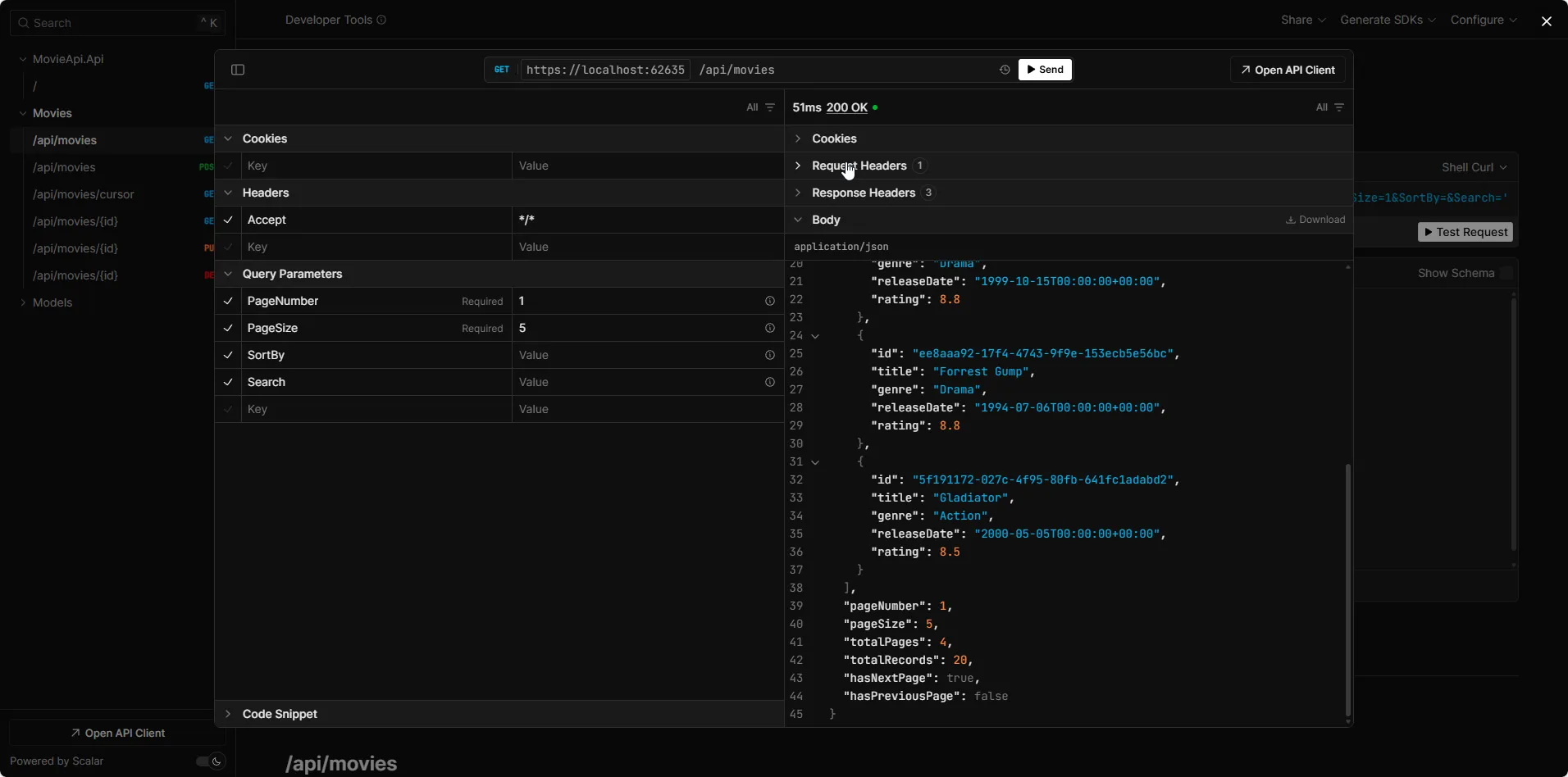
Pagination + Sorting
GET /api/movies?pageNumber=1&pageSize=5&sortBy=rating descReturns the top 5 highest-rated movies. The Shawshank Redemption (9.3) comes first, followed by The Godfather (9.2).
You can also sort by multiple columns:
GET /api/movies?pageNumber=1&pageSize=10&sortBy=genre asc,rating descThis groups movies by genre alphabetically, with the highest-rated movie first within each genre.
Pagination + Sorting + Searching
GET /api/movies?pageNumber=1&pageSize=5&sortBy=rating desc&search=sci-fiThis searches for movies with “sci-fi” in the title or genre, sorts by rating descending, and returns the first page. You should see Inception (8.8), The Matrix (8.7), Interstellar (8.7), and other sci-fi films.
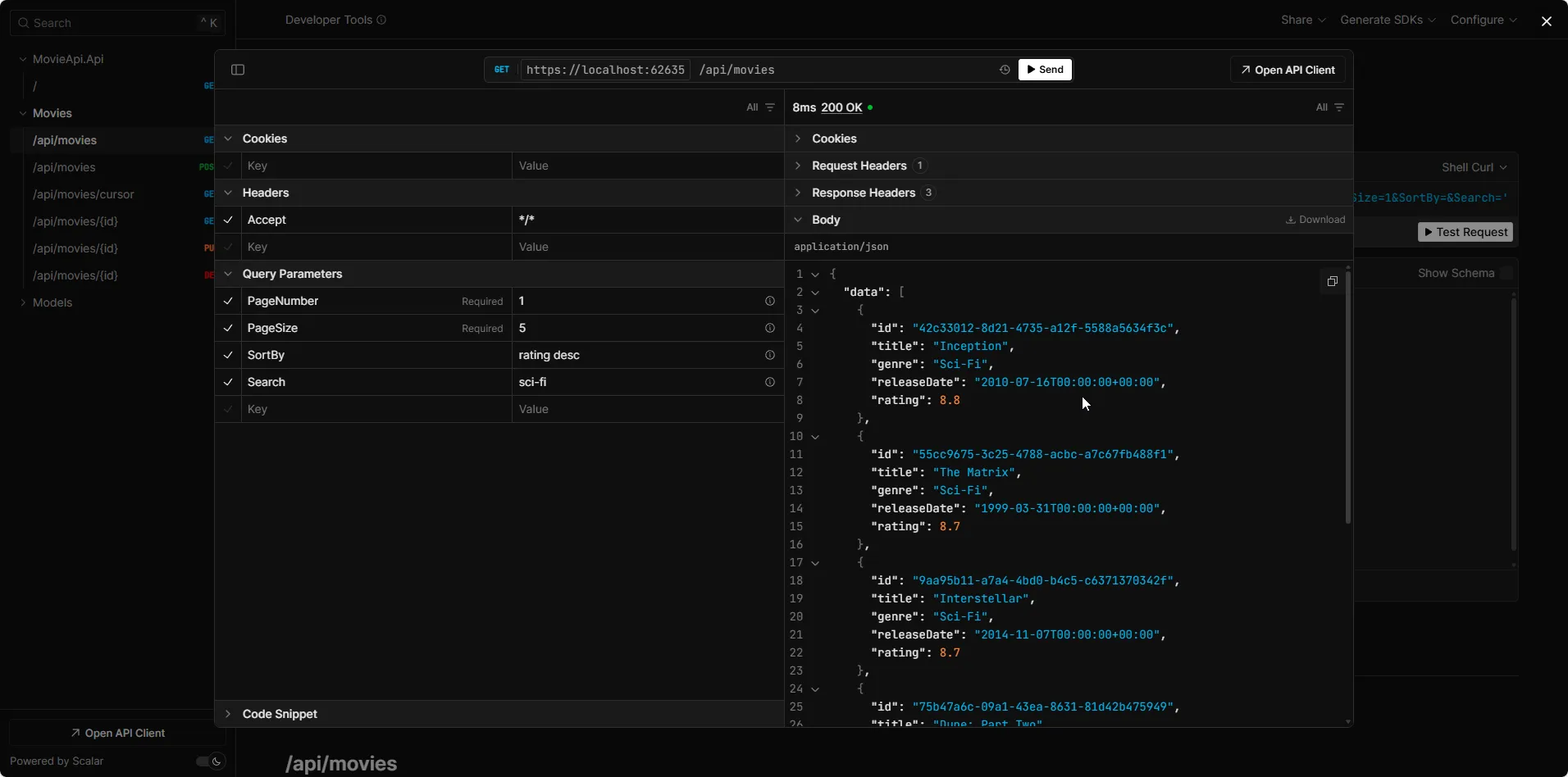
All three features compose seamlessly. The query goes to PostgreSQL as a single optimized SQL statement: search with ILIKE, sort with ORDER BY, paginate with OFFSET and LIMIT.
Keyset Pagination: The Faster Alternative for Large Datasets
The offset pagination I implemented above works great for most APIs. But it has a performance weakness: as the page number increases, the database still has to scan and skip all previous rows. Requesting page 1,000 with a page size of 10 means the database processes 10,000 rows and discards 9,990 of them.
Keyset pagination (also called cursor-based pagination) avoids this problem entirely. Instead of using OFFSET, it uses a WHERE clause to start after the last record from the previous page. According to Microsoft’s EF Core pagination documentation, keyset pagination is the recommended alternative for large datasets.
How It Works
Instead of “skip 100 rows, take 10”, keyset pagination says “give me the next 10 rows after this specific value”:
// Offset pagination - gets slower as offset growsvar page = await context.Movies    .OrderBy(m => m.Title)    .Skip(1000)    .Take(10)    .ToListAsync();
// Keyset pagination - constant speed regardless of positionvar page = await context.Movies    .OrderBy(m => m.Title)    .Where(m => string.Compare(m.Title, lastTitle) > 0)    .Take(10)    .ToListAsync();
The keyset approach is efficient because an index on Title lets the database jump directly to the right position without scanning previous rows.
Implementation
Here’s how you’d add a keyset-paginated endpoint to the Movie API. I’ll use the Created timestamp from EntityBase as the cursor, ordering newest first:
// In MovieEndpoints.csmovieApi.MapGet("/cursor", async (    MovieDbContext db,    DateTimeOffset? after,    int pageSize = 10,    CancellationToken cancellationToken = default) =>{    pageSize = Math.Clamp(pageSize, 1, 50);
    var query = db.Movies        .AsNoTracking()        .OrderByDescending(m => m.Created)        .AsQueryable();
    if (after.HasValue)    {        query = query.Where(m => m.Created < after.Value);    }
    var items = await query        .Take(pageSize + 1)        .Select(m => new MovieDto(m.Id, m.Title, m.Genre, m.ReleaseDate, m.Rating))        .ToListAsync(cancellationToken);
    var hasMore = items.Count > pageSize;    var data = hasMore ? items[..pageSize] : items;
    return TypedResults.Ok(new    {        Data = data,        HasNextPage = hasMore    });});
The trick is fetching pageSize + 1 records. If the result contains more than requested, there’s a next page. The client passes the Created value of the last returned item as the after cursor on the next request.
Offset vs Keyset: When to Use Which
| Aspect | Offset Pagination | Keyset Pagination |
|---|---|---|
| Implementation | Simple - Skip() + Take() | Moderate - requires cursor tracking |
| Jump to page | Yes - request any page number | No - sequential navigation only |
| Performance at depth | Degrades with large offsets | Constant - always fast |
| Concurrent data changes | May skip or duplicate rows | Stable - no missed records |
| Best for | Admin dashboards, tables with page numbers | Infinite scroll, feeds, mobile apps |
| Database requirement | None special | Index on cursor column(s) |
The recommendation: Use offset pagination for most APIs, especially those with traditional page-number navigation. Switch to keyset pagination when you’re dealing with very large datasets (100K+ rows), real-time feeds, or infinite scroll interfaces where users never jump to a specific page.
Performance Tips for Pagination at Scale
Add Indexes for Sorted and Searched Columns
Pagination without proper indexes is like searching a phone book page by page instead of using the alphabetical tabs. If you’re sorting by Rating or searching by Title, those columns need indexes.
Update your MovieConfiguration.cs to include additional indexes:
// Add inside the Configure methodbuilder.HasIndex(m => m.Genre);builder.HasIndex(m => m.Rating);builder.HasIndex(m => m.Created);Then create and apply the migration:
dotnet ef migrations add AddPaginationIndexesdotnet ef database updateFor composite sorts like genre asc, rating desc, a composite index provides the best performance:
builder.HasIndex(m => new { m.Genre, m.Rating });Always Use AsNoTracking for Read Queries
I’m already using AsNoTracking() in the service, and it’s critical for paginated endpoints. Change tracking adds memory overhead for every entity EF Core loads. When you’re returning paginated data, you’re never going to modify those entities, so skip the tracking.
Enforce a Maximum Page Size
I’m using Math.Clamp(filter.PageSize, 1, 50) to cap page size at 50. Without this guard, a client could request ?pageSize=1000000 and nuke your database. Always set an upper bound.
Project Before Materializing
Notice the code applies .Select(m => new MovieDto(...)) before .ToListAsync(). This tells EF Core to only fetch the columns you need from the database (the DTO fields), rather than loading every column of the Movie entity and mapping in memory. This reduces both database I/O and memory allocation.
Key Takeaways
- Always paginate list endpoints - returning unbounded datasets is a performance and security risk.
- Return pagination metadata in the response body -
totalRecords,totalPages,hasNextPage, andhasPreviousPagegive clients everything they need. - Use
IQueryable<T>extension methods -ApplyPagination,ApplySort, andApplySearchkeep your service layer clean and your logic reusable. - Validate sort properties against the entity’s actual properties to prevent invalid column errors.
- Use offset pagination for most APIs and keyset pagination for large datasets or infinite scroll scenarios.
- Add database indexes on columns used for sorting and searching. This is the single biggest performance improvement.
What is pagination in ASP.NET Core Web API?
Pagination is a technique where the API returns data in pages instead of all at once. The client sends a page number and page size as query parameters, and the server uses Skip() and Take() on IQueryable to return only the requested subset. In EF Core 10, this translates to SQL OFFSET and LIMIT clauses, so the filtering happens at the database level.
What is the difference between offset pagination and keyset pagination?
Offset pagination uses Skip and Take to skip a number of rows and return the next batch. It supports jumping to any page but gets slower as the offset grows because the database must scan all skipped rows. Keyset pagination uses a WHERE clause to start after the last record from the previous page. It has constant performance regardless of position but only supports forward and backward navigation, not jumping to a specific page.
How do you implement sorting in ASP.NET Core Web API?
Install the System.Linq.Dynamic.Core NuGet package, which allows you to pass sort expressions as strings to the OrderBy method. Create an extension method on IQueryable that validates the requested sort columns against the entity's properties, then applies the sort using Dynamic LINQ. The client sends a query parameter like sortBy=rating desc,title asc and the server dynamically applies the ORDER BY clause.
How do you add search functionality to a .NET API?
Create an extension method on IQueryable that applies a WHERE clause using EF.Functions.ILike for PostgreSQL (case-insensitive) or EF.Functions.Like for SQL Server. The method checks if the search term appears in one or more text columns using pattern matching with wildcards. EF Core parameterizes the search value, preventing SQL injection.
Should I use Skip and Take or keyset pagination for large datasets?
For datasets under 100,000 rows and APIs with traditional page-number navigation, offset pagination with Skip and Take works well. For very large datasets, real-time feeds, or infinite scroll interfaces, keyset pagination is recommended because its performance does not degrade with depth. Microsoft's official EF Core documentation recommends keyset pagination as the preferred approach for large datasets.
How do you combine pagination, sorting, and searching in a single API endpoint?
Create a query filter class with properties for PageNumber, PageSize, SortBy, and Search. Use the AsParameters attribute in Minimal APIs to bind query string values to this class. In the service, apply the operations in order: search first to reduce the dataset, count for total records, sort to order results, then paginate with Skip and Take. Build each operation as an IQueryable extension method for clean and reusable code.
What is the performance impact of offset pagination on large tables?
Offset pagination degrades linearly with the offset value. Requesting page 1000 with page size 10 means the database must scan 10,000 rows and discard 9,990 of them. On a table with millions of rows, deep pagination can take seconds per request. Adding proper indexes helps but does not eliminate the fundamental OFFSET scanning problem. For deep pagination on large tables, switch to keyset pagination.
How do you return pagination metadata in an API response?
Create a generic PagedResponse wrapper class with properties for Data (the items), PageNumber, PageSize, TotalRecords, TotalPages, HasNextPage, and HasPreviousPage. Return this wrapper from your API endpoint. Modern APIs return metadata in the response body alongside the data rather than in custom HTTP headers like X-Pagination, because it is easier for clients to parse and works with any HTTP client.
Common Issues & Troubleshooting
System.Linq.Dynamic.Core throws ParseException on sort
Symptom: The API returns a 500 error with ParseException: No property or field 'xyz' exists in type 'Movie'.
Root Cause: The client passed a sort column name that doesn’t exist on the entity.
Fix: The ApplySort extension validates property names before passing them to Dynamic LINQ. If you see this error, make sure you’re using the extension method (not calling OrderBy() directly with user input). Valid sort columns for the Movie entity are: Title, Genre, ReleaseDate, Rating, Id, Created, LastModified.
EF.Functions.ILike not found
Symptom: Compiler error: 'DbFunctions' does not contain a definition for 'ILike'.
Root Cause: ILike is PostgreSQL-specific and comes from the Npgsql provider.
Fix: Make sure you have the Npgsql.EntityFrameworkCore.PostgreSQL package installed (version 10.0.0 for .NET 10). If you’re using SQL Server, replace ILike with Like: EF.Functions.Like(m.Title, $"%{search}%").
Pagination returns empty data but TotalRecords is correct
Symptom: The API returns data: [] with totalRecords: 20 and totalPages: 2.
Root Cause: The requested page number exceeds the total pages. For example, ?pageNumber=5&pageSize=10 with 20 records only has 2 pages.
Fix: The client should check hasNextPage before requesting the next page. Optionally, you can add a guard in the service that clamps pageNumber to the valid range: pageNumber = Math.Min(pageNumber, totalPages).
Sort by related entity property fails
Symptom: Sorting by a property from a related entity (e.g., ?sortBy=director.name) throws an error.
Root Cause: The ApplySort method validates against direct properties of the entity only. Nested property paths aren’t supported by the current implementation.
Fix: For sorting by related entity properties, you would need to include navigation properties in your IQueryable (via .Include()) and extend the validation logic to support dot-notation property paths. This is an advanced scenario. For most APIs, sorting by direct properties is sufficient.
Summary
I took the basic GetAll endpoint and transformed it into a production-ready, queryable endpoint that supports pagination, dynamic multi-column sorting, and case-insensitive searching, all composing into optimized SQL queries via EF Core 10.
The key pattern is building reusable IQueryable<T> extension methods that you can apply to any entity in your application. This keeps your service methods clean and your query logic testable.
I also explored keyset pagination as a high-performance alternative for large datasets and covered essential performance tips including database indexes, AsNoTracking(), and page size guards.
The complete source code is available on GitHub. Feel free to clone it and experiment!
If you found this guide helpful, share it with your colleagues. What other features should I add to this Movie API next? Drop a comment and let me know.
Happy Coding :)




What's your Feedback?
Do let me know your thoughts around this article.