


To convert HTML to PDF in C#, pass the markup to a Chromium based rendering engine and save the bytes it hands back. With IronPDF 2026.8.1 on .NET 10, that is three lines: create a ChromePdfRenderer, call RenderHtmlAsPdfAsync, write out BinaryData. No Office install, no external binary, no browser to ship with your app.
var renderer = new ChromePdfRenderer();var pdf = await renderer.RenderHtmlAsPdfAsync("<h1>Hello PDF</h1>");await File.WriteAllBytesAsync("hello.pdf", pdf.BinaryData);That snippet works, and it is also the easy part.
Hardly anyone starts an invoice template from a blank file now. You ask a model for one, and what comes back looks finished: Grid layout, a clean type scale, a line item table structured the way you would have structured it. Then you render a real order with 46 lines instead of three, open page two, and find out which half of that template was only ever designed for a screen.
That gap is what this article is about. The model gets you most of the way, and the part it misses is CSS Paged Media, which almost none of the HTML it learned from ever used. So: the prompt I use to draft a template, then what actually breaks when I strip the print rules and re-render the same invoice, which is not the list you usually get handed. Two of the five rules everyone repeats turn out to do nothing. After that, the real invoice endpoint built around the ones that matter, including two things that usually get skipped: what rendering on the request thread does to the rest of your API, and when this whole approach is the wrong choice.
Everything here runs. The complete solution is on GitHub - .NET 10, the new .slnx solution format, Scalar instead of Swagger, and a seeded 46 line invoice so you can watch the page break rules actually doing something.
What do I need before starting?
The .NET 10 SDK and an IronPDF license key. I tested everything here on SDK 10.0.302, runtime 10.0.10.
IronPDF is a commercial library, and the key is not optional. Without one you get sandbox mode: it renders only in a Development environment with a debugger attached, so dotnet run, dotnet test and CI all throw a LicensingException instead of giving you a file, and anything that does render carries a watermark on every page. The 30 day trial key is free and has no restrictions, so grab one before you start.
Add the package:
dotnet add package IronPdfI keep my key in user secrets rather than the appsettings file, so it never reaches source control:
cd InvoicePdf.Apidotnet user-secrets set "IronPdf:LicenseKey" "YOUR-KEY-HERE"Then apply it once at startup, before anything builds a renderer:
var licenseKey = builder.Configuration["IronPdf:LicenseKey"];if (!string.IsNullOrWhiteSpace(licenseKey)){ IronPdf.License.LicenseKey = licenseKey;}Those two lines are not optional. IronPDF only picks up a key automatically when it is stored under the flat name IronPdf.LicenseKey, so a nested config section is invisible to it. Reading the value through IConfiguration has a nice side effect: a container can supply the same key as an environment variable and nothing in the code changes. If the output still looks wrong, check IronPdf.License.IsLicensed before you start debugging your CSS.
What are the three ways to feed HTML into a PDF renderer?
There are three inputs, and picking the wrong one is the most common reason people end up with missing CSS. A string carries no base path. A file resolves relative assets from its own folder. A URL renders whatever the browser would render, including anything JavaScript adds after the page loads.
var renderer = new ChromePdfRenderer();
// 1. From an HTML string. Fast, self-contained, no disk access.var fromString = await renderer.RenderHtmlAsPdfAsync("<h1>Invoice</h1>");
// 2. From a file. Relative <img> and <link> paths resolve from the file's folder.var fromFile = await renderer.RenderHtmlFileAsPdfAsync("Invoices/Templates/invoice.html");
// 3. From a URL. Runs scripts, follows redirects, waits on the network.var fromUrl = await renderer.RenderUrlAsPdfAsync("https://codewithmukesh.com/");
await File.WriteAllBytesAsync("invoice.pdf", fromString.BinaryData);
The string overload is the one you want in a web API, with one catch. Relative paths have nothing to resolve against, so <img src="logo.png"> quietly renders as a broken image box. Pass a base path, inline the asset as a data URI, or use the file overload.
The URL overload looks convenient, but I would avoid it inside an API. You are making an HTTP call to your own app from inside a request that app is already serving. Auth cookies do not travel with it, a busy thread pool can deadlock waiting on itself, and a slow page turns into a slow PDF.
Which renderer settings actually matter?
Five of them do most of the work.
var renderer = new ChromePdfRenderer();var options = renderer.RenderingOptions;
options.CssMediaType = PdfCssMediaType.Print;options.PaperSize = PdfPaperSize.A4;
// Without this, Chromium strips every background color and the dark table// header renders as black text on white.options.PrintHtmlBackgrounds = true;
// The template declares its own @page margins. By default the values on// RenderingOptions win and silently override the CSS.options.CssPageRulePolicy = CssPageRulePolicy.CssPageWin;
// Static markup. No scripts to run, no reason to pay for a render delay.options.EnableJavaScript = false;
CssPageRulePolicy is the one that costs people an afternoon. You write a careful @page { margin: 18mm 14mm 24mm 14mm; } rule, the output ignores it, and nothing in the markup tells you why. The library’s own margin properties win unless you say otherwise.
Build the renderer once and register it as a singleton. The ChromePdfRenderer object is cheap, but the Chromium instance behind it is not, and creating one per request is the easiest way to make a PDF endpoint feel slow.
builder.Services.AddSingleton<InvoiceHtmlBuilder>();builder.Services.AddSingleton<InvoicePdfRenderer>();There is a catch that comes with the singleton, and it is worth knowing before it bites you in production. RenderingOptions is shared mutable state, and the footer in this sample carries the invoice number, so two renders running at the same time would stamp each other’s documents. I put a SemaphoreSlim(1, 1) around the render so only one runs per renderer instance:
await _gate.WaitAsync(cancellationToken);try{    _renderer.RenderingOptions.TextFooter = new TextHeaderFooter { /* ... */ };
    var pdf = await _renderer.RenderHtmlAsPdfAsync(html);    return pdf.BinaryData;}finally{    _gate.Release();}
You give up less than it sounds. A render is a full Chromium layout pass, so running several of them through one instance does not get them done any faster. It is also the reason for the queue further down this article.
Can Claude write my invoice template?
Yes, and it is genuinely good at it. Once, at design time. Then you read what came back, fix what it got wrong, and commit it as a static file in the repo like any other asset.
Here is the prompt, copy it as it is:
Write a single-file HTML invoice template for A4 print output.CSS Grid for the masthead and the seller/buyer blocks. One <table> forline items with columns: SKU, description, qty, unit price, discount,amount. A totals block with subtotal, discount, tax, and grand total.Neutral professional styling, no external assets, no JavaScript.Use {{Token}} placeholders for every value.The last two lines do most of the work. “No external assets, no JavaScript” keeps the result as one self contained file you can render from a string, which is exactly what you want inside an API. “{{Token}} placeholders for every value” means the output drops straight into a replace loop instead of needing a second pass to make it fillable.
What comes back is a strong first draft, and it deserves credit. Sensible Grid for the masthead, a readable type scale, a line item table structured the way you would have structured it, numeric columns already right aligned. On screen it looks finished. Page one of the render looks finished too.
Page two is where it falls apart, and that is the part worth knowing about before you commit anything.
What does the model always get wrong?
I tested this instead of assuming it. I took the committed template, stripped every paged-media rule you get told to add, and re-rendered the same 46 line invoice against the same renderer. Two of the five made no difference at all, and why they made no difference is worth more than the checklist.
Here is what actually breaks, worst first.
1. There is no real @page rule.
This is the one that always bites. The generated template sizes itself for a screen: pixel padding on the body, font sizes picked for a monitor. It still renders, but the margins are whatever the renderer defaulted to and nothing reserves space for a footer. Removing this rule from my template moved the margins and pushed pagination by a full row.
@page { size: A4; margin: 18mm 14mm 24mm 14mm;}The bottom margin is deliberately larger than the other three. That is where the page numbers go, and without the extra space the footer draws on top of the last line item.
2. Rows and the totals block split across a page boundary.
Nothing stops the renderer breaking wherever the page runs out, which puts a SKU and description on page one and its price on page two. The totals block is worse: a subtotal stranded at the bottom of one page with the grand total on the next reads as a mistake to whoever receives the invoice.
table.lines tbody tr { break-inside: avoid; }.summary { break-inside: avoid; }Being straight about this one: in my 46 line sample the page break happened to land between two rows, so removing the rule changed nothing visible. It costs one line and it is the difference between a clean document and a sliced one the first time a description wraps to two lines. Cheap insurance rather than a guaranteed bug.
One trap: break-inside: avoid cannot be honored on an element taller than a page, so the engine breaks it anyway. Apply it to rows and small blocks only.
3. The money column sits ragged.
Most fonts give digits different widths, so a 1 is narrower than an 8.
.num { text-align: right; font-variant-numeric: tabular-nums; white-space: nowrap;}Also honest: this is subtle. Right-aligning the column already lines up the last digit, so what actually drifts is the currency symbol at the front. You see it clearly at print size on a long column and barely at all on screen. nowrap matters more than it looks, because a wrapped amount changes the row height.
4. Two rules that do nothing, and everyone repeats them anyway.
Strip these two and the render does not change. I checked.
thead { display: table-header-group }is already the browser default. It is in the HTML standard’s own stylesheet, so writing it again is a no-op. My header repeated on page two with the rule removed. wkhtmltopdf repeatstheadby default too, so a broken header is not a reason to migrate off it either. Its Qt WebKit engine is a 2012 era fork that predates CSS Grid and Flexbox, which is the real reason to leave, and the repository was archived in January 2023.print-color-adjust: exactdid not matter either, because the renderer option covers it.PrintHtmlBackgrounds = trueis already set further up this article, and with it on the dark header band survives whether or not the CSS is there. Keep the CSS anyway if the same template is ever printed straight from a browser, where you have no renderer option to set.
The header breaks when something overrides it.
This is the failure worth checking for. Responsive table CSS commonly makes thead a block so it can be restyled on small screens, and a model that has seen a lot of that will hand it to you inside an otherwise print-ready template:
/* Looks harmless. Destroys paged output. */table.lines thead { display: block; }I rendered it. Page two opens with a bare row of numbers and no column labels at all, the column widths collapse because a block thead no longer participates in the table’s layout, and the invoice grows from two pages to three.
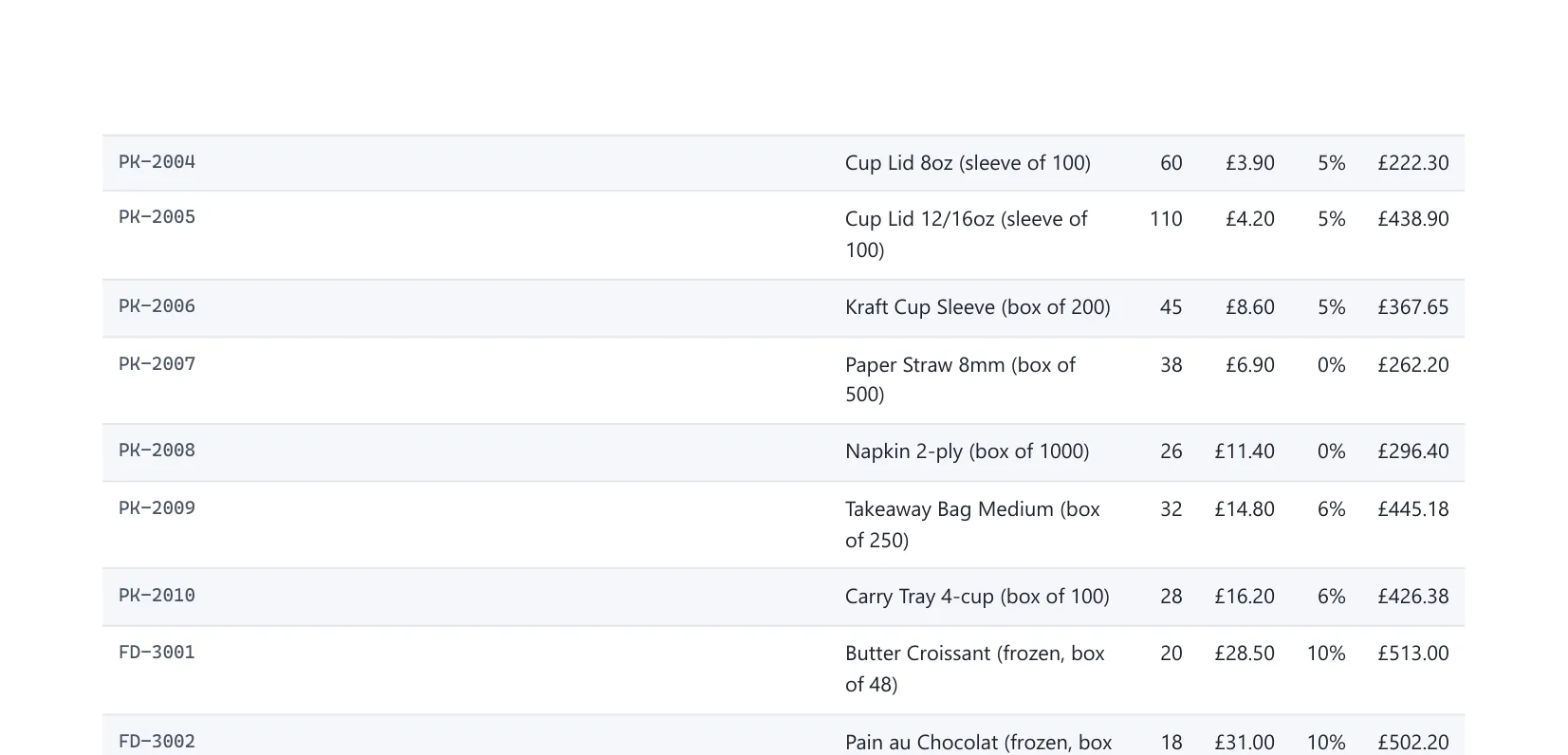
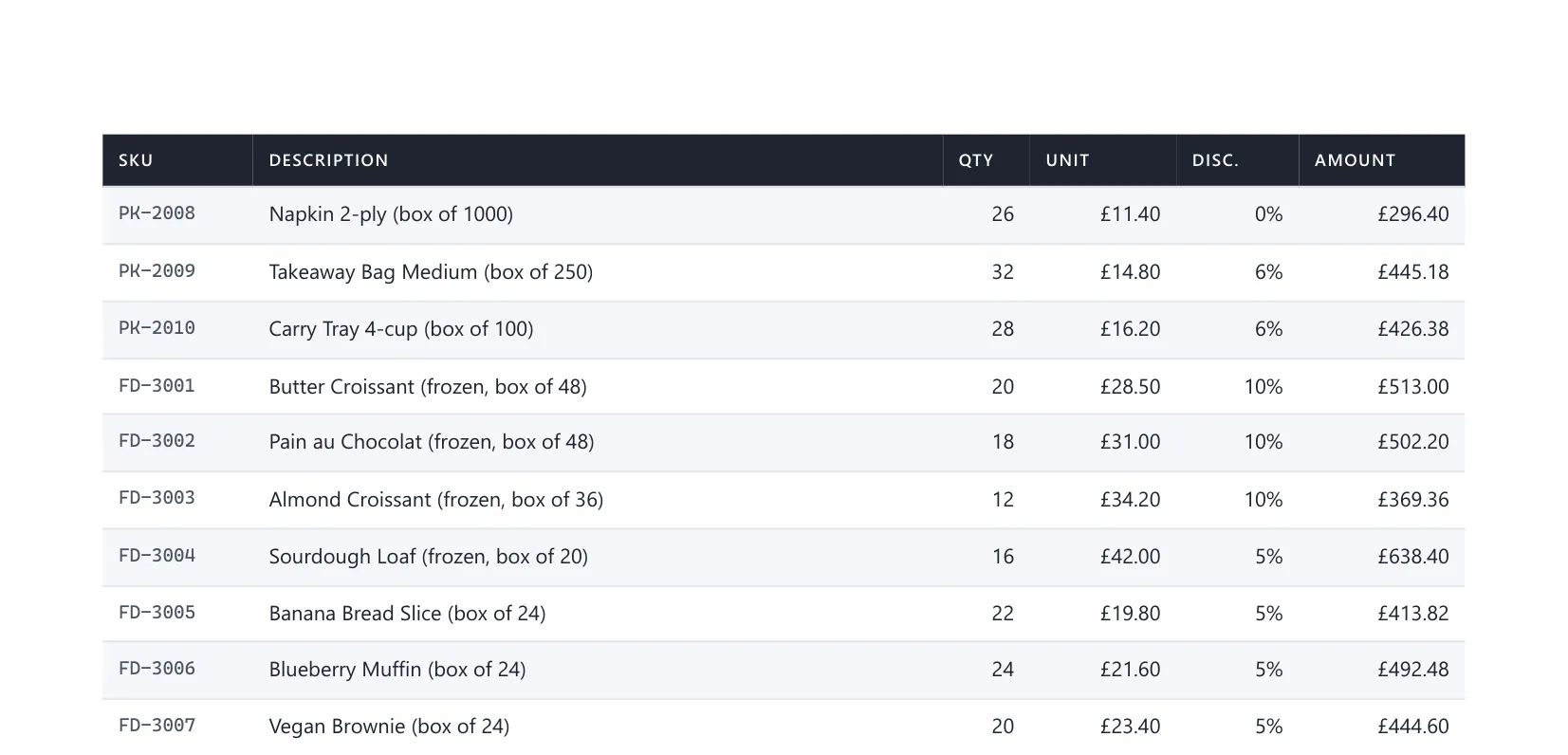
Same invoice, same renderer, one line of CSS between them. That is the wall of unlabeled numbers people blame on a missing rule, and it is caused by an added one.
So the review is not “paste in these five rules”. It is: render a document long enough to span pages, open page two, and check nothing in the stylesheet is fighting the table. Three of the five earn their place, two are true by default, and the one that actually breaks a multi page invoice is a line somebody added.
Where else does AI fit in this pipeline?
Three more questions come up once you have a drafted template: how to stop the agent guessing at the library’s API, whether the model should produce the PDF itself, and whether it can drive the renderer.
How do I get an agent to write correct IronPDF code?
Point it at the vendor’s skill file before you ask for code.
The template prompt above needs no help, because HTML and CSS are the most heavily represented thing in any model’s training data. Library APIs are the opposite. Version specific method names are exactly where a model fills a gap with something plausible, and a call that looks right but does not exist costs you more time than the draft saved.
IronPDF publishes two files for this:
https://ironpdf.com/llms.txtis the index. It follows the llms.txt convention: a short markdown file at a known path listing what is worth reading, so an agent does not have to scrape a marketing page to find the docs.https://ironpdf.com/skill.mdis the payload. It is a drop inSKILL.md, roughly 2,000 words, with the frontmatter that tells the tool when to load it.
For Claude Code, that is one download:
mkdir -p .claude/skills/ironpdfcurl -o .claude/skills/ironpdf/SKILL.md https://ironpdf.com/skill.mdSKILL.md is an open format rather than a Claude Code feature, so Cursor and Copilot read the same file from their own rules folder.
Claude Code Skills
How SKILL.md files work - the frontmatter fields, how a tool decides to load one, and where they live in a .NET project.
What it actually buys you is the version and platform detail a model has no reliable way to know: that Linux needs IronPdf.Linux and Apple Silicon needs IronPdf.MacOs.ARM rather than the plain IronPdf package every Windows tutorial shows, that the license key has to be set before the first render or every page comes out watermarked, and that IronPdf.Universal is a separate product line with an incompatible API that must never be mixed in. It also carries an explicit instruction not to invent a member, and points at the XML documentation shipped inside the NuGet package as the authority for the installed version.
One limit worth being straight about. This fixes the API half. It does not fix the half this article is about: page two of your invoice breaks on CSS Paged Media, which is not IronPDF’s API and is not in that file. The renderer was never the thing getting it wrong.
Should the model generate the PDF at runtime?
No, and this is the one place I would push back on how AI document generation usually gets demoed. Draft the template with a model at design time, render it with code at request time.
Three reasons, in the order they will hurt you. Layout stops being deterministic, so two invoices for the same order can come out different, and nobody wants to explain that to a customer. You pay latency and tokens on every single render, on a document whose structure has not changed since you committed it. And when a client disputes a total six months later, “the model produced that layout” is not an answer that survives the conversation.
The template is the part that benefits from a model, because designing it is a one time creative job. Filling it is a loop over line items, and code has been good at that for forty years.
Can Claude call IronPDF directly?
Yes. The renderer is a service with one job, so exposing it as a tool an agent can call is mostly wiring. With the official C# SDK it is two attributes. This is a sketch rather than part of the sample repo, and it leans on the InvoicePdfRenderer built further down:
[McpServerToolType]public class InvoiceTools(InvoicePdfRenderer renderer){    [McpServerTool(Name = "render_invoice_pdf")]    [Description("Renders an existing invoice to a PDF and returns the saved file path.")]    public async Task<string> RenderAsync(        [Description("Invoice number, for example INV-2026-0841.")] string number,        CancellationToken cancellationToken)    {        var invoice = InvoiceStore.GetSample(number);        var pdf = await renderer.RenderAsync(invoice, cancellationToken);        var path = Path.Combine(Path.GetTempPath(), $"{invoice.Number}.pdf");
        await File.WriteAllBytesAsync(path, pdf, cancellationToken);        return path;    }}
Keep the tool narrow. render_invoice_pdf taking an invoice number beats a clever do_something_with_pdfs that takes free text, because the model picks tools by reading the description and a vague one gets called at the wrong moment. That closes the loop most AI document demos leave open: the model writes the HTML, the tool renders it, and what comes back is an actual file rather than a wall of markup.
The full build, with the server registration and a real transcript of a working call, is its own article. It is coming next.
So: a model at design time, code at request time. The rest of this article is the code half.
How do I build an invoice template that survives printing?
Use CSS Grid and Flexbox for layout, and a real <table> only for the line items. Chromium handles modern CSS in print mode the same way it does on screen, so old style nested layout tables buy you nothing.
Here is the masthead and line item table from the committed invoice.html, trimmed to the parts that matter. The print rules from the last section are already applied:
<style>  @page { size: A4; margin: 18mm 14mm 24mm 14mm; }
  body {    font-family: "Segoe UI", "Helvetica Neue", Arial, sans-serif;    font-size: 10.5px;    /* Redundant with PrintHtmlBackgrounds above, which is what actually       keeps this header dark. Kept so the template also prints correctly       straight from a browser. */    print-color-adjust: exact;    -webkit-print-color-adjust: exact;  }
  /* Layout with Grid, not a nested table. */  .masthead {    display: grid;    grid-template-columns: 1fr auto;    gap: 24px;    border-bottom: 2px solid #1f2430;  }
  table.lines { width: 100%; border-collapse: collapse; }
  table.lines th {    background: #1f2430;    color: #ffffff;    text-transform: uppercase;    text-align: left;    padding: 7px 8px;  }
  .num {    text-align: right;    /* Digits line up in columns. Non-negotiable on a money document. */    font-variant-numeric: tabular-nums;  }</style>
With a key applied, that markup renders like this:
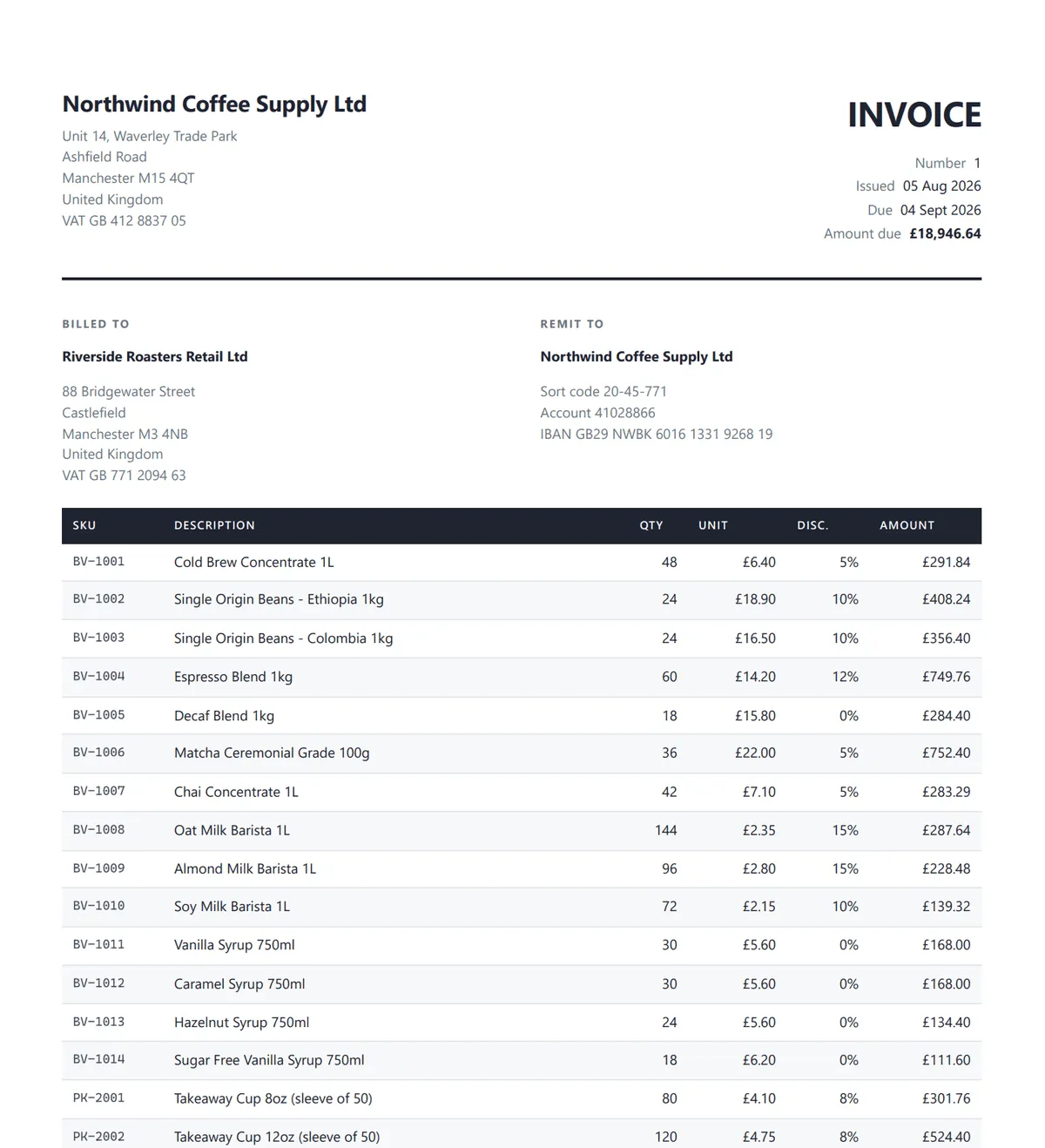
The template is filled with plain {{Token}} replacement, and every value goes through WebUtility.HtmlEncode first. Product descriptions and customer names are user data going into an HTML document. An unencoded & in “Smith & Sons Ltd” breaks the markup, and a <script> tag in a product description is a much bigger problem than a broken invoice.
Minimal APIs in ASP.NET Core
The endpoint layer used throughout this article - route groups, typed results, and the patterns that keep Minimal APIs readable past ten endpoints.
How do I format currency correctly on a generated invoice?
Format money against the culture that matches the invoice currency. A container in a US region will happily render a UK invoice with dollar signs, and no unit test is going to catch it.
private static readonly Dictionary<string, string> CurrencyCultures = new(StringComparer.OrdinalIgnoreCase){    ["GBP"] = "en-GB",    ["USD"] = "en-US",    ["EUR"] = "de-DE",    ["INR"] = "en-IN",    ["JPY"] = "ja-JP",};
private static CultureInfo ResolveCulture(string currencyCode) =>    CurrencyCultures.TryGetValue(currencyCode, out var name)        ? CultureInfo.GetCultureInfo(name)        : CultureInfo.InvariantCulture;
// Then, inside Build(invoice):var culture = ResolveCulture(invoice.CurrencyCode);string Money(decimal value) => value.ToString("C", culture);
The "C" standard numeric format gives you £1,234.50 for en-GB and 1.234,50 € for de-DE: right symbol, right separators, right symbol position. String concatenation gets the first one right and the second one wrong.
Two rules go with it. Use decimal for money, never double, because binary floating point cannot represent 0.1 exactly and an invoice that is off by a penny becomes a support ticket. And round each line as you calculate it, instead of rounding once at the end:
public decimal DiscountAmount => decimal.Round(GrossAmount * DiscountRate, 2, MidpointRounding.AwayFromZero);Totals in the sample are computed properties over the line items rather than stored fields, so the summary block can never drift out of sync with the rows above it.
Environment-Based Configuration in ASP.NET Core
Where the license key and per-environment settings belong, and why the server's locale should never be an input to your output.
How do I add page numbers to a generated PDF?
The template has no idea how many pages it will turn into, so page numbers cannot come from the HTML. The engine only knows the count once it has laid the document out. Configure the footer on the renderer instead:
// In RenderAsync, per invoice - the footer text carries the invoice number._renderer.RenderingOptions.TextFooter = new TextHeaderFooter{    LeftText = $"Invoice {invoice.Number}",    RightText = "Page {page} of {total-pages}",    DrawDividerLine = true,    FontSize = 8,};
// In CreateRenderer, once - reserve space for the footer so it never sits// on top of a line item.options.MarginBottom = 16;options.UseMarginsOnHeaderAndFooter = UseMargins.All;
{page} and {total-pages} are placeholders the renderer replaces once pagination is done. The MarginBottom line matters as much as the footer itself. Without that reserved space, the footer draws on top of the last table row instead of below it.
If you need a logo or real styling in the footer, there is an HtmlFooter option that takes markup. It costs an extra render pass per page.
How do I return a PDF from a Minimal API endpoint?
Results.File with the application/pdf content type and a filename. That is the whole thing:
invoices.MapGet("/{number}/pdf", async (    string number,    InvoicePdfRenderer renderer,    CancellationToken cancellationToken) =>{    var invoice = InvoiceStore.GetSample(number);    var pdf = await renderer.RenderAsync(invoice, cancellationToken);
    return Results.File(pdf, "application/pdf", $"{invoice.Number}.pdf");}).WithName("GetInvoicePdf").Produces(StatusCodes.Status200OK, contentType: "application/pdf");
Passing a filename sets Content-Disposition: attachment, so the browser downloads it. Drop the filename and it opens inline in the browser’s PDF viewer instead, which is a product decision rather than a technical one. Prefer the byte[] or Stream overload over a temp file, which adds disk I/O, something to clean up, and a race between concurrent requests.
This endpoint is correct, and it is where most tutorials stop. It is fine for a handful of invoices a minute. It becomes a problem as soon as that number grows.
What the output should look like
The sample renders INV-2026-0841 as a 62 KB, two page A4 PDF. Check all four of these by hand, because every one of them fails quietly:
- Page 2 opens with a bare row of numbers. Something in the stylesheet overrode
thead. Look fordisplay: blockon it. - Footers read
Page 1 of 2andPage 2 of 2. A literal{page}means the placeholder was never substituted. - Money renders with the wrong currency symbol. The format fell back to the server culture instead of the invoice currency.
- Totals reconcile: £15,788.87 plus 20% VAT £3,157.77 equals £18,946.64.
Why should PDF rendering not happen on the request thread?
Because a render is a full Chromium layout pass. It takes anywhere from a few hundred milliseconds to a few seconds, and it holds on to a thread that could be serving normal traffic. Twenty concurrent invoice downloads slow down every other request on the server too, because the thread pool is busy rendering.
The fix is to accept the request, put the work on a bounded channel, and answer straight away with a job id:
public PdfRenderQueue(int capacity = 100){    _channel = Channel.CreateBounded<RenderJob>(new BoundedChannelOptions(capacity)    {        FullMode = BoundedChannelFullMode.Wait,        SingleReader = false,        SingleWriter = false,    });}
/// <summary>Returns null when the queue is saturated so the endpoint can answer 503.</summary>public Guid? TryEnqueue(Invoice invoice){    var job = new RenderJob(Guid.CreateVersion7(), invoice);
    if (!_channel.Writer.TryWrite(job))    {        return null;    }
    _results[job.Id] = new RenderResult(job.Id, RenderState.Queued, null, null);    return job.Id;}
The bound is the important part. An unbounded queue turns a traffic spike into an out of memory kill: requests keep arriving faster than renders finish, and the process eventually dies holding a few thousand pending invoices. A bounded channel pushes back and lets the API admit that it is busy, which is the same idea behind rate limiting.
Pick the FullMode carefully, because this one is easy to get wrong. With BoundedChannelFullMode.Wait, TryWrite returns false once the channel is full, which is what makes the 503 path above reachable. With DropWrite it returns true and quietly throws the job away, so the caller polls a status endpoint forever for work that is never going to happen.
A BackgroundService drains the queue:
protected override async Task ExecuteAsync(CancellationToken stoppingToken){    await foreach (var job in queue.ReadAllAsync(stoppingToken))    {        queue.Update(new RenderResult(job.Id, RenderState.Running, null, null));
        try        {            var pdf = await renderer.RenderAsync(job.Invoice, stoppingToken);            queue.Update(new RenderResult(job.Id, RenderState.Done, pdf, null));        }        catch (OperationCanceledException) when (stoppingToken.IsCancellationRequested)        {            // Shutting down. Leave the job queued rather than marking it failed.            throw;        }        catch (Exception ex)        {            queue.Update(new RenderResult(job.Id, RenderState.Failed, null, ex.Message));        }    }}
The endpoint returns 202 Accepted with a Location header pointing at the job, and the client polls it. The sample keeps results in a ConcurrentDictionary to keep the code readable. Anything real should put the bytes in blob storage, because a dictionary full of finished PDFs is a memory leak.
IHostedService vs BackgroundService in .NET
The hosting model behind the worker above - lifetime, graceful shutdown, and why swallowing OperationCanceledException during shutdown hides bugs.
Working with AWS S3 using ASP.NET Core
Where finished PDFs belong once you stop holding them in memory - upload, pre-signed download URLs, and lifecycle rules.
My take: when is HTML-to-PDF the wrong approach?
Three kinds of tool solve this, and the right one depends on what you already run and whether you ever need to open a PDF that someone else made.
| Approach | Wins when | Breaks when |
|---|---|---|
| Browser automation (Playwright, Puppeteer) | It is already in your stack for tests, or you need one-off exports and nobody is on call for it | You own the container. You are now shipping and patching a full browser, and it can only create PDFs. It cannot open, merge, sign or fill an existing one |
| PDF library (IronPDF) | Your document is HTML and CSS, you need to edit or merge existing PDFs, and you do not want an external binary in the image | It is commercial. The license is a real line item and needs sign-off before you commit |
| Programmatic builder (QuestPDF) | You want full C# control, compile-time safety over layout, and its Community license covers you | Your document already exists as HTML. You are rewriting a designed template in a C# DSL, and the designer can no longer touch it |
My default for a .NET API where the document starts out as an HTML template is a PDF library, because the template stays a template. A front end developer can edit it, it diffs cleanly in review, and there is no browser in the image.
I would genuinely pick QuestPDF over all of this in two cases: the document is generated purely from data with no design input, or getting the budget approved is going to be harder than writing the code. It is a great library, and a fluent C# API is easier to live with than debugging print CSS. If you end up there after reading this, that is a fine outcome.
Check the license first, though. QuestPDF’s Community license is free under $1M revenue, but it excludes publicly traded and public sector organizations at any revenue, which rules out a lot of enterprise .NET teams.
And if Playwright already runs your end to end tests and you need a weekly export from an internal tool, use what you already have.
Can I just ask an AI to generate the PDF?
This comes up often enough to answer directly rather than add a fourth row to that table, because it is not really a fourth option.
No model renders a PDF. There is no Chromium layout pass running inside an LLM. When a chat tool appears to turn your HTML into a PDF, it is writing code that calls a library and running it in a sandbox you cannot see. The library never left the picture. It moved somewhere you cannot configure, pin a version of, or deploy.
The cost shape is wrong for this job too. A render is a fixed, predictable cost per document: the same template with 46 line items costs the same today and next quarter. A model call is priced per token, so the bill moves with the length of the document and with whatever comes back. That is a variable price for a job whose structure has not changed since you committed it.
There is also a supply chain problem that is easy to miss in review. Generated code reaches for whichever packages appeared most often in its training data, and “most common” is not the same as “still maintained”. An abandoned dependency with nobody patching it, sitting inside the service that produces your financial documents, is a bad trade for the twenty minutes it saved. A generated .csproj rarely gets read as carefully as one somebody typed. This is part of what the skill file above is for: it pins the model to the right package for the target platform instead of letting it guess.
Where a model genuinely wins is the other direction. Generating a document is deterministic work: your data, your template, one correct output. Reading one is not. A supplier sends a PDF invoice in a layout nobody has seen before, and getting the totals out of it takes interpretation, which is the thing models are good at and libraries are bad at.
So the split I would draw runs both ways. The library does the mechanical half, whether that is rendering HTML into a PDF or pulling the text back out of one. The model does the half that needs judgement, which is deciding what that extracted text actually means. Asking it to be the renderer instead spends tokens on work a library already does for a fixed price, and hands you a dependency you did not choose.
What breaks when you put this in Docker?
Chromium needs fonts and native libraries that the dotnet/aspnet base images do not ship. Missing shared objects fail loudly at startup, which is easy to debug. Missing fonts fail quietly: the render succeeds and every character outside the default set comes out as an empty box in an otherwise perfect invoice.
That is the next article in this series. For now: install the font packages your documents need, and render a real document in CI.
Docker Guide for .NET Developers
Multi-stage builds, base image selection, and layer caching - the groundwork before you start adding native dependencies to a .NET image.
Key takeaways
- Render from an HTML string in a web API. A URL render makes your app call itself, loses the auth context, and risks a thread pool deadlock.
CssPageRulePolicy.CssPageWinandPrintHtmlBackgroundsexplain most “my CSS is being ignored” bugs. The first stops the renderer’s margins overriding your@pageblock, the second keeps background colors from being dropped.- Check page two. Every paged-media problem is invisible on a single page preview, so render a document long enough to actually break across pages before you trust a template.
- Format money with
ToString("C", culture)against the invoice currency, and usedecimalthroughout. A US region container will render a UK invoice with dollar signs otherwise. - Reuse one renderer, but serialize renders through it.
RenderingOptionsis shared state, so concurrent renders on a singleton can stamp each other’s headers and footers. - Do not render on the request thread once volume is real. Queue with a bounded
Channel, drain with aBackgroundService, and return202with a job id. - Use a model to draft the template once at design time, review it, and commit it as a static file. Never generate a financial document at runtime: the layout stops being deterministic, you pay latency and tokens per render, and “the model produced that” is not a dispute answer.
- A real
@pageblock,break-inside: avoidandtabular-numsare what a generated template actually misses.thead { display: table-header-group }andprint-color-adjust: exactare cargo cult in a Chromium renderer: the first is the browser default, the second is already covered byPrintHtmlBackgrounds. - A missing header row on page two means something overrode
thead.thead { display: block }from a responsive-table stylesheet kills header repetition and collapses the column widths. Check nothing is fighting the table before you add rules to it. - Exposing the renderer as an agent tool is two attributes. Keep the tool narrow and name it for the job, because a model picks tools by reading the description.
- No model renders a PDF. A chat tool that appears to convert HTML to PDF is running a library in a sandbox you cannot version, configure or deploy. Point the model at interpretation, reading a supplier’s PDF, and leave generation to the library.
Can AI convert HTML to PDF on its own?
Not directly. No language model performs a browser layout pass, so nothing inside the model turns HTML and CSS into a paginated PDF. A chat tool that appears to do it is writing code that calls a PDF library and running it in a hosted sandbox, which means the library is still doing the work, just somewhere you cannot pin a version, configure the renderer, or deploy. Rendering is also the wrong economic shape for a model: a library render is a fixed cost per document, while a model call is billed per token and scales with document length. Generated code also tends to pull in whichever packages were most common in its training data, which is not the same as still maintained. Use a model where the input is unpredictable, such as extracting totals from a supplier PDF you have never seen, and use a library for generating your own documents from your own template.
What is the fastest way to convert HTML to PDF in C#?
Build a Chromium-based renderer once, reuse it, and render from an HTML string you already hold in memory. With IronPDF that is a singleton ChromePdfRenderer and a call to RenderHtmlAsPdfAsync. The two biggest avoidable costs are building a new renderer per request, which starts a fresh browser engine every time, and rendering from a URL, which adds a full HTTP round trip back into your own application first.
Can I convert a Razor view or Blazor component to PDF?
Yes. Render the view to an HTML string first, then pass that string to the PDF renderer. For Blazor, the framework has had a built-in type since .NET 8: create an HtmlRenderer and call RenderComponentAsync inside its Dispatcher to get static markup. For Razor views there is no single built-in API, so use IRazorViewEngine with a StringWriter, or a templating package such as RazorLight. The PDF library never needs to know a view engine was involved.
Why does my CSS look wrong in the generated PDF?
Four causes account for almost all of it. Background colors are dropped unless background printing is enabled on the renderer, which for IronPDF is PrintHtmlBackgrounds. Your @page margin rules are overridden by the renderer's own margin properties unless you set the page-rule policy so CSS wins. Relative asset paths do not resolve when you render from a string, so images and stylesheets silently go missing. And the renderer may be set to screen media rather than print media, so your print stylesheet never applies at all.
How do I repeat table headers on every page of a PDF?
Put the header row in a thead element and then leave its display alone. thead { display: table-header-group } is already the browser default, so adding the rule explicitly changes nothing in a Chromium-based renderer. I verified that by removing it and re-rendering a two page invoice: the header still repeated. When a header genuinely stops repeating it is almost always because something overrode the default, typically thead { display: block } carried over from responsive table CSS, which also collapses the column widths. Pair the default with break-inside: avoid on table rows so a single row is never sliced in half at a page break. wkhtmltopdf repeats thead by default too, so header repetition is not a reason to migrate off it. Modern layout is the real reason: its Qt WebKit engine dates from 2012 and has no CSS Grid or Flexbox support at all.
Is there a free way to convert HTML to PDF in .NET?
Yes, with conditions. QuestPDF's Community license is free under $1 million in annual revenue, but it excludes publicly traded companies and public-sector organizations at any revenue, and it uses a fluent C# API rather than HTML templates, so an existing template has to be rebuilt in code. Playwright and PuppeteerSharp are open source and can print a page to PDF, but you take on shipping and patching a full browser in your container. Commercial libraries like IronPDF are paid, and what you buy is HTML template support plus the ability to edit existing PDFs without an external binary in the image.
Why does PDF generation time out under load?
Because each render is a full browser layout pass that holds a thread for hundreds of milliseconds or longer, so concurrent renders on the request thread starve the pool serving all your other traffic. Move rendering off the request path: accept the request, write the job to a bounded Channel, return 202 Accepted with a job id, and drain the queue in a BackgroundService. The bound matters, because an unbounded queue turns a traffic spike into an out-of-memory kill instead of an honest 503.
Can AI generate a print-ready invoice template?
It generates a good first draft. Print readiness is the part it misses. Ask for a single-file A4 template with CSS Grid layout, no external assets, no JavaScript, and token placeholders, and what comes back usually has sensible layout and a clean type scale. What it misses is CSS Paged Media. I tested this by stripping the print rules from a working template and re-rendering: the ones that genuinely matter are a real @page rule with margins, break-inside avoid on rows and the totals block, and tabular-nums on money columns. Two rules commonly recommended do nothing in a Chromium renderer: thead display table-header-group is already the browser default, and print-color-adjust exact is redundant when the renderer prints backgrounds. The failure people blame on a missing header rule is usually an added one, thead display block from a responsive stylesheet, which stops the header repeating and collapses the column widths.
How do I let an AI agent generate PDFs?
Wrap the renderer as a tool and let the agent call it, rather than asking the model to produce the PDF itself. With the official ModelContextProtocol C# SDK that means marking a class with McpServerToolType and a method with McpServerTool, with a Description attribute on the method and each parameter so the model knows when to call it. Keep the tool narrow and specific, such as render_invoice_pdf taking an invoice number, because a vague multi-purpose tool gets called at the wrong moment. The model writes or picks the HTML, the tool renders it with code, and the agent gets back a real file instead of a wall of markup.
Can I generate PDFs inside a Docker container?
Yes, but the ASP.NET Core base images do not include everything a Chromium engine needs. Missing native shared libraries cause a startup exception, which is loud and easy to diagnose. Missing fonts are quieter and worse: the render succeeds and every character outside the default set comes out as an empty box. Install the font packages your documents need and render a real document in CI, because a green build does not prove a correct PDF.
Troubleshooting
- Blank PDF or missing sections. JavaScript is off in the sample. If your template builds content with a script, enable it and set a render delay.
- Images do not appear. You are rendering from a string, so relative paths resolve against nothing. Pass a base path or inline the asset as a data URI.
- The footer overlaps the last table row. Increase
MarginBottomand setUseMarginsOnHeaderAndFooter. - Footers show the wrong invoice number under load.
RenderingOptionsis shared state on a singleton renderer. Serialize renders per instance. - Wrong currency symbol in production. Never rely on
CultureInfo.CurrentCulture. break-inside: avoidis ignored. The element is taller than a page. Apply it to rows and small blocks.- A generated template has huge or wrong margins. There is no
@pagerule, so the model sized the body in pixels for a screen and the renderer used its own defaults. Add a real@pageblock withsizeandmargin, and leave extra room at the bottom for the footer. - The header row vanishes after page 1. Do not add
thead { display: table-header-group }, it is already the default. Search the stylesheet for a rule that overrides it, usuallythead { display: block }carried over from responsive table CSS. The same override collapses your column widths, which is the faster tell.
Summary
Converting HTML to PDF in C# takes three lines. Shipping an invoice endpoint is everything else in this article: print CSS that survives pagination, table headers that repeat, currency formatted against the invoice instead of the server, page numbers from the renderer because only it knows the count, and rendering moved off the request thread once volume is real.
The tool choice matters more than the code. If your document starts out as an HTML template that someone else needs to edit, an HTML-to-PDF library is the right fit. If it is generated purely from data, QuestPDF is probably better. If a browser is already in your stack and volume is low, use what you have.
Grab the solution from the course repo and edit the template until something breaks. These rules only make sense on a document long enough to need them.
Happy Coding :)




What's your take?
Push back, share a war story, or ask the obvious question someone else is wondering. I read every comment.