


Claims-based authorization in ASP.NET Core grants access based on what a user’s claims say, not which group they belong to. A claim is a name-value pair describing the user - department: engineering, email: mukesh@example.com. You store claims with ASP.NET Core Identity, carry them in the JWT, and enforce them with RequireClaim("department", "engineering") on any endpoint. This guide builds all of it on .NET 10.
In the previous article I secured endpoints with roles and ended on a confession: a role inside a JWT is just a claim with an agreed-upon name. This article is where that idea pays off. Once you understand claims, you understand what ASP.NET Core authorization has been doing the whole time - and you unlock checks that roles cannot express.
This is article 2 of my three-part authorization series (roles, claims, then policies), with a working .NET 10 repo you can clone and run. Let’s get into it.
What Is a Claim in ASP.NET Core?
A claim is a name-value pair that states a fact about the user: who they are, not what they may do - that is how Microsoft’s claims-based authorization docs define it too. email: admin@codewithmukesh.com is a claim. department: engineering is a claim. dateofbirth: 1995-04-12 is a claim. The subject of every claim is the user, and each claim is one piece of evidence about them.
Authorization then becomes a question of evidence. Instead of asking “is this user in the ExportManagers group?”, claims-based authorization asks “does this user’s evidence say they belong to a department?”. The endpoint declares what evidence it needs; users who carry it get in.
One user can hold many claims, and multiple claims of the same type are fine - someone can have two department claims if they really work in two departments. That flexibility is exactly what roles lack.
The Anatomy: ClaimsPrincipal, ClaimsIdentity, and Claim
Every authenticated request in ASP.NET Core hands you a ClaimsPrincipal - the User property in controllers, or an injected ClaimsPrincipal parameter in Minimal APIs. The object model has three layers, and it maps one-to-one onto the JWT you already have:
Claim- a single name-value pair:department: engineering.ClaimsIdentity- one identity built from one authentication source, holding a collection of claims. Your validated JWT becomes oneClaimsIdentity.ClaimsPrincipal- the user as a whole, wrapping one or more identities. In a typical API there is exactly one identity inside, so principal and identity feel interchangeable - until you add a second authentication scheme like API keys.
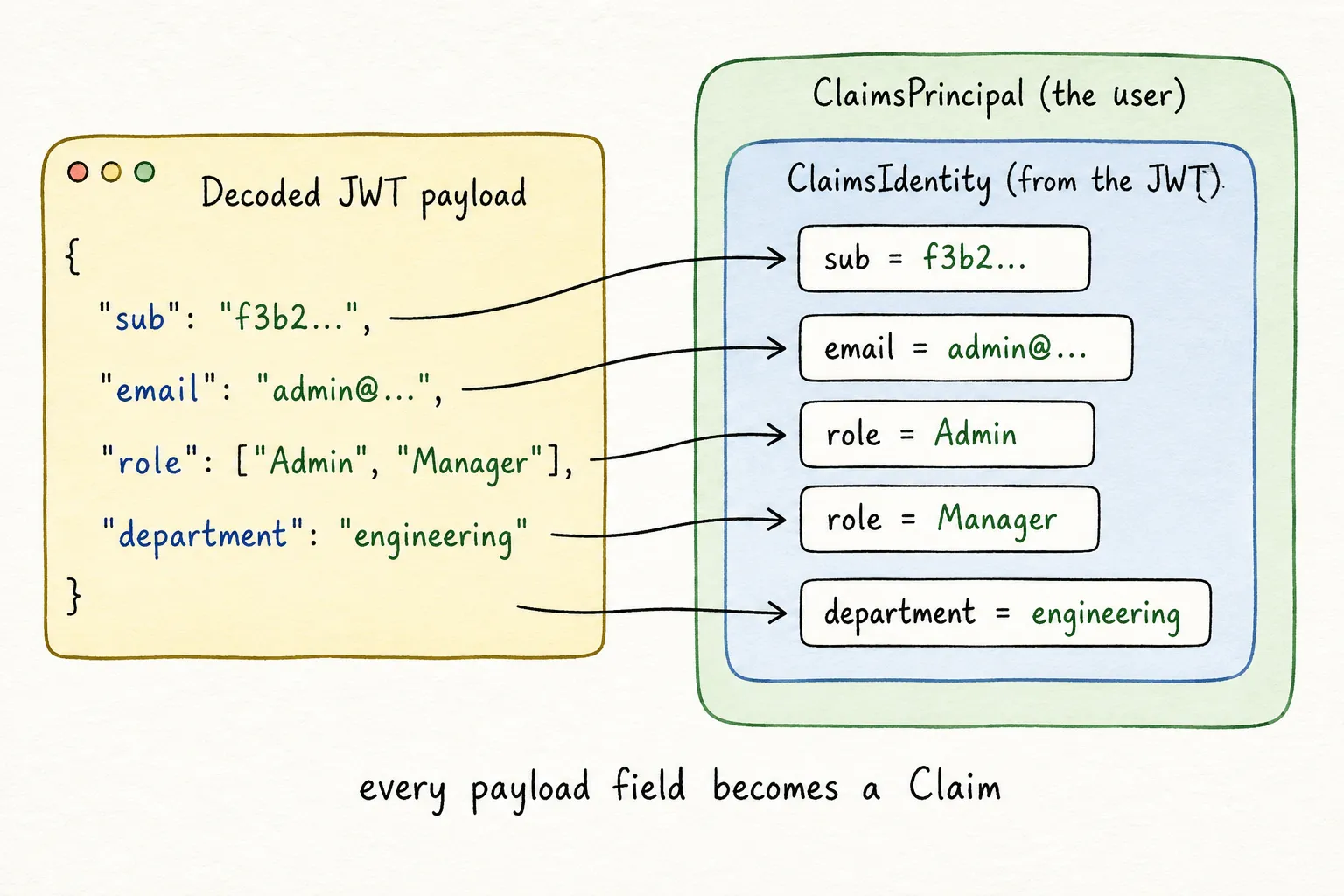
Here is the part that makes it click. Take the admin’s token from this article’s demo and decode it at jwt.io:
{ "sub": "f3b2...", "email": "admin@codewithmukesh.com", "name": "Default Admin", "role": ["Admin", "Manager"], "department": "engineering", "exp": 1781430000}Every single field becomes a Claim. The sub field becomes a claim of type sub. The two roles become two claims of type role. Even exp, the expiry timestamp, is a claim. The JWT payload IS a claims list serialized as JSON, and the ClaimsPrincipal is that same list deserialized back into objects. Once you see that, JWT authorization stops being magic.
Are Roles Just Claims?
Yes. When the role article called RequireRole("Admin"), ASP.NET Core looked through the user’s claims for one with the type named by RoleClaimType and the value Admin. User.IsInRole() does the same claim scan. There is no separate role storage, no role table consulted at request time - just claims with a special, agreed-upon name.
So why do roles get dedicated APIs? Convenience and history. Group membership is the single most common authorization fact, so it earned shorthand - RequireRole, IsInRole, [Authorize(Roles = ...)]. Use the shorthand when you mean groups. Use raw claims for everything else. Same engine underneath.
Setting Up: Storing Claims with ASP.NET Core Identity
I am continuing with the project from the role article - ASP.NET Core Identity, JsonWebTokenHandler, EF Core InMemory, the same three users. The JWT article covers the token plumbing if you have not seen it. I tested everything on .NET 10 with Microsoft.AspNetCore.Authentication.JwtBearer 10.0.0.
New in this round: each user gets a department claim stored in Identity. The seeded picture:
| Roles | Department claim | Subscription tier | |
|---|---|---|---|
admin@codewithmukesh.com | Admin, Manager | engineering | premium |
manager@codewithmukesh.com | Manager | operations | standard |
user@codewithmukesh.com | User | (none) | free |
Claim type names are strings, and typos in strings fail silently. So like role names, they live in one class:
public static class AppClaimTypes{ public const string Department = "department"; public const string Subscription = "subscription";}Identity stores user claims in the AspNetUserClaims table, and UserManager gives you full CRUD over them. Seeding a claim is one call:
// Department is a durable fact about the user - store it as an Identity claim.// It lands in the AspNetUserClaims table and goes into the token at login.if (department is not null){ await userManager.AddClaimAsync(user, new Claim(AppClaimTypes.Department, department));}The same API works at runtime: AddClaimAsync, RemoveClaimAsync, ReplaceClaimAsync, GetClaimsAsync. An HR system promoting someone to a new department is one ReplaceClaimAsync call.
Putting Custom Claims Inside the JWT
At login, I now read the user’s stored claims alongside their roles and pass both to the token service:
var roles = await userManager.GetRolesAsync(user);
// The user's stored claims (department, etc.) from the AspNetUserClaims table.var userClaims = await userManager.GetClaimsAsync(user);
var (token, expiresAt) = tokenService.CreateToken(user, roles, userClaims);
The token service appends them to the standard identity claims:
// Roles are claims too - one "role" claim per role.claims.AddRange(roles.Select(role => new Claim("role", role)));
// Custom claims stored against the user in Identity (department, etc.).claims.AddRange(userClaims);
That is the entire pipeline: claim stored in Identity, read at login, serialized into the token, deserialized into the ClaimsPrincipal on every request. Same journey the roles took in the previous article, because it is the same mechanism.
A warning from production experience: the token is not a dumping ground. Every claim you add travels in the Authorization header of every single request. I keep tokens well under 8 KB because that is where real infrastructure starts rejecting requests - nginx defaults to 8 KB per header, IIS to 16 KB, and Kestrel caps all request headers combined at 32 KB. Identity facts that endpoints actually check belong in the token. Fast-changing or bulky data does not - there is a better tool for that below.
Enforcing Claims: Presence vs Value
RequireClaim comes in two shapes, and the difference is worth being deliberate about.
Presence check - the claim must exist, any value will do. Here, any user assigned to a department may trigger exports:
// Claim PRESENCE check: the user must have a department claim - any value.group.MapGet("/exports", () => Results.Ok("Export started. Any user assigned to a department can do this.")) .RequireAuthorization(policy => policy.RequireClaim(AppClaimTypes.Department));Value check - the claim must exist AND match one of the allowed values:
// Claim VALUE check: the department claim must be exactly "engineering".group.MapGet("/deployments", () => Results.Ok("Deployment dashboard. Engineering only.")) .RequireAuthorization(policy => policy.RequireClaim(AppClaimTypes.Department, "engineering"));You can pass multiple allowed values - RequireClaim("department", "engineering", "operations") - and any match passes, the same OR semantics as multi-role checks in the role article. On controllers, the equivalent is a named policy with [Authorize(Policy = "...")] - claims never got an attribute shortcut the way roles did, which is a small preview of why policies exist.
Run the demo and the contrast is immediate: the manager (department: operations) gets 200 from /exports but 403 Forbidden from /deployments. The regular user, holding no department claim at all, gets 403 from both. And remember the rule from this series: 403 means the API knows who you are and the answer is no - 401 means it does not know who you are. Full breakdown in HTTP status codes for ASP.NET Core APIs.
Two case-sensitivity rules save you a debugging session here: claim values are always compared with an ordinal, case-sensitive comparison - department: Engineering will not satisfy RequireClaim("department", "engineering"). Claim types are messier: RequireClaim matches them case-insensitively, but if you look claims up yourself with FindFirst or HasClaim, JWT-validated identities have been fully case-sensitive on the type too since .NET 8 (the CaseSensitiveClaimsIdentity change). Pick a casing convention and never deviate.
Reading Claims in Endpoint Code
Declarative checks gate the door. Inside the endpoint, you read claims to do the actual work - load this user’s data, shape the response. The two workhorses are FindFirstValue and HasClaim:
group.MapGet("/me", (ClaimsPrincipal user) =>{    // FindFirstValue returns the first claim's value, or null if absent.    var userId = user.FindFirstValue("sub");    var department = user.FindFirstValue(AppClaimTypes.Department);
    return Results.Ok(new    {        UserId = userId,        Department = department ?? "none",        // Every claim the server sees for this request - roles included.        AllClaims = user.Claims.Select(c => new { c.Type, c.Value })    });});
That AllClaims projection is the single most useful debugging trick in this series. Whenever a claim check misbehaves, hit /me and look at what the server actually sees - not what you think the token contains. The role-mapping bug from the previous article’s troubleshooting section shows up instantly here as a claim sitting under a URL-style type name.
The user ID deserves a special note, because it carries the same mapping trap as roles. I write the ID under the standard JWT sub claim and read it back with FindFirstValue("sub") - which works because MapInboundClaims = false keeps claim names untouched. If you leave legacy mapping on, sub gets renamed to the long ClaimTypes.NameIdentifier URI and FindFirstValue("sub") quietly returns null. One MapInboundClaims setting, two articles’ worth of bugs.
For branching logic, HasClaim reads cleanly:
if (user.HasClaim(AppClaimTypes.Department, "engineering")){ return Results.Ok("Engineering workspace: build pipelines and deployment logs.");}Same rule as roles: gate with RequireClaim, branch with HasClaim. If an endpoint’s access decision is buried in if-statements, it belongs in a policy.
Claims Transformation: Enriching the User on Every Request
Now the technique most claims tutorials skip entirely. Some facts should not live in the token. A subscription tier can change the moment a payment fails - but the token is frozen until the next login, exactly like the stale-roles problem from the previous article. Shipping subscription: premium inside a 60-minute JWT means up to 60 minutes of premium access after a downgrade.
IClaimsTransformation solves this. It runs after authentication on every request and lets you add claims to the ClaimsPrincipal from any source - database, cache, external service. The token stays small and stable; the volatile facts stay current:
public class SubscriptionClaimsTransformation(SubscriptionStore subscriptions) : IClaimsTransformation{    public Task<ClaimsPrincipal> TransformAsync(ClaimsPrincipal principal)    {        // Never add the same claim twice - transformations can run more than once per request.        if (principal.HasClaim(c => c.Type == AppClaimTypes.Subscription))        {            return Task.FromResult(principal);        }
        var userId = principal.FindFirstValue("sub");        if (userId is null)        {            return Task.FromResult(principal);        }
        var tier = subscriptions.GetTier(userId);
        // Clone before modifying - the incoming principal should be treated as read-only.        var clone = principal.Clone();        var identity = (ClaimsIdentity)clone.Identity!;        identity.AddClaim(new Claim(AppClaimTypes.Subscription, tier));
        return Task.FromResult(clone);    }}
Registration is one line, and downstream nothing changes - RequireClaim cannot tell a transformed claim from a token claim:
builder.Services.AddTransient<IClaimsTransformation, SubscriptionClaimsTransformation>();// The subscription claim is NOT in the token - claims transformation added it// from the subscription store on this very request.group.MapGet("/reports/premium", () => Results.Ok("Premium analytics report. Generated fresh for premium subscribers.")) .RequireAuthorization(policy => policy.RequireClaim(AppClaimTypes.Subscription, "premium"));Decode the admin’s token: no subscription claim anywhere. Call /api/me with that token: subscription: premium is right there in the claims list, loaded fresh this request. Two details in the implementation matter in production. First, the duplicate guard - the framework documents that transformations may run multiple times per request, so they must be idempotent. Second, the clone-before-modify pattern, which avoids mutating a principal other middleware may hold a reference to.
My decision rule for token vs transformation: stable identity facts go in the token, volatile entitlement facts go through transformation. Department changes once a year - token. Subscription changes on a failed payment - transformation. And weigh the cost honestly: a transformation hitting your database runs on every request to every protected endpoint, so back it with HybridCache or accept the latency.
Where Claim Checks Stop Being Enough
Claims got us further than roles: the regular user could never be department-gated with role checks alone without inventing an EngineeringDepartment role - and that way lies the role explosion from article one. But RequireClaim has a ceiling, and it is exact matching.
Try to express “the user’s dateofbirth claim must make them at least 18” with RequireClaim. You cannot - there is no value to match, only a comparison to compute. “Subscription is premium OR the user is an Admin”? Two claims with OR-across-types - RequireClaim cannot say that either. “Department matches the department of the document being requested”? Now the rule needs runtime data that is not even on the user.
My take: claims are the right vocabulary for authorization facts, and RequireClaim covers maybe 80% of real-world checks - presence and exact match go a long way. The moment your rule contains the words “at least”, “or”, “unless”, or “matches the resource”, you have outgrown declarative claim checks. You need code that receives the claims and computes a decision. That is precisely what policy requirements and handlers are - and that is the next article in this series, where the whole system clicks together. From there, permission-based authorization turns those policies into access levels an admin can grant and revoke at runtime.
Key Takeaways
- A claim is a name-value fact about the user - email, department, date of birth. Authorization becomes a question of what evidence the user carries.
- The JWT payload is a claims list in JSON;
ClaimsPrincipal→ClaimsIdentity→Claimis that same list as objects. Roles are claims with a special name. - Store durable claims with Identity (
AddClaimAsync→AspNetUserClaimstable), put them in the token at login, enforce withRequireClaim- presence or exact value. - Claim types match case-insensitively; claim values are case-sensitive. Centralize claim names in constants.
- Use
IClaimsTransformationfor volatile facts like subscription tiers - claims stay current per request without bloating the token. Make transformations idempotent. - When a rule needs comparison, OR-logic, or resource data, claims checks have hit their ceiling - reach for policies.
What is a claim in ASP.NET Core?
A claim is a name-value pair that states a fact about the authenticated user, such as email, department, or date of birth. Claims describe who the user is rather than what they can do. ASP.NET Core builds a ClaimsPrincipal from the user's claims on every authenticated request, and authorization checks read from that object.
What is the difference between claims and roles in ASP.NET Core?
A role is technically a claim with a special, agreed-upon type name - RequireRole and IsInRole just scan the user's claims for it. Roles express group membership and get convenient shorthand APIs. Claims express any fact about the user, including things roles cannot, like a department value or a date of birth. Both are checked through the same ClaimsPrincipal.
How do I add custom claims to a JWT in ASP.NET Core?
Store the claim against the user with UserManager.AddClaimAsync, which writes to the AspNetUserClaims table. At login, read the user's claims with GetClaimsAsync and add them to the claims list you pass to the token handler. The claim then appears in the JWT payload and is rebuilt into the ClaimsPrincipal on every request.
What is the difference between RequireClaim with one argument and two?
RequireClaim with only a claim type checks presence - the user must hold that claim with any value. Adding values checks both presence and value - the claim must exist and match one of the allowed values. Multiple allowed values use OR semantics, so any single match passes the check.
What is ClaimsPrincipal vs ClaimsIdentity?
ClaimsIdentity represents one identity from one authentication source, such as a validated JWT, and holds that identity's claims. ClaimsPrincipal represents the user as a whole and can wrap multiple identities, for example when an API supports both JWT and API key authentication. In a typical single-scheme API there is one identity inside the principal.
What is claims transformation in ASP.NET Core?
Claims transformation is the IClaimsTransformation interface, which runs after authentication on every request and lets you add claims to the ClaimsPrincipal from sources outside the token, such as a database. It suits volatile facts like subscription tiers that would go stale inside a JWT. Transformations can run more than once per request, so they must check for existing claims before adding.
How do I get the current user's ID from a JWT in ASP.NET Core?
Read it with User.FindFirstValue("sub") if you write the user ID under the standard sub claim and have MapInboundClaims set to false. With legacy claim mapping enabled, the sub claim is renamed to the long ClaimTypes.NameIdentifier URI, and looking it up by the short name returns null - the most common cause of a mysteriously missing user ID.
Summary
Claims are the vocabulary of ASP.NET Core authorization: facts stored with Identity, carried in the JWT, rebuilt into the ClaimsPrincipal, and enforced with RequireClaim by presence or value - with IClaimsTransformation keeping the volatile facts fresh outside the token. And the reveal from the role article is now complete: roles, claims, the lot of it, all one claims engine. The full source is in the GitHub repository.
This article is part of my free .NET Web API Zero to Hero course, and the claims-vs-roles distinction is a regular in .NET Web API interviews - the “roles are claims” answer tends to land well.
The finale ties it all together: Policy-Based Authorization in ASP.NET Core - requirements, handlers, and the system that roles and claims were shorthand for all along.
Role-Based Authorization in ASP.NET Core
Article 1 of this series - RequireRole, OR vs AND semantics, and the claim-mapping bug that breaks role checks.
JWT Authentication in ASP.NET Core
The foundation - registration, login, and signed token generation with JsonWebTokenHandler on .NET 10.
Refresh Tokens in ASP.NET Core
Short-lived tokens without constant logins - and the cure for stale claims after a role or department change.
Happy Coding :)




What's your take?
Push back, share a war story, or ask the obvious question someone else is wondering. I read every comment.