


To add role-based authorization in ASP.NET Core .NET 10: put the user’s roles inside the JWT as claims, set RoleClaimType so ASP.NET Core knows which claim holds the roles, then protect endpoints with RequireAuthorization(p => p.RequireRole("Admin")) on Minimal APIs or [Authorize(Roles = "Admin")] on controllers. That is the whole mechanism. The details - OR vs AND semantics, named policies, and the claim-mapping bug that silently breaks everything - are what this guide covers.
Authentication answers “who are you?”. Authorization answers “what are you allowed to do?”. In the JWT authentication article I built the first half: users log in and get a signed token. Now I will build the second half - restricting what each logged-in user can actually reach, based on their role.
This is article 1 of my three-part authorization series (roles, then claims, then policies), and everything runs on a working .NET 10 repo you can clone and hit F5 on. Let’s get into it.
What Is Role-Based Authorization?
Role-based authorization restricts access to endpoints based on the roles assigned to a user. A role is a named group like Admin, Manager, or User, and an endpoint declares which roles may call it. If the caller’s token carries a matching role, the request goes through. If not, the API returns 403 Forbidden.
It is the oldest and most intuitive authorization model, often called RBAC (Role-Based Access Control). You already think in roles: admins can delete things, managers can edit things, everyone else can look at things. Role-based authorization just turns that sentence into code.
How Roles Travel from the Database to Your Endpoint
This is the part most tutorials skip, and it is exactly where things break in real projects. A role check involves three places, and they have to agree:
- The Identity store - ASP.NET Core Identity keeps users and their roles in the
AspNetUsersandAspNetRolestables (or the in-memory equivalent in this demo). - The JWT - at login, you read the user’s roles from Identity and write them into the token as claims. One
roleclaim per role. - The
ClaimsPrincipal- on every request, the JWT bearer middleware validates the token and rebuilds the user from its claims.RequireRoleandUser.IsInRole()check THIS object, not the database.
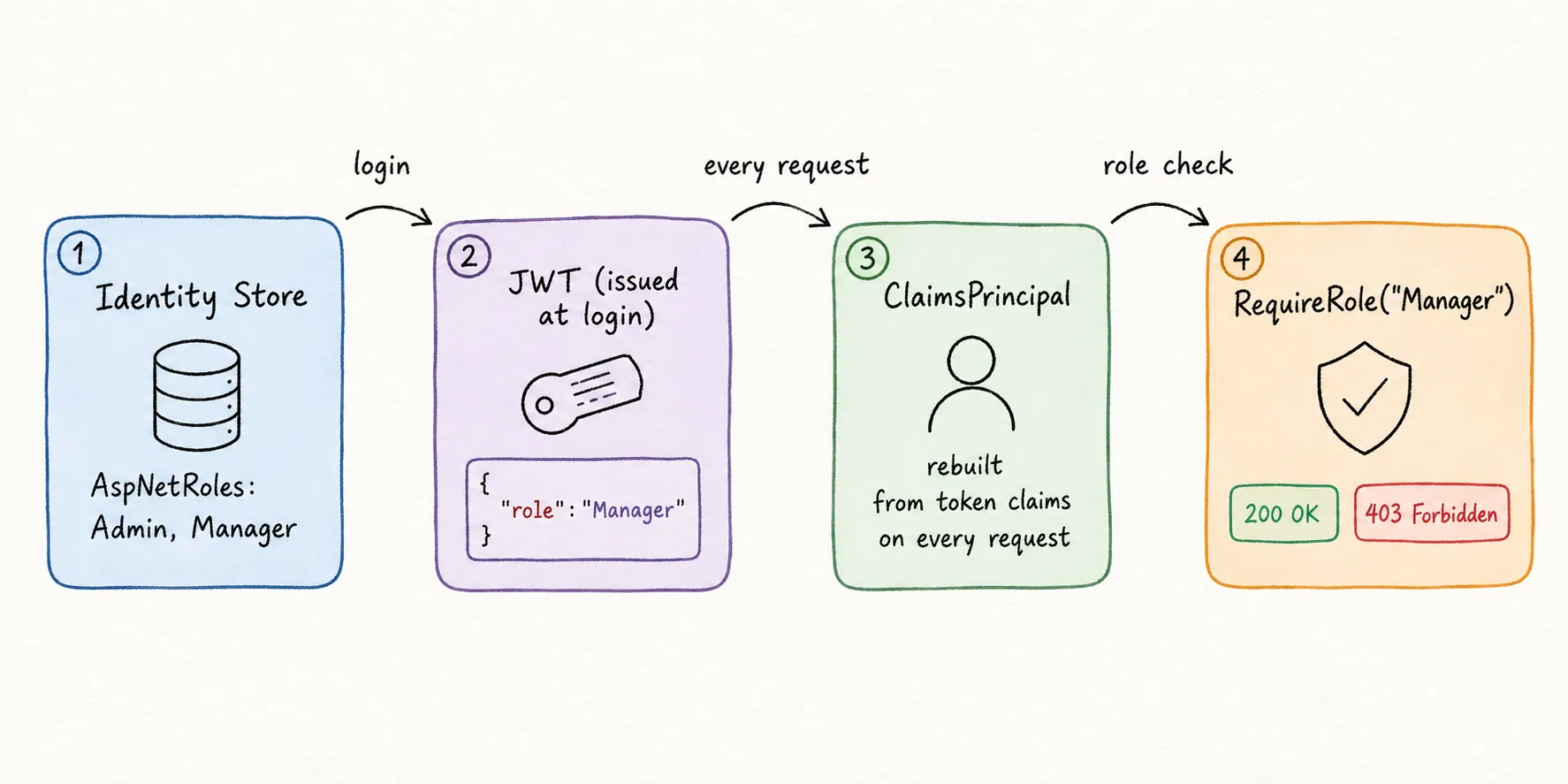
Two practical consequences fall out of this, and both trip people up:
- Role checks never hit the database. Once the token is issued, the roles inside it are what count. Fast, stateless, and exactly why JWT scales.
- Roles in a token are frozen until the next login. Promote someone to Admin and their current token still says otherwise. They need a fresh token. This is one more reason to keep tokens short-lived and pair them with refresh tokens.
Setting Up the Demo API
I am building on the exact project from the JWT authentication guide - ASP.NET Core Identity for users, JsonWebTokenHandler for tokens, EF Core InMemory so there is zero database setup. If you want the token plumbing explained line by line, read that article first; I will not repeat it here.
The complete source for this article is on GitHub. I tested it on .NET 10 with Microsoft.AspNetCore.Authentication.JwtBearer 10.0.0 and Scalar.AspNetCore 2.13.18.
The scenario is a small product inventory API. Three roles, three seeded users:
| Password | Roles | |
|---|---|---|
admin@codewithmukesh.com | Admin123! | Admin, Manager |
manager@codewithmukesh.com | Manager123! | Manager |
user@codewithmukesh.com | User123! | User |
The admin holds two roles on purpose. You will see why in the AND section below.
Role names live in one static class so a typo cannot sneak in. Role names are case-sensitive once they become claims, so "admin" and "Admin" are different roles as far as the check is concerned:
public static class Roles{ public const string Admin = "Admin"; public const string Manager = "Manager"; public const string User = "User";}Putting Roles Inside the JWT
At login, I read the user’s roles from Identity and add one role claim per role to the token:
var claims = new List<Claim>{    new(JwtRegisteredClaimNames.Sub, user.Id),    new(JwtRegisteredClaimNames.Email, user.Email!),    new(JwtRegisteredClaimNames.Name, $"{user.FirstName} {user.LastName}"),    new(JwtRegisteredClaimNames.Jti, Guid.NewGuid().ToString())};
// One "role" claim per role the user has. This is what RequireRole reads later.claims.AddRange(roles.Select(role => new Claim("role", role)));
Decode the manager’s token at jwt.io and the payload literally contains "role": "Manager". The admin’s token contains "role": ["Admin", "Manager"] - multiple claims of the same type collapse into an array. Roles are not some separate mechanism bolted onto the token. A role is just a claim with an agreed-upon name. Keep that sentence in mind; it is the bridge to the next article in this series.
On the receiving side, ASP.NET Core needs to know which claim name holds the roles. That is the RoleClaimType setting in TokenValidationParameters:
.AddJwtBearer(options =>{ // Keep the claim names exactly as they appear in the token (no surprise remapping). options.MapInboundClaims = false; options.TokenValidationParameters = new TokenValidationParameters { // ...issuer, audience, signing key as usual... NameClaimType = JwtRegisteredClaimNames.Name, // RoleClaimType must match the claim name TokenService writes roles under. // If these two disagree, every role check fails with 403. RoleClaimType = "role" };});I write roles under role and I tell the middleware roles live under role. The two lines agree, so everything downstream works. Half of all “roles not working” bugs are these two lines disagreeing - there is a full troubleshooting section on this below.
Protecting Endpoints with RequireRole
With roles in the token and RoleClaimType wired up, protecting an endpoint is one line. Here is the products API, Minimal API style:
public static void MapProductEndpoints(this IEndpointRouteBuilder app){    // RequireAuthorization() on the group = every endpoint below needs a valid token.    var group = app.MapGroup("/api/products")        .WithTags("Products")        .RequireAuthorization();
    // Any authenticated user can view products. No role needed.    group.MapGet("/", (ProductStore store) => Results.Ok(store.GetAll()));
    // Only Admin can delete. Manager gets a 403 here.    group.MapDelete("/{id:int}", (int id, ProductStore store) =>            store.Delete(id) ? Results.NoContent() : Results.NotFound())        .RequireAuthorization(policy => policy.RequireRole(Roles.Admin));}
Two layers are working together here, following the patterns from Microsoft’s Minimal API security docs. The group-level RequireAuthorization() says “you must be logged in to touch anything under /api/products”. The endpoint-level RequireRole adds “and for THIS one, you must also be an Admin”. A caller with no token gets 401. A logged-in manager calling DELETE gets 403. That distinction matters: 401 means the API does not know who you are, 403 means it knows exactly who you are and the answer is no. I keep a full reference of these in HTTP status codes for ASP.NET Core APIs.
If you are on controllers instead of Minimal APIs, the same check is the classic attribute:
[Authorize(Roles = "Admin")][HttpDelete("{id}")]public IActionResult Delete(int id) { ... }Both forms compile down to the same authorization machinery. Use whichever matches your project style - I use Minimal APIs throughout this series, and if you want the full endpoint story, read Minimal APIs in ASP.NET Core.
One ordering rule before moving on: app.UseAuthentication() must run before app.UseAuthorization() in the pipeline. Authentication figures out who you are; authorization decides what you can do. Swap them and every protected call fails. The middleware article explains why pipeline order matters in general.
Multiple Roles: Is It OR or AND?
This is the question that catches almost everyone, because the answer flips depending on how you write it.
Multiple roles in ONE call means OR. Any one of the listed roles gets you in:
// Admin OR Manager can create products.group.MapPost("/", (CreateProductRequest request, ProductStore store) => { var product = store.Add(request); return Results.Created($"/api/products/{product.Id}", product); }) .RequireAuthorization(policy => policy.RequireRole(Roles.Admin, Roles.Manager));The attribute form behaves the same way: [Authorize(Roles = "Admin,Manager")] means Admin OR Manager - Microsoft’s role-based authorization docs spell out both semantics explicitly. The comma reads like “and” in English, which is exactly why so many developers get this backwards.
Separate requirements mean AND. Chain two RequireRole calls and the caller must hold both roles:
// Chaining two RequireRole calls = two separate requirements = AND.group.MapGet("/audit", () => Results.Ok("Stock audit report. You hold both the Admin and Manager roles.")) .RequireAuthorization(policy => policy .RequireRole(Roles.Admin) .RequireRole(Roles.Manager));With controllers, you stack attributes to get AND:
[Authorize(Roles = "Admin")][Authorize(Roles = "Manager")] // must satisfy BOTH attributesIn the demo, the seeded admin holds both Admin and Manager, so they pass /audit. The manager holds only Manager and gets 403, even though they pass the OR check on POST. Run both requests from the included requests.http file and watch the difference - it makes the rule stick.
Reusing Role Checks with a Named Policy
Inline RequireRole is fine for one endpoint. The moment three endpoints need the same check, give it a name and define it once. .NET 7 introduced AddAuthorizationBuilder() as the cleaner registration syntax, and it is the standard way in .NET 10:
builder.Services.AddAuthorizationBuilder() .AddPolicy("ManagerOnly", policy => policy.RequireRole(Roles.Manager));Endpoints then reference the policy by name:
group.MapPut("/{id:int}/restock", (int id) => Results.Ok($"Product {id} restocked.")) .RequireAuthorization("ManagerOnly");Change what “ManagerOnly” means in one place and every endpoint using it follows. This is your first taste of policy-based authorization - under the hood, even the inline RequireRole calls you have written so far become policies. That full story (requirements, handlers, custom rules) is the third article in this series, and trust me, it ties everything together.
Checking Roles in Code with User.IsInRole
Not every role decision is allow-or-deny at the gate. Sometimes the same endpoint serves different data per role. For that, inject ClaimsPrincipal and branch with IsInRole():
group.MapGet("/dashboard", (ClaimsPrincipal user) =>{    var greeting = $"Hello {user.Identity?.Name}.";
    if (user.IsInRole(Roles.Admin))    {        return Results.Ok($"{greeting} Full dashboard: sales, inventory, and user management.");    }
    return user.IsInRole(Roles.Manager)        ? Results.Ok($"{greeting} Manager dashboard: inventory and restock queue.")        : Results.Ok($"{greeting} Your orders and saved items.");});
IsInRole("Admin") simply asks: does this principal have a role claim with the value Admin? Same data, same RoleClaimType rules - just checked imperatively instead of declaratively. My rule of thumb: use RequireRole when the answer is allow or deny, use IsInRole when the answer is “show them something different”. If you find yourself writing long IsInRole if-chains to guard access, that logic belongs in a policy instead.
Testing the Role Checks
Clone the repo, run dotnet run --project RoleBasedAuth.Api, and open the Scalar UI at /scalar/v1 or use requests.http. Here is the run I did while writing this, with the results:
- GET
/api/productswith no token -401 Unauthorized. - GET
/api/productsas the regular user -200 OK. Any authenticated user can view. - POST
/api/productsas the manager -201 Created. Manager passes the Admin-OR-Manager check. - POST
/api/productsas the regular user -403 Forbidden. - DELETE
/api/products/1as the manager -403 Forbidden. Manager is not Admin. - DELETE
/api/products/1as the admin -204 No Content. - GET
/api/products/auditas the manager -403 Forbidden. AND requires both roles. - GET
/api/products/auditas the admin -200 OK. Admin holds Admin and Manager.
Eight requests, every role rule in this article exercised. If your results differ, the next section is for you.
Why Are My Roles Not Working?
The most-searched problem with role-based authorization in ASP.NET Core: the token clearly contains the roles, and every role check still returns 403. Almost always, it is claim-type mapping.
Here is what actually happens, and Microsoft documents the mapping behavior if you want the full table. The older JWT handler ships with a legacy compatibility behavior: when MapInboundClaims is true (the historical default), incoming claim names get translated to long SOAP-era URIs. Your tidy role claim arrives in the ClaimsPrincipal renamed to http://schemas.microsoft.com/ws/2008/06/identity/claims/role. Then RequireRole looks for roles under whatever RoleClaimType says - and finds nothing, because the claim is sitting under a different name. The check fails silently. No exception, no log entry, just 403.
The fix is to make three things agree:
- The claim name you write at token creation - this guide uses
role. MapInboundClaims = false- so the middleware does not rename anything on the way in.RoleClaimType = "role"- so the role checks read the claim you actually wrote.
A 30-second diagnostic when a role check misbehaves - dump what the server actually sees:
group.MapGet("/debug/claims", (ClaimsPrincipal user) => Results.Ok(user.Claims.Select(c => new { c.Type, c.Value }))) .RequireAuthorization();Call it with the failing token. If the role claim’s Type is a long URL instead of role, you have found the bug. Delete this endpoint before shipping - it leaks more than you want public.
Three more quick ones while you are debugging:
- 403 on every request including login? Check you did not put
RequireAuthorization()on the auth group itself - the login endpoint must stay anonymous. - Role added but still 403? The user’s current token predates the role change. Roles are read at login, so log in again. This surprises everyone exactly once.
- Works in Scalar, fails from your SPA? That is usually CORS rejecting the preflight before authorization ever runs, not a role problem.
Where Role Checks Stop Scaling
Roles are the right tool for broad groups of users. They are the wrong tool for fine-grained abilities, and you will feel the moment they stop fitting.
It starts innocently. Admin, Manager, User. Then the business asks for managers who can restock but not create. So you add SeniorManager. Then customer admins who must not touch orders - CustomerAdmin, OrderAdmin. I have watched this play out in production systems: the role list grows from 3 to 15, endpoints accumulate checks like RequireRole("Admin", "OrderAdmin", "SeniorManager", "RegionalLead"), and nobody can answer “what exactly can a RegionalLead do?” without reading every endpoint in the codebase. Roles describe who someone is. The business kept asking questions about what someone can do, and those are different questions.
My take: role-based authorization is the right choice when your access model has 5 or fewer stable groups and the rules are “this group can, that group cannot”. The moment you invent a role to represent a single capability, you are encoding claims into role names - switch tools instead. That is precisely what the next article in this series covers: claims-based authorization, where access is based on what a user’s attributes say rather than which group label they carry. And when even claims are not expressive enough, policies with custom requirements take over - that is article three. If what you actually need is for an admin to change access levels without a deployment, skip ahead to permission-based authorization, which is where this series ends up.
Key Takeaways
- Role-based authorization restricts endpoints by role membership:
RequireRoleon Minimal APIs,[Authorize(Roles = "...")]on controllers, and403 Forbiddenwhen the check fails. - A role inside a JWT is just a claim with an agreed name.
RoleClaimTypetells ASP.NET Core which claim that is, and it must match what your token service writes. - Multiple roles in one
RequireRolecall mean OR. ChainedRequireRolecalls (or stacked[Authorize]attributes) mean AND. - Roles are frozen into the token at login - role changes need a fresh token to take effect.
- Define repeated role checks once as a named policy with
AddAuthorizationBuilder()and reference them by name. - When role names start encoding individual capabilities, you have outgrown roles - move to claims.
What is role-based authorization in ASP.NET Core?
Role-based authorization restricts access to API endpoints based on the roles assigned to a user, such as Admin or Manager. The user's roles travel inside their authentication token as claims, and ASP.NET Core checks them with RequireRole on Minimal APIs or the Authorize attribute's Roles property on controllers. If the caller lacks the required role, the API returns 403 Forbidden.
How do I add roles to a JWT token in ASP.NET Core?
When generating the token at login, read the user's roles from your user store (for example UserManager.GetRolesAsync with ASP.NET Core Identity) and add one claim per role, all under the same claim name such as role. Then set RoleClaimType in TokenValidationParameters to that same claim name so ASP.NET Core knows where to find the roles when validating requests.
Why are my roles not working with JWT authentication?
Almost always the role claim name in the token does not match the RoleClaimType the middleware is checking. The legacy MapInboundClaims behavior renames incoming claims to long URI-style names, so your role claim ends up under a different name than RoleClaimType expects and every check fails with 403. Set MapInboundClaims to false and make RoleClaimType match the exact claim name you write at token creation.
Is Authorize with multiple roles AND or OR?
Multiple roles inside a single attribute or a single RequireRole call mean OR - any one of the listed roles grants access. To require ALL roles (AND), stack multiple Authorize attributes on a controller action or chain multiple RequireRole calls on the policy builder in Minimal APIs. Each attribute or chained call adds a separate requirement that must pass.
What is the difference between roles and claims in ASP.NET Core?
A claim is a name-value pair describing the user, like email or department. A role is technically just a claim with a special, agreed-upon type that answers which group the user belongs to. Roles suit broad groupings such as Admin or Manager, while claims suit fine-grained attributes and capabilities. ASP.NET Core checks both through the same ClaimsPrincipal object.
Why do I get 403 Forbidden instead of 401 Unauthorized?
401 means the request is not authenticated - no token or an invalid one, so the API does not know who you are. 403 means authentication succeeded but authorization failed - the token is valid, the API knows exactly who you are, and that user lacks the required role. If you get 403, check the user's roles; if you get 401, check the token itself.
How do I protect Minimal API endpoints by role in .NET 10?
Call RequireAuthorization on the endpoint or route group. For a plain authentication check, use RequireAuthorization with no arguments. For a role check, pass a policy: RequireAuthorization(policy => policy.RequireRole("Admin")). You can also register a named policy with AddAuthorizationBuilder in Program and reference it by name, which keeps repeated checks in one place.
Summary
You now have complete role-based authorization running on a .NET 10 Web API: roles seeded with ASP.NET Core Identity, carried as JWT claims, enforced with RequireRole and named policies, with OR and AND semantics under control and the claim-mapping trap defused. The full source is in the GitHub repository.
This article is part of my free .NET Web API Zero to Hero course, sitting right after JWT authentication and refresh tokens in the security module. Roles vs claims is also a regular in .NET Web API interviews, so the mental model here pays off beyond your codebase.
Next up in the series: Claims-Based Authorization in ASP.NET Core, where the “a role is just a claim” idea gets its full payoff.
JWT Authentication in ASP.NET Core
The prerequisite for this article - registration, login, and signed token generation with JsonWebTokenHandler on .NET 10.
API Key Authentication in ASP.NET Core
When machine-to-machine callers need access without a user login - production-grade API keys with hashed storage.
Rate Limiting in ASP.NET Core
The other half of API protection - stop abusive callers before authorization even runs.
Happy Coding :)




What's your take?
Push back, share a war story, or ask the obvious question someone else is wondering. I read every comment.