


APIs are stateless. There is no session sitting on the server remembering who you are, so every single request has to prove who is making it. The most common way to do that in ASP.NET Core is JWT authentication: the user logs in once, gets a signed token, and sends that token on every request after.
In this guide I will build a complete JWT authentication setup in ASP.NET Core on .NET 10 - user registration, login, token generation, protecting endpoints, and role-based authorization. Everything uses Minimal APIs and runs out of the box with zero database setup, so you can clone it and hit F5. Let’s get into it.
TL;DR - JWT Authentication in ASP.NET Core .NET 10
To add JWT authentication in ASP.NET Core .NET 10: install Microsoft.AspNetCore.Authentication.JwtBearer (10.0.0), generate a signed token on login with JsonWebTokenHandler (the modern replacement for JwtSecurityTokenHandler), register the JWT scheme with AddAuthentication().AddJwtBearer(...) and set the TokenValidationParameters (issuer, audience, signing key, lifetime), then call app.UseAuthentication() and app.UseAuthorization() and protect routes with .RequireAuthorization(). The client sends the token on every request in the Authorization: Bearer <token> header.
This guide covers user registration and login with ASP.NET Core Identity, role-based authorization, and the security practices that actually matter. Refresh tokens are a topic of their own - I cover those in a separate article.
What Is a JWT?
A JWT (JSON Web Token) is a signed string that carries information about the user. When a user logs in, your API creates this token and hands it back. The client stores it and attaches it to every future request. Your API checks the signature, trusts the contents, and lets the request through.
A JWT has three parts, separated by dots: header.payload.signature.
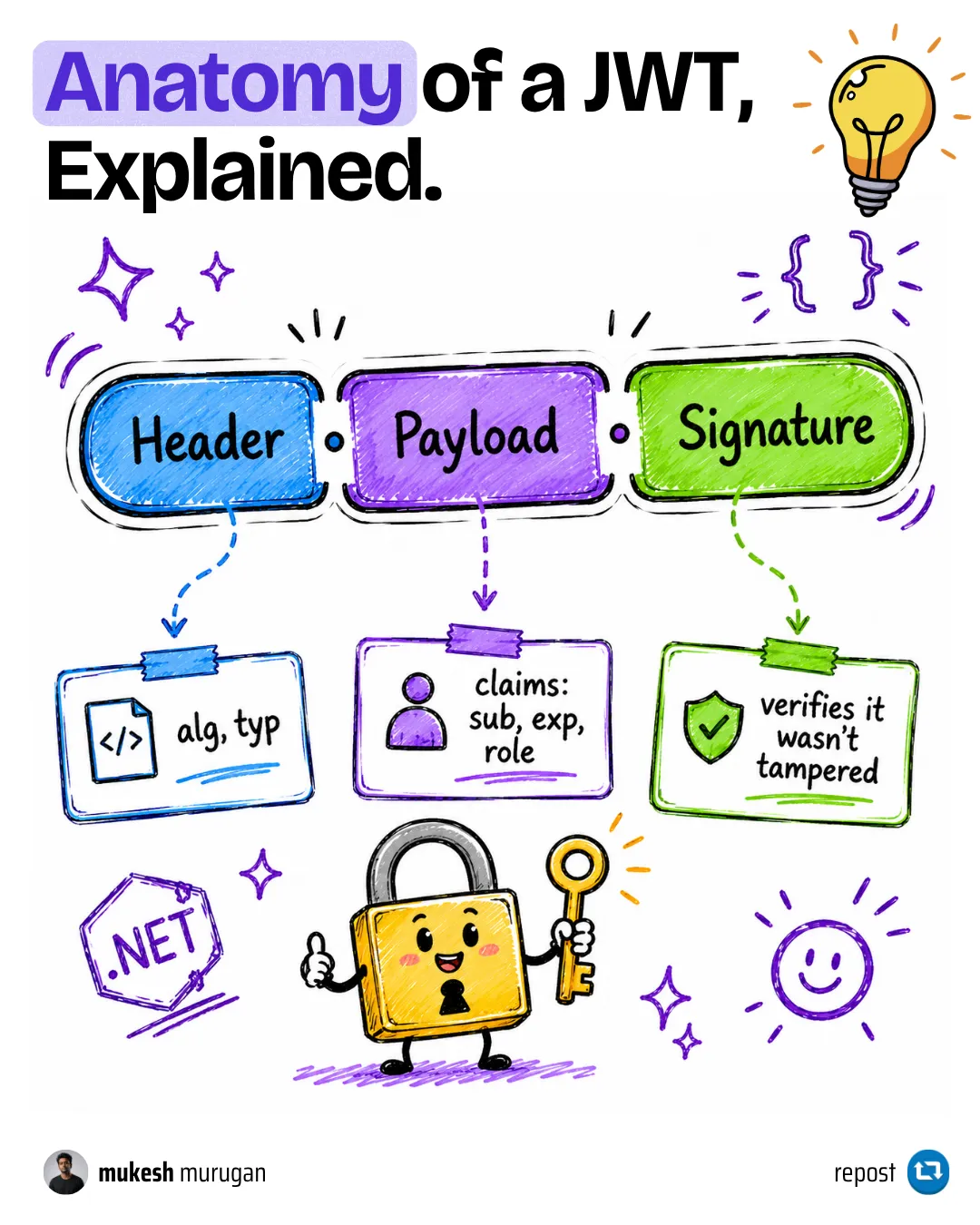
- Header - says this is a JWT and which algorithm signed it (for example, HMAC SHA-256).
- Payload - the actual data, called claims. Things like the user ID, email, and roles, plus an expiry time.
- Signature - the header and payload signed with a secret key only your server knows. This is what stops anyone from tampering with the token.
One thing every beginner needs to hear early: the payload is only Base64-encoded, not encrypted. Anyone with the token can read its contents by pasting it into jwt.io. The signature does not hide the data, it only proves the data was not changed. So never put passwords or secrets inside a JWT.
How JWT Authentication Works
The flow is simple once you see it end to end:
- The user sends their email and password to a login endpoint.
- Your API checks the credentials. If they are valid, it builds a JWT with the user’s claims and signs it.
- The API returns the token. The client stores it.
- On every protected request, the client sends the token in the
Authorization: Bearer <token>header. - ASP.NET Core validates the signature and the expiry. If everything checks out, the request is treated as authenticated.
Notice that the server never stores the token. It only needs the secret key to validate it. That is what makes JWT stateless and easy to scale across multiple servers.
When Should You Use JWT?
JWT is not the only way to authenticate in ASP.NET Core, and it is not always the right one. Here is how I decide:
| Approach | Best for | Trade-off |
|---|---|---|
| JWT bearer tokens | SPAs (React, Angular), mobile apps, and service-to-service calls | You manage token lifetime and refresh yourself |
| Cookie authentication | Server-rendered apps (MVC, Razor Pages) on the same domain | Tied to the browser; needs anti-forgery protection |
Identity API endpoints (MapIdentityApi) | Spinning up Identity-backed token endpoints fast | Less control over the token and the login flow |
| API keys | Machine-to-machine and third-party integrations | Identifies an app, not a user - no roles or claims |
My take: if your API is consumed by a React/Angular front end or a mobile app, JWT is the default choice, and that is what this guide builds. I only reach for cookie authentication when the app is server-rendered on the same domain. For internal service-to-service traffic, I lean on API key authentication instead, since there is no human user to model.
Setting Up the Project
I am using a .NET 10 Minimal API project. You only need two packages on top of the SDK for JWT plus Identity:
dotnet add package Microsoft.AspNetCore.Authentication.JwtBearer --version 10.0.0dotnet add package Microsoft.AspNetCore.Identity.EntityFrameworkCore --version 10.0.0For this guide I use the Entity Framework Core InMemory provider so the sample runs without SQL Server or migrations. In a real app you would swap it for SQL Server or PostgreSQL - the rest of the code stays identical.
dotnet add package Microsoft.EntityFrameworkCore.InMemory --version 10.0.0Setting Up Users with ASP.NET Core Identity
Rather than managing password hashing myself, I let ASP.NET Core Identity handle users, passwords, and roles. I extend the built-in IdentityUser so I can store a first and last name:
public class ApplicationUser : IdentityUser{ public string FirstName { get; set; } = string.Empty; public string LastName { get; set; } = string.Empty;}The database context just inherits from IdentityDbContext, which brings in all the user and role tables for free:
public class AppDbContext(DbContextOptions<AppDbContext> options) : IdentityDbContext<ApplicationUser>(options);I also keep my role names in one small class so I never fat-finger "Admin" as "admin" somewhere:
public static class Roles{ public const string Admin = "Admin"; public const string User = "User";}Adding the JWT Settings
Your token needs a few settings: a secret key to sign with, an issuer, an audience, and how long the token stays valid. Put these in appsettings.json:
"JwtSettings": { "Key": "this-is-a-demo-key-please-replace-with-a-long-random-secret-256-bit", "Issuer": "https://codewithmukesh.com", "Audience": "codewithmukesh-api", "ExpiryMinutes": 60}The key must be at least 256 bits (32 characters) for the HMAC SHA-256 algorithm, otherwise .NET throws an error at startup. Issuer is who created the token, audience is who it is meant for, and ExpiryMinutes is how long it lives. I will cover where to actually store this key in production further down - appsettings.json is fine for learning, not for real secrets.
Bind it to a strongly-typed class using the options pattern:
public class JwtSettings{ public string Key { get; set; } = string.Empty; public string Issuer { get; set; } = string.Empty; public string Audience { get; set; } = string.Empty; public int ExpiryMinutes { get; set; }}Generating the JWT
This is the part everyone comes here for. The token service takes a user and their roles, builds the claims, signs them, and returns the token string.
public class TokenService(IOptions<JwtSettings> jwtSettings) : ITokenService{    private readonly JwtSettings _settings = jwtSettings.Value;
    public (string Token, DateTime ExpiresAt) CreateToken(ApplicationUser user, IEnumerable<string> roles)    {        var expiresAt = DateTime.UtcNow.AddMinutes(_settings.ExpiryMinutes);
        // Claims are the pieces of information we store inside the token.        var claims = new List<Claim>        {            new(JwtRegisteredClaimNames.Sub, user.Id),            new(JwtRegisteredClaimNames.Email, user.Email!),            new(JwtRegisteredClaimNames.Name, $"{user.FirstName} {user.LastName}"),            new(JwtRegisteredClaimNames.Jti, Guid.NewGuid().ToString())        };
        // One "role" claim per role the user has.        claims.AddRange(roles.Select(role => new Claim("role", role)));
        var signingKey = new SymmetricSecurityKey(Encoding.UTF8.GetBytes(_settings.Key));        var credentials = new SigningCredentials(signingKey, SecurityAlgorithms.HmacSha256);
        var descriptor = new SecurityTokenDescriptor        {            Subject = new ClaimsIdentity(claims),            Expires = expiresAt,            Issuer = _settings.Issuer,            Audience = _settings.Audience,            SigningCredentials = credentials        };
        var handler = new JsonWebTokenHandler();        var token = handler.CreateToken(descriptor);
        return (token, expiresAt);    }}
A few things worth calling out:
JsonWebTokenHandleris the modern handler. A lot of older tutorials useJwtSecurityTokenHandlerfrom theSystem.IdentityModel.Tokens.Jwtpackage. That one still works, butJsonWebTokenHandler(fromMicrosoft.IdentityModel.JsonWebTokens, which ships with the JwtBearer package) is faster and is what Microsoft recommends today.Subholds the user ID,Jtiis a unique token ID, and each role becomes its ownroleclaim.- I return the expiry time alongside the token so the client knows when to ask for a new one.
Wiring Up Authentication in Program.cs
Now I tell ASP.NET Core to actually use JWT. This is where the validation rules live - the same secret, issuer, and audience used to sign the token are used to validate it.
builder.Services    .AddAuthentication(options =>    {        options.DefaultAuthenticateScheme = JwtBearerDefaults.AuthenticationScheme;        options.DefaultChallengeScheme = JwtBearerDefaults.AuthenticationScheme;    })    .AddJwtBearer(options =>    {        // Keep the claim names exactly as they appear in the token (no surprise remapping).        options.MapInboundClaims = false;        options.TokenValidationParameters = new TokenValidationParameters        {            ValidateIssuer = true,            ValidateAudience = true,            ValidateLifetime = true,            ValidateIssuerSigningKey = true,            ValidIssuer = jwtSettings.Issuer,            ValidAudience = jwtSettings.Audience,            IssuerSigningKey = new SymmetricSecurityKey(Encoding.UTF8.GetBytes(jwtSettings.Key)),            ClockSkew = TimeSpan.Zero,            NameClaimType = JwtRegisteredClaimNames.Name,            RoleClaimType = "role"        };    });
builder.Services.AddAuthorization();
Two settings trip people up, so let me explain them in plain terms:
ClockSkew = TimeSpan.Zero- by default .NET allows a 5-minute grace window on expiry to account for clock differences between servers. That means a “60 minute” token actually works for 65. Setting it to zero makes the token expire exactly when it says it does. I prefer that.MapInboundClaims = false- by default .NET rewrites short claim names (likesubandrole) into long URL-style names. Turning it off keeps the claims exactly as you wrote them, which is far less confusing. Because I do that, I tell the validator that the role claim is calledroleand the name claim is calledname.
Then register the validation middleware in the right order. Authentication always comes before authorization - you have to figure out who someone is before you can check what they are allowed to do:
app.UseAuthentication();app.UseAuthorization();Register and Login Endpoints
With the plumbing in place, here are the two endpoints users actually call. Registration creates the user and gives them the default User role:
private static async Task<IResult> RegisterAsync(    RegisterRequest request,    UserManager<ApplicationUser> userManager){    if (await userManager.FindByEmailAsync(request.Email) is not null)    {        return Results.BadRequest($"Email '{request.Email}' is already registered.");    }
    var user = new ApplicationUser    {        FirstName = request.FirstName,        LastName = request.LastName,        UserName = request.Email,        Email = request.Email    };
    var result = await userManager.CreateAsync(user, request.Password);    if (!result.Succeeded)    {        return Results.BadRequest(result.Errors.Select(e => e.Description));    }
    await userManager.AddToRoleAsync(user, Roles.User);    return Results.Ok($"User '{request.Email}' registered successfully.");}
Login checks the password and, if it is correct, returns a fresh token:
private static async Task<IResult> LoginAsync(    LoginRequest request,    UserManager<ApplicationUser> userManager,    ITokenService tokenService){    var user = await userManager.FindByEmailAsync(request.Email);
    // Same response for "no such user" and "wrong password" so we don't leak which emails exist.    if (user is null || !await userManager.CheckPasswordAsync(user, request.Password))    {        return Results.Unauthorized();    }
    var roles = await userManager.GetRolesAsync(user);    var (token, expiresAt) = tokenService.CreateToken(user, roles);
    return Results.Ok(new AuthResponse(user.Id, user.Email!, roles, token, expiresAt));}
That comment on the login check matters: returning the same 401 whether the email does not exist or the password is wrong stops attackers from discovering which emails are registered.
Protecting Endpoints
Now the payoff. Adding .RequireAuthorization() to a route means it needs a valid token. Adding a role requirement means it needs a specific role too:
public static void MapSecuredEndpoints(this IEndpointRouteBuilder app){    var group = app.MapGroup("/api/secured").WithTags("Secured");
    // Any logged-in user with a valid token can reach this.    group.MapGet("/", (ClaimsPrincipal user) =>            Results.Ok($"Hello {user.Identity?.Name}, you reached a protected endpoint."))        .RequireAuthorization();
    // Only users in the "Admin" role can reach this.    group.MapGet("/admin", () =>            Results.Ok("Hello Admin, this endpoint is for administrators only."))        .RequireAuthorization(policy => policy.RequireRole(Roles.Admin));}
Notice the first endpoint reads the logged-in user straight from ClaimsPrincipal. Because authentication already ran, user.Identity?.Name gives you the name claim from the token without any extra work.
Adding Roles to a User
Finally, an admin-only endpoint to promote a user. It is protected by the same RequireRole check, so only an existing admin can hand out roles:
group.MapPost("/add-role", AddRoleAsync) .RequireAuthorization(policy => policy.RequireRole(Roles.Admin));private static async Task<IResult> AddRoleAsync( AddRoleRequest request, UserManager<ApplicationUser> userManager, RoleManager<IdentityRole> roleManager){ var user = await userManager.FindByEmailAsync(request.Email); if (user is null) { return Results.NotFound($"No user found with email '{request.Email}'."); }
if (!await roleManager.RoleExistsAsync(request.Role)) { return Results.BadRequest($"Role '{request.Role}' does not exist."); }
await userManager.AddToRoleAsync(user, request.Role); return Results.Ok($"Role '{request.Role}' added to '{request.Email}'.");}One thing to remember: roles live inside the token. If you promote a user to Admin, their current token still only has the old roles. They need to log in again to get a new token that includes the Admin role.
Testing It
The sample seeds a default admin for you (admin@codewithmukesh.com / Admin123!), so you can test immediately. Run the project and open the Scalar UI at /scalar/v1, or use the included requests.http file. Here is the flow I ran while writing this, with the real results:
- Log in as the admin - returns a JWT plus the user’s roles.
- Call
/api/securedwith no token -401 Unauthorized. - Call
/api/securedwith the token -200 OK, “Hello Default Admin…”. - Call
/api/secured/adminwith the admin token -200 OK. - Register a normal user, log in, then call
/api/secured/admin-403 Forbidden, because they are not an admin. The plain/api/securedendpoint still returns200. - Wrong password -
401 Unauthorized.
That 401 versus 403 difference is worth understanding: 401 means “I don’t know who you are” (no or invalid token), while 403 means “I know who you are, but you are not allowed here” (valid token, missing role).
JWT Security Best Practices
Getting JWT working is easy. Getting it right is what separates a demo from production. These are the rules I follow:
- Never commit your signing key. In
appsettings.jsonit is fine for learning, but in production move it to user secrets during development and environment variables or a secrets vault in the cloud. Anyone with your key can forge valid tokens. - Use a long, random key. For HMAC SHA-256 the key must be at least 256 bits. A short or guessable key defeats the entire point of signing.
- Keep access tokens short-lived. 15 to 60 minutes is reasonable. Since you cannot revoke a JWT once it is issued, a short lifetime limits the damage if one leaks. To avoid forcing users to log in every hour, pair it with a refresh token - that is exactly what refresh tokens solve.
- Always use HTTPS. A token sent over plain HTTP can be sniffed and reused. The sample calls
app.UseHttpsRedirection()for this reason. - Never put secrets in the payload. Remember, anyone can read it. Store an ID, not a password or anything sensitive.
- Consider RS256 for distributed systems. HMAC SHA-256 (HS256) uses one shared secret to both sign and validate. If several services need to validate tokens but only one should issue them, switch to RS256, which signs with a private key and validates with a public one.
- Rate-limit the login endpoint. A login route is the obvious target for credential-stuffing and brute-force attempts. I put rate limiting in front of it so a flood of bad guesses gets throttled before it ever reaches Identity.
What About Refresh Tokens?
A JWT cannot be revoked and should expire quickly, which creates an obvious problem: you do not want to ask users to log in every 30 minutes. The answer is a refresh token - a long-lived, single-use token stored server-side that lets a client quietly swap an expired access token for a new one.
That is a full topic on its own, so I kept it out of this guide to stay focused. I walk through the complete implementation in Refresh Tokens in ASP.NET Core. Think of this article as Part 1 and that one as Part 2.
Troubleshooting
Getting 401 even with a valid token? Check that app.UseAuthentication() comes before app.UseAuthorization(), and that the issuer, audience, and key used to validate match exactly what you used to sign. A single mismatched character in the key causes this.
[Authorize(Roles = "Admin")] or RequireRole always returns 403? Your RoleClaimType must match the claim name you put roles under. This guide uses role for both, so they line up. If you let .NET remap claims, the role claim becomes a long URL-style name and your role checks silently fail.
“IDX10653” or key-size error at startup? Your signing key is too short. HMAC SHA-256 needs at least 32 characters. Make the key longer.
Token expires too soon or too late? That is ClockSkew. The default adds 5 minutes of grace on top of your expiry. Set it to TimeSpan.Zero for exact expiry.
user.Identity.Name is null? Set NameClaimType in TokenValidationParameters to the claim you stored the name under (this guide uses name), or the framework will not know which claim represents the name.
Key Takeaways
- A JWT is a signed, not encrypted, token - the payload is readable by anyone, so never put secrets in it.
- Use
JsonWebTokenHandlerto create tokens in .NET 10, not the olderJwtSecurityTokenHandler. - The same issuer, audience, and signing key you use to create a token must be used to validate it.
.RequireAuthorization()protects a route;.RequireAuthorization(p => p.RequireRole(...))adds a role check.401means unauthenticated (who are you?),403means unauthorized (you are not allowed here).- Keep access tokens short-lived and pair them with refresh tokens for a good user experience.
What is JWT authentication in ASP.NET Core?
JWT authentication is a stateless way to secure an API. When a user logs in, the API returns a signed JSON Web Token containing the user's claims. The client sends that token in the Authorization header on every request, and ASP.NET Core validates the signature and expiry to authenticate the request without storing any server-side session.
How do I generate a JWT in .NET 10?
Create a list of claims (user ID, email, roles), build a SecurityTokenDescriptor with the signing credentials, issuer, audience, and expiry, then call CreateToken on a JsonWebTokenHandler. JsonWebTokenHandler is the modern, faster replacement for JwtSecurityTokenHandler and ships with the Microsoft.AspNetCore.Authentication.JwtBearer package.
Is a JWT encrypted?
No. A JWT is signed, not encrypted. The header and payload are only Base64-encoded, so anyone with the token can read them at jwt.io. The signature only proves the token was not tampered with. Never store passwords or secrets inside a JWT payload.
What is the difference between 401 and 403?
401 Unauthorized means the request is not authenticated - there is no valid token, so the API does not know who you are. 403 Forbidden means the request is authenticated but not authorized - the token is valid, but the user lacks the required role or permission for that endpoint.
How do I add role-based authorization with JWT?
Add the user's roles as claims when you generate the token, then protect endpoints with RequireAuthorization(policy => policy.RequireRole("Admin")) in Minimal APIs or [Authorize(Roles = "Admin")] on controllers. Make sure your RoleClaimType in TokenValidationParameters matches the claim name you used for roles.
Should I use JwtSecurityTokenHandler or JsonWebTokenHandler?
Use JsonWebTokenHandler. It is the newer, faster handler that Microsoft recommends for .NET. JwtSecurityTokenHandler from System.IdentityModel.Tokens.Jwt still works and appears in many older tutorials, but JsonWebTokenHandler is the better default for new .NET 10 projects.
How do I handle token expiry without forcing users to log in repeatedly?
Keep the JWT access token short-lived (15 to 60 minutes) and issue a long-lived refresh token alongside it. When the access token expires, the client exchanges the refresh token for a new access token without asking the user to log in again. Refresh tokens are covered in a separate article.
Where should I store the JWT signing key?
Never hardcode it or commit it. Use user secrets during local development, and environment variables or a managed secrets vault (such as Azure Key Vault or AWS Secrets Manager) in production. Anyone who has your signing key can forge valid tokens, so it must be treated as a critical secret.
Summary
You now have a complete, production-shaped JWT authentication setup in ASP.NET Core .NET 10: user registration and login with ASP.NET Core Identity, signed tokens generated with JsonWebTokenHandler, protected Minimal API endpoints, and role-based authorization - all backed by code that builds and runs with zero database setup.
The full source code is in the GitHub repository. This article is part of my .NET Web API Zero to Hero course, where I also cover global exception handling, API key authentication, and the options pattern.
The natural next step is to make these tokens refreshable so users are not logged out every hour. I cover that in Refresh Tokens in ASP.NET Core. After that, the other half of API security is authorization - deciding what each authenticated user is allowed to do. I build it up across four guides: role-based, then claims-based, then policy-based, and finally permission-based authorization for access levels an admin can change at runtime. Once the API is protected, rate limiting rounds out the security module.
Happy Coding :)




What's your take?
Push back, share a war story, or ask the obvious question someone else is wondering. I read every comment.