


Policy-based authorization is the one real authorization system in ASP.NET Core. A policy is a named set of requirements; each requirement is checked by one or more handlers - plain C# classes where you write any rule you want, with full dependency injection. Register policies with AddAuthorizationBuilder(), apply them with RequireAuthorization("PolicyName"), and every check the framework offers - roles included - runs through this exact pipeline.
That last part is the punchline of this whole series. In article one I restricted endpoints with roles. In article two I moved to claims and hit their ceiling: RequireClaim can only match values, never compute. This finale removes the ceiling - and shows that the two earlier articles were policy-based authorization wearing convenient disguises.
Everything runs on a working .NET 10 repo with three seeded users, each passing some policies and failing others. Let’s get into it.
What Is Policy-Based Authorization?
A policy is a named authorization rule made of one or more requirements. A requirement is a small class carrying the rule’s data - “minimum tenure: 6 months”. A handler is the class that evaluates a requirement against the current user and says yes or no. You register the policy once at startup, then apply it anywhere by name.
The design separates three things that roles and claims kept glued together: what the rule is called (the policy name), what the rule needs (the requirement data), and how the rule is decided (the handler logic). Once those are separate, a rule can be anything C# can compute - claim comparisons, database lookups, time windows, external service calls.
Were Roles and Claims Policies All Along?
Yes - and you can see it in the framework source. When you write RequireRole("Admin"), ASP.NET Core builds a policy containing a RolesAuthorizationRequirement. When you write RequireClaim("department", "engineering"), it builds one with a ClaimsAuthorizationRequirement. Even [Authorize(Roles = "Admin")] on a controller gets translated into a policy at runtime. The framework ships pre-built requirements and handlers for the common cases; the “three kinds of authorization” you read about everywhere are one engine with shorthand on top.
This is why the series saved policies for last. You have been using this system for two articles. Now you get to extend it.
The Anatomy: Policy, Requirement, Handler
Three pieces, three responsibilities:
- Policy - a named bundle of requirements. ALL requirements must pass for the policy to pass (AND).
- Requirement - a marker class implementing
IAuthorizationRequirement, carrying the rule’s data. No logic. - Handler - a class extending
AuthorizationHandler<TRequirement>, resolved from DI, that inspects the user and callscontext.Succeed(requirement)if satisfied. One requirement can have MANY handlers, and if ANY succeeds, the requirement passes (OR).
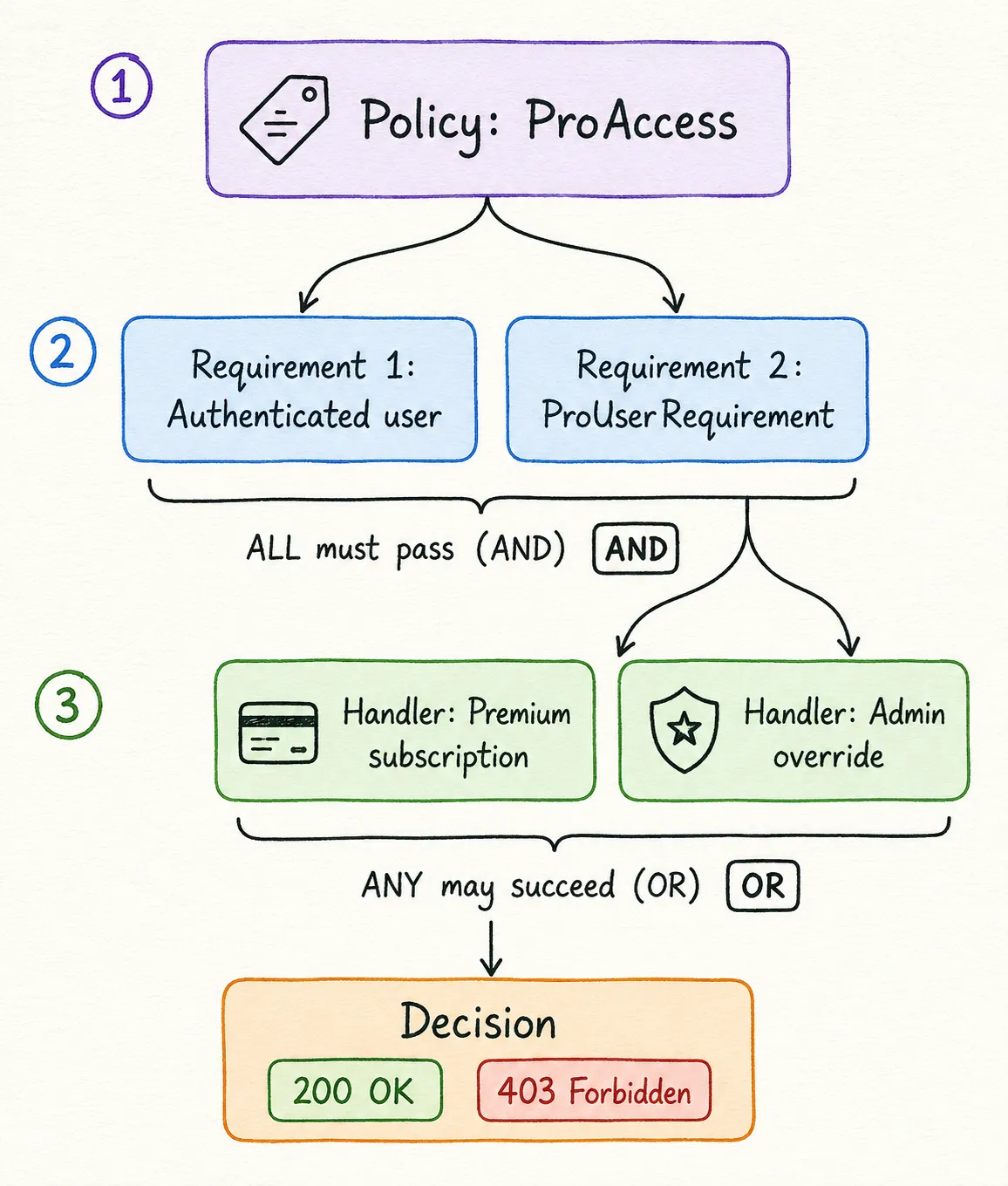
Hold onto that AND/OR asymmetry: requirements combine with AND, handlers combine with OR. It is the most useful sentence in this article, and it is how you express both “premium AND verified” and “premium OR admin” cleanly.
Setting Up: The Demo and Its Users
Same project lineage as the whole series - ASP.NET Core Identity, JWT via JsonWebTokenHandler (the full token setup is in the JWT article), EF Core InMemory, tested on .NET 10 with Microsoft.AspNetCore.Authentication.JwtBearer 10.0.0. The users now carry everything the previous articles built: roles, a department claim, a joined date claim, and a subscription tier served by the claims transformation from article two.
| Roles | Tier | Joined | |
|---|---|---|---|
admin@codewithmukesh.com | Admin, Manager | standard | 2024-01-15 |
manager@codewithmukesh.com | Manager | premium | 2026-04-20 |
user@codewithmukesh.com | User | free | 2024-08-01 |
The seeding is deliberate: the admin has the role but NOT the premium tier, the manager has the tier but NOT the role. That split is about to matter.
Defining Policies with AddAuthorizationBuilder
AddAuthorizationBuilder() (introduced in .NET 7, the standard registration in .NET 10) chains policy definitions in one place:
builder.Services.AddAuthorizationBuilder() // RequireAuthenticatedUser is NOT implied by custom requirements - without it, // a rule like working hours would pass for anonymous callers too. .AddPolicy("ProAccess", policy => policy .RequireAuthenticatedUser() .AddRequirements(new ProUserRequirement())) .AddPolicy("WorkingHoursOnly", policy => policy .RequireAuthenticatedUser() .AddRequirements(new WorkingHoursRequirement(9, 18)));That RequireAuthenticatedUser() line looks redundant and is anything but - the section on handler gotchas below shows what happens without it.
Applying a policy is the same RequireAuthorization call you have used all series, now with a name:
group.MapGet("/insights", (ClaimsPrincipal user) => Results.Ok($"Pro insights for {user.Identity?.Name}.")) .RequireAuthorization("ProAccess");On controllers, the equivalent is [Authorize(Policy = "ProAccess")]. Same policy, same evaluation, both endpoint styles.
Building a Custom Requirement and Handler
The business rule: documents may only be published during working hours, 09:00 to 18:00 UTC. RequireClaim cannot express this - there is no claim to match, only a clock to consult. A policy handles it in two small classes.
The requirement carries the rule’s data and nothing else:
// Requirements carry DATA for the rule. This one says: only between these hours (UTC).public class WorkingHoursRequirement(int startHourUtc, int endHourUtc) : IAuthorizationRequirement{ public int StartHourUtc { get; } = startHourUtc; public int EndHourUtc { get; } = endHourUtc;}The handler holds the logic - and because handlers come from DI, it takes TimeProvider as a dependency, which makes the rule unit-testable with a fake clock:
public class WorkingHoursHandler(TimeProvider timeProvider) : AuthorizationHandler<WorkingHoursRequirement>{    protected override Task HandleRequirementAsync(        AuthorizationHandlerContext context,        WorkingHoursRequirement requirement)    {        var hour = timeProvider.GetUtcNow().Hour;
        if (hour >= requirement.StartHourUtc && hour < requirement.EndHourUtc)        {            context.Succeed(requirement);        }
        return Task.CompletedTask;    }}
Handlers register in DI like any other service - singleton is fine when the handler holds no per-request state:
builder.Services.AddSingleton<IAuthorizationHandler, WorkingHoursHandler>();builder.Services.AddSingleton(TimeProvider.System);That DI line is the superpower the reference docs undersell. A handler can inject your DbContext, your cache, an HTTP client to an entitlement service - any rule your application can compute, the authorization layer can enforce. If your handler hits the database, remember it runs on every request to every endpoint using that policy, so cache accordingly - HybridCache fits this exactly.
Notice what the handler does NOT do: it never calls context.Fail() when the check does not match. It just returns. That restraint is the key to the next section.
How Do Multiple Handlers Work? (OR Logic)
The rule for /insights: premium subscribers get in, and admins get in regardless of subscription. That is an OR across two completely different facts - a claim and a role. RequireClaim cannot say it. Two handlers for one requirement say it perfectly.
One empty requirement as the anchor:
// A requirement is just a marker carrying data (none needed here).// The LOGIC lives in handlers - and one requirement can have several.public class ProUserRequirement : IAuthorizationRequirement;Handler one passes premium subscribers:
public class PremiumSubscriptionHandler : AuthorizationHandler<ProUserRequirement>{    protected override Task HandleRequirementAsync(        AuthorizationHandlerContext context,        ProUserRequirement requirement)    {        if (context.User.HasClaim(AppClaimTypes.Subscription, "premium"))        {            context.Succeed(requirement);        }
        // Never call Fail() just because THIS handler didn't match -        // another handler for the same requirement may still succeed.        return Task.CompletedTask;    }}
Handler two passes admins:
public class AdminOverrideHandler : AuthorizationHandler<ProUserRequirement>{    protected override Task HandleRequirementAsync(        AuthorizationHandlerContext context,        ProUserRequirement requirement)    {        if (context.User.IsInRole(Roles.Admin))        {            context.Succeed(requirement);        }
        return Task.CompletedTask;    }}
Both register in DI, and the framework runs them all. Run the demo and the seeding pays off: the admin reaches /insights through AdminOverrideHandler (standard tier, but Admin role), the manager reaches it through PremiumSubscriptionHandler (premium tier, no Admin role), and the regular user gets 403 Forbidden because no handler succeeded. Three users, three different evaluation paths, one policy.
Three rules keep multi-handler policies from biting you in production:
- Not succeeding is not failing. A handler that does not match simply returns. The requirement fails only if NO handler succeeds.
context.Fail()is a veto. Call it only for hard blocks - “account suspended” - because it fails the requirement even if another handler already succeeded. The framework still runs the remaining handlers after aFail()(unless you setInvokeHandlersAfterFailureto false), but the outcome is locked.- Never depend on handler order. Microsoft’s documentation is explicit that handlers run in unspecified order. If your logic needs handler A before handler B, your logic is wrong.
And the one that surprises everyone: handlers run even when the caller is anonymous. Applying a policy does not implicitly demand authentication first - an unauthenticated request still walks through your handlers, with an empty, unauthenticated ClaimsPrincipal. Claim and role checks fail naturally for an empty principal, but a time-based rule like working hours happily succeeds for a ghost. I verified this while writing the article: with WorkingHoursOnly defined as just the requirement, an anonymous POST /api/documents returned 200 OK at 11:24 UTC. No token, full access.
The fix is the RequireAuthenticatedUser() call already shown in the policy definitions above - requirements are AND, so the authentication requirement and your custom rule must both pass. Do not count on the fallback policy (coming up below) to save you here: the fallback only applies to endpoints with NO authorization metadata, and an endpoint carrying RequireAuthorization("WorkingHoursOnly") has metadata - so the fallback never touches it. After adding RequireAuthenticatedUser() to the policy, the same anonymous request returns 401.
IAuthorizationRequirementData: The Attribute Is the Policy
Named policies have one annoyance at scale: parameterized rules. “Minimum tenure 6 months” here, “12 months” there - with named policies that is MinimumTenure6, MinimumTenure12, a registration per value, and a registry that grows forever. .NET 8 added IAuthorizationRequirementData to kill exactly this, and it is the current pattern in .NET 10:
// IAuthorizationRequirementData (.NET 8+) lets the ATTRIBUTE carry the requirement.// No named policy registration needed - [MinimumTenure(6)] just works,// with any number of months, without registering a policy per value.public class MinimumTenureAttribute(int months) : AuthorizeAttribute, IAuthorizationRequirementData{    public int Months { get; } = months;
    public IEnumerable<IAuthorizationRequirement> GetRequirements()    {        yield return new MinimumTenureRequirement(Months);    }}
The handler computes tenure from the joined claim - a comparison, the exact thing claims checks could never do:
var today = DateOnly.FromDateTime(timeProvider.GetUtcNow().UtcDateTime);var tenureMonths = ((today.Year - joined.Year) * 12) + today.Month - joined.Month;
if (tenureMonths >= requirement.Months){    context.Succeed(requirement);}
On a controller you would write [MinimumTenure(6)] directly. On Minimal APIs, pass the attribute instance:
group.MapGet("/veterans-lounge", () => Results.Ok("Welcome, long-time member.")) .RequireAuthorization(new MinimumTenureAttribute(6));Nothing registered in Program.cs for this rule except the handler. The months value travels on the attribute. In the demo, the regular user (joined 2024-08-01) gets in; the manager (joined 2026-04-20, under 6 months as I write this on 2026-06-11) gets 403. Change the attribute to [MinimumTenure(1)] and the manager is in - no policy registry touched.
Securing Everything by Default with a Fallback Policy
Every protection so far is opt-in: forget RequireAuthorization on an endpoint and it ships wide open. After watching that happen in real codebases, I flip the default with a fallback policy - the policy applied to every endpoint that has NO authorization metadata of its own:
builder.Services.AddAuthorizationBuilder() .AddPolicy("ProAccess", policy => policy.AddRequirements(new ProUserRequirement())) .AddPolicy("WorkingHoursOnly", policy => policy.AddRequirements(new WorkingHoursRequirement(9, 18))) // Secure by default: every endpoint requires an authenticated user // unless it explicitly opts out with AllowAnonymous. .SetFallbackPolicy(new AuthorizationPolicyBuilder() .RequireAuthenticatedUser() .Build());Now a forgotten endpoint fails closed (401) instead of open, and public endpoints must say so out loud:
var group = app.MapGroup("/api/auth").WithTags("Auth").AllowAnonymous();The gotcha that gets everyone on the first run: the fallback applies to EVERYTHING without auth metadata - including your OpenAPI document and Scalar UI. Open the browser, get a 401, wonder what broke. The docs endpoints need to opt out too:
app.MapOpenApi().AllowAnonymous();app.MapScalarApiReference().AllowAnonymous();A related knob exists called SetDefaultPolicy - that one redefines what a bare RequireAuthorization() / [Authorize] with no arguments means (default: authenticated user). Fallback covers endpoints that say nothing; default covers endpoints that say “authorize” without saying how. My recommendation for any new .NET 10 API: set the fallback policy on day one. It is one statement, and it converts every future “oops, forgot the attribute” from a security incident into a support ticket.
Imperative Checks with IAuthorizationService
Declarative policies return a bare 403 on failure. Sometimes you owe the caller an explanation, or the decision sits mid-endpoint. IAuthorizationService evaluates any policy on demand:
group.MapDelete("/documents/{id:int}", async (    int id,    ClaimsPrincipal user,    IAuthorizationService authorizationService) =>{    var result = await authorizationService.AuthorizeAsync(user, "WorkingHoursOnly");
    if (!result.Succeeded)    {        // A plain policy failure would be a bare 403 - this one explains itself.        return Results.Problem(            title: "Outside working hours",            detail: "Documents can only be deleted between 09:00 and 18:00 UTC.",            statusCode: StatusCodes.Status403Forbidden);    }
    return Results.Ok($"Document {id} deleted.");});
Same policy, same handlers, same answer as the declarative version - but now the 403 carries a ProblemDetails body that tells the caller what to do about it. AuthorizeAsync also has an overload taking a resource object, which is the doorway to resource-based authorization - “is this user allowed to delete THIS document?” - a topic that deserves its own article rather than a cramped section here.
Roles vs Claims vs Policies: Which One Do I Use?
The series decision matrix. Three articles, one table:
| Your rule sounds like… | Reach for | Why |
|---|---|---|
| ”Admins can delete products” | Roles (article 1) | Stable group membership is exactly what roles model |
| ”Anyone in the engineering department” | Claims (article 2) | A fact about the user, matched by presence or value |
| ”Premium subscribers OR admins” | Policy, 2 handlers | OR across different fact types - only handlers express this |
| ”Account older than 6 months” | Policy + IAuthorizationRequirementData | A computed comparison with a parameter that varies per endpoint |
| ”Only during business hours” | Policy + DI handler | The rule consults the environment, not the user |
| ”Same rule, 3+ endpoints” | Named policy | One definition, referenced by name, changed in one place |
| ”Only the document’s owner can edit it” | Resource-based (AuthorizeAsync with resource) | The decision needs the resource, not just the user - future article |
| ”Admins manage permissions per role at runtime” | Permission-based | Policies generated dynamically - covered end to end in permission-based authorization |
My take after three articles: think in claims, enforce through policies, and keep roles for what they are - the convenient shorthand for group membership. On a new API I define named policies from day one even for plain role checks, because RequireAuthorization("CanManageProducts") survives every business rule change, while RequireRole("Admin") scattered across forty endpoints survives none of them. The policy name describes intent; how it is satisfied is an implementation detail you can change in one place. In larger codebases - say a Clean Architecture solution - those policy definitions live in one registration file, which is exactly where an auditor will ask to look.
Key Takeaways
- ASP.NET Core has ONE authorization system: policies. Role and claim checks compile down to built-in requirements like
RolesAuthorizationRequirement- the shorthand and the real thing run the same pipeline. - A policy is a named set of requirements (AND); each requirement is evaluated by one or more handlers (OR). That asymmetry expresses almost any access rule.
- Handlers come from DI, so authorization rules can use your DbContext, caches, clocks, or external services - and be unit-tested with fakes like
TimeProvider. - A non-matching handler returns without succeeding; it never calls
Fail().Fail()is a veto for hard blocks. Handler execution order is unspecified - never rely on it. - Handlers run even for anonymous callers - add
RequireAuthenticatedUser()to the policy itself. The fallback policy will not save an endpoint that already carries a policy. IAuthorizationRequirementData(.NET 8+) puts parameterized rules on the attribute itself - no more one-policy-per-value registrations.- Set a fallback policy requiring authentication on every new API. Fail closed, opt out with
AllowAnonymous- and remember the Scalar/OpenAPI endpoints need the opt-out too.
What is policy-based authorization in ASP.NET Core?
Policy-based authorization is the core authorization model of ASP.NET Core. A policy is a named set of requirements, and each requirement is evaluated by one or more handler classes that inspect the current user and any other data. Policies are registered at startup with AddAuthorizationBuilder and applied to endpoints by name with RequireAuthorization or the Authorize attribute. Role and claim checks are built on this same system.
What is the difference between a policy, a requirement, and a handler?
A policy is the named bundle you apply to endpoints. A requirement is a small class implementing IAuthorizationRequirement that carries the rule's data, such as a minimum tenure in months. A handler contains the actual logic - it extends AuthorizationHandler of the requirement type, inspects the user, and calls context.Succeed when the requirement is met. All requirements in a policy must pass, while any single handler can satisfy its requirement.
When should I use policy-based authorization instead of roles or claims?
Use policies when the rule needs anything beyond exact matching: comparisons like minimum age or tenure, OR-logic across different facts, data from a database or external service, or environmental conditions like time of day. Also use named policies whenever the same check applies to several endpoints, so the rule is defined once. Plain role checks and claim matches remain fine for simple group membership and attribute checks.
How do multiple authorization handlers work - AND or OR?
Multiple handlers for the SAME requirement combine with OR semantics - if any one handler succeeds, the requirement passes. Multiple requirements inside one policy combine with AND semantics - every requirement must pass. A handler that does not match should simply return without calling anything; the requirement only fails if no handler succeeded or a handler explicitly called Fail.
What is IAuthorizationRequirementData in .NET?
IAuthorizationRequirementData, added in .NET 8 and current in .NET 10, lets an attribute supply its own authorization requirements. The attribute carries the rule's parameters, like a minimum tenure value, and returns the requirement from GetRequirements. This removes the need to register a named policy for every parameter value - you write MinimumTenure(6) on one endpoint and MinimumTenure(12) on another with zero extra registration.
What is a fallback authorization policy?
The fallback policy applies to every endpoint that has no authorization metadata of its own - no RequireAuthorization, no Authorize attribute, no AllowAnonymous. Setting it to require an authenticated user makes the whole API secure by default: a forgotten attribute fails closed with 401 instead of shipping an open endpoint. Public endpoints, including OpenAPI and Scalar documentation routes, must then explicitly opt out with AllowAnonymous.
Do authorization handlers run for unauthenticated users?
Yes. Applying a policy does not implicitly require authentication, so handlers execute even when the caller has no valid token - the ClaimsPrincipal is just empty and unauthenticated. Claim and role checks fail naturally in that case, but rules based on other data, like time of day, can succeed for an anonymous caller. Add RequireAuthenticatedUser to the policy definition itself to close the gap - the fallback policy does not apply to endpoints that already carry authorization metadata.
How do I check a policy inside endpoint code?
Inject IAuthorizationService and call AuthorizeAsync with the current ClaimsPrincipal and the policy name. The result tells you whether the policy passed, and you decide the response - for example returning a ProblemDetails body that explains the failure instead of a bare 403. An overload of AuthorizeAsync also accepts a resource object, which enables resource-based authorization decisions.
Summary
The series is complete. Policies turned out to be the system underneath everything: requirements carry rule data, handlers compute decisions with full DI, multiple handlers express OR, IAuthorizationRequirementData puts parameterized rules on attributes, fallback policies make the API secure by default, and IAuthorizationService brings it all into endpoint code when you need custom responses. The full source - with three users engineered to pass and fail different policies - is in the GitHub repository.
This article closes the authorization module of my free .NET Web API Zero to Hero course: JWT authentication, refresh tokens, roles, claims, and now policies. The natural next step is permission-based authorization - admin-managed permissions, dynamic policies via a custom policy provider, and measured numbers on why permissions should not ride inside your token.
Role-Based Authorization in ASP.NET Core
Article 1 of this series - RequireRole, OR vs AND semantics, and the claim-mapping bug that breaks role checks.
Claims-Based Authorization in ASP.NET Core
Article 2 of this series - ClaimsPrincipal anatomy, custom JWT claims, RequireClaim, and claims transformation.
JWT Authentication in ASP.NET Core
The foundation of the security module - registration, login, and signed token generation on .NET 10.
Happy Coding :)




What's your take?
Push back, share a war story, or ask the obvious question someone else is wondering. I read every comment.